What is AI YouTube Title Generator with Emojis – PackaPop
PackaPop's AI YouTube Title Generator is a free online tool designed to help creators generate high-CTR (click-through rate) YouTube titles quickly. It crafts engaging, keyword-rich video titles, with the option to include emojis, to improve video ranking and boost viewership. The tool is suitable for creators across various niches.
How to use AI YouTube Title Generator with Emojis – PackaPop
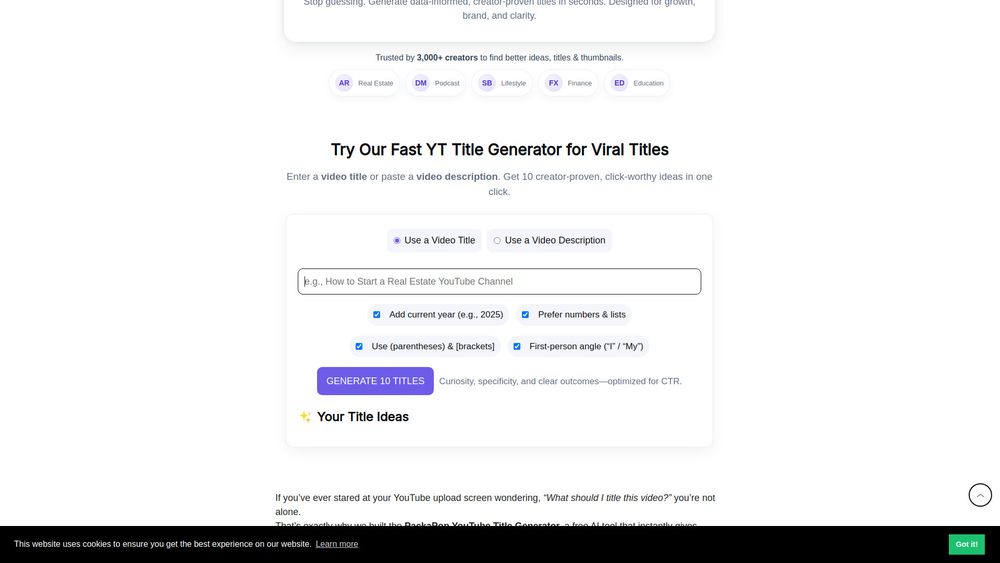
- Choose Input Mode: Select whether to input a video title or a video description.
- Enter Input: Type your video title or paste your video description into the provided text area.
- Select Options: Customize title generation by choosing options such as adding the current year, preferring numbers and lists, using parentheses/brackets, or adopting a first-person angle.
- Generate Titles: Click the "Generate 10 Titles" button.
- Review Results: View the generated title ideas in the "Your Title Ideas" section.
- Copy Titles: Use the "Copy" button next to each title to save it.
Features of AI YouTube Title Generator with Emojis – PackaPop
- Generates high-CTR YouTube titles in seconds.
- AI-powered for engaging and keyword-rich titles.
- Option to include emojis.
- Supports input via video title or description.
- Customizable options: add current year, prefer numbers/lists, use brackets/parentheses, first-person angle.
- Provides 10 title ideas per generation.
- Free to use.
- Runs locally in the browser, with no data storage.
Use Cases of AI YouTube Title Generator with Emojis – PackaPop
- Creators looking to increase their YouTube video click-through rates.
- Content creators seeking to improve video ranking and watch time.
- Individuals needing to brainstorm effective titles quickly.
- Users wanting to generate titles that blend curiosity, keywords, and emotion.
- Anyone aiming to save time on title brainstorming.
FAQ
- What does this generator actually do? It turns your video title or description into creator-proven title ideas using patterns that boost CTR. It runs locally in your browser with no login or data storage.
- Why are these titles more clickable? They use hooks like specific outcomes, numbers/lists, curiosity gaps, and social proof, matching how viewers scan results.
- Title vs. Description input—what should I use? Use "Title" for refining a clear idea. Paste 2-5 sentences of a "Description" to extract themes and generate fresh angles.
- Can I use these titles for any niche? Yes, the tool is niche-agnostic, with a focus on Real Estate, Podcasts, Finance, Lifestyle, and Education.
- Do I need to edit the titles before posting? A quick polish to match your voice and add specifics (numbers, city, tools, timeframe) is recommended for higher CTR.
- Does this affect SEO? Good titles balance search intent and curiosity. Pair with a strong description, tags, and a matching thumbnail for best results.
- Can I save or copy all results at once? Each idea has a "Copy" button. Bulk export is on the roadmap.
- Will this update the year automatically? Yes, by toggling the "Add current year" option.
- Is my input stored anywhere? No, everything runs locally in your browser; PackaPop does not store your text.
- How do I make my thumbnail match the title? Use PackaPop's YouTube Thumbnail Templates, built with the same click psychology.
- Do you offer done-for-you thumbnails? Yes, PackaPop can design custom, high-CTR thumbnails and full channel packaging. Contact them to start.