What is AI Art Create - Generate Character, VTuber and Game Assets
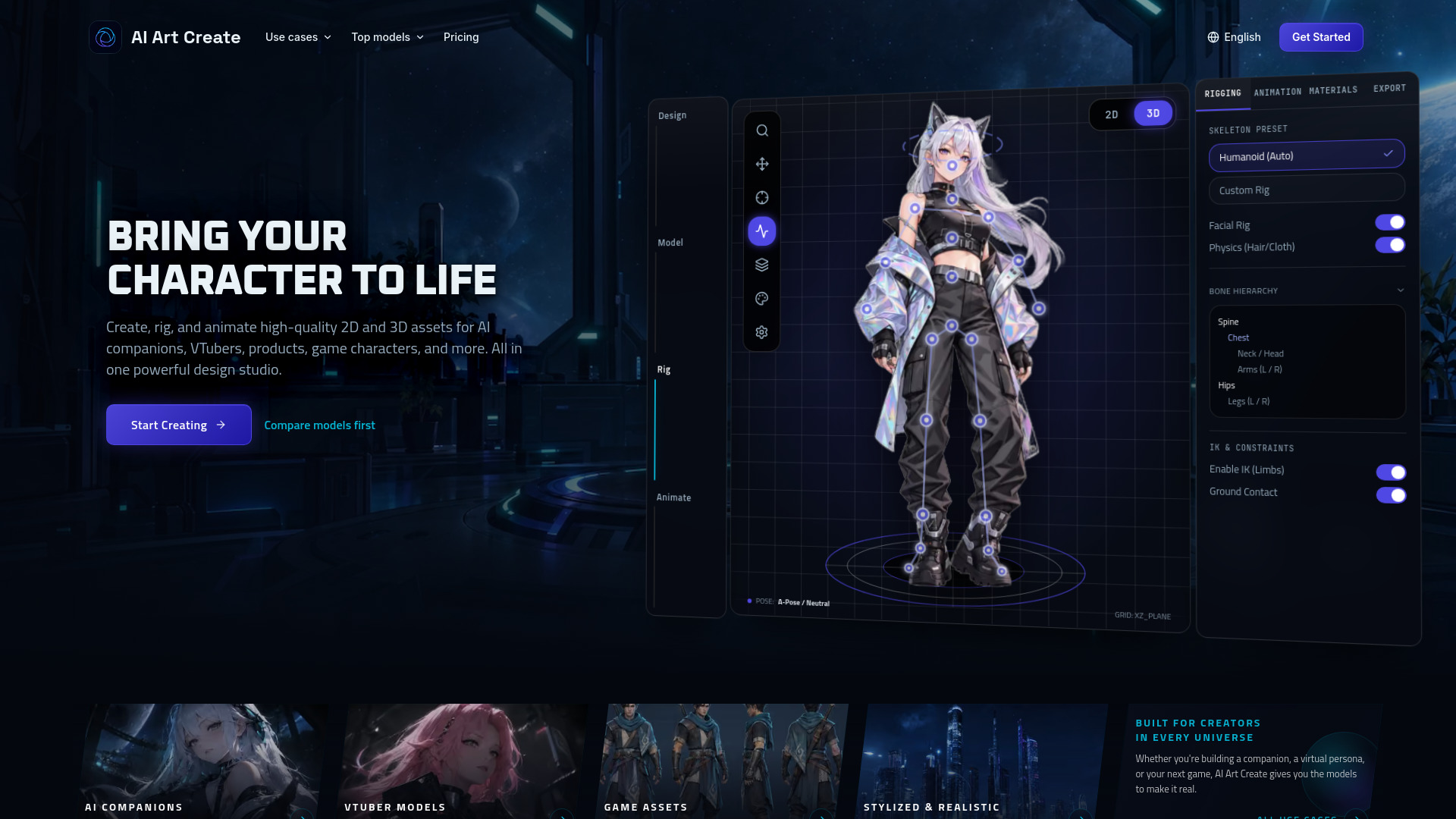
AI Art Create is a multi-model character studio for generating AI companion portraits, chatbot avatars, PNGTuber assets, character sheets, and short video clips. It combines leading models like FLUX.2, Kling, Wan, and Recraft on a single credit balance, enabling users to create, rig, and animate high-quality 2D and 3D assets for AI companions, VTubers, products, game characters, and more.
How to use AI Art Create - Generate Character, VTuber and Game Assets
- Start Creating: Click the "Start Creating" button to begin. You can try the text-to-image and text-to-video tools once for free without a card.
- Design: Use text prompts or reference images to generate character concepts, portraits, or assets.
- Model: Select from top models like FLUX.2, Recraft V4, Kling, Wan, Seedance, and Veo to create or refine your assets.
- Rig: Utilize the rigging tools to add armatures and prepare your character for animation.
- Animate: Apply animation to your character using video models to bring it to life.
- Compare Models: Use the side-by-side comparison feature to test the same prompt across different models.
- Manage Credits: All generations use a unified credit balance; costs are shown before submission.
Features of AI Art Create - Generate Character, VTuber and Game Assets
- Multi-model studio supporting FLUX.2, Kling, Wan, Recraft, and others.
- Reference-guided companion portraits and character assets.
- Editable vector emotes with Recraft V4.
- Short character animations with Kling, Wan, Seedance, and Veo.
- Side-by-side model comparison using the same prompt.
- Free first generation, no card required.
- One credit balance for both image and video generation.
- Rigging and animation tools for 2D and 3D assets.
- Upcoming music localization tools for adapting songs into other languages.
Use Cases of AI Art Create - Generate Character, VTuber and Game Assets
- AI Companion Characters: Create consistent portraits and avatars for AI companions and chatbots.
- VTuber & Streamer Assets: Generate PNGTuber avatars, emotes, and stream overlays.
- Character Sheets: Produce turnaround sheets and reference sheets for game characters.
- Anime Art: Generate anime-style character art and illustrations.
- Short Video Clips: Animate approved portraits into short video clips for social media or games.
- Music Localization: (Upcoming) Adapt songs into other languages while preserving meaning and rhythm.
Pricing
AI Art Create offers a Starter plan at $9.99 per month for 1,000 credits. Every generation shows its credit cost before submission. A free first generation is available without a card. Additional credit tiers and top-up packs are available to match production pace.
FAQ
What makes a multi-model studio better than single-model apps like Midjourney or Runway? Different models solve different parts of a character workflow. FLUX.2 accepts reference images for detailed stills, Recraft V4 creates editable vector assets, and Kling or Wan can animate an approved portrait. AI Art Create puts those models in one workspace with one credit balance.
Is AI Art Create cheaper than paying for OpenArt, Higgsfield, Runway, or Kling directly? The Starter plan costs $9.99 per month for 1,000 credits, and every generation shows its credit cost before you submit it. The practical saving comes from using one balance across image and video models instead of maintaining separate accounts.
Can I generate consistent characters for AI companions, chatbots, and games? Yes, with an important limitation: generative models can still drift. Start with a strong reference portrait, reuse the same visual description, and make controlled changes to expression or pose. FLUX.2 supports multiple reference images, while Kling and Wan accept a source image for short animation. This workflow improves continuity but does not guarantee an identical result every time.
How will the upcoming music localization tool work for musicians? Music localization will adapt songs into other languages while accounting for lyric meaning, syllable count, rhythm, and vocal delivery. Many artists are musically-inclined and will have access to a powerful workflow for localizing and making songs accessible all over the world.
Can I turn a text prompt into both still images and motion video? Yes. You can start with text to image to produce concept art, sprite ideas, or companion portraits, then transition directly to a text to video generator or image to video tool to add motion. The same credit balance covers both formats, making cross-media asset creation immediate.
Can I try AI Art Create before purchasing credits? Yes. The text to image and text to video tools both let you generate once with no card on file. After that first test, you can choose a credit tier or top-up pack matched to your production pace.