What is Arnis Minecraft
Arnis is an online real-world Minecraft map generator. It helps everyday players create playable worlds from real locations without complicated setup. Search for a place, draw the area you want, and generate a Minecraft world shaped by OpenStreetMap details such as streets, buildings, parks, rivers, terrain, and familiar local landmarks.
How to use Arnis Minecraft
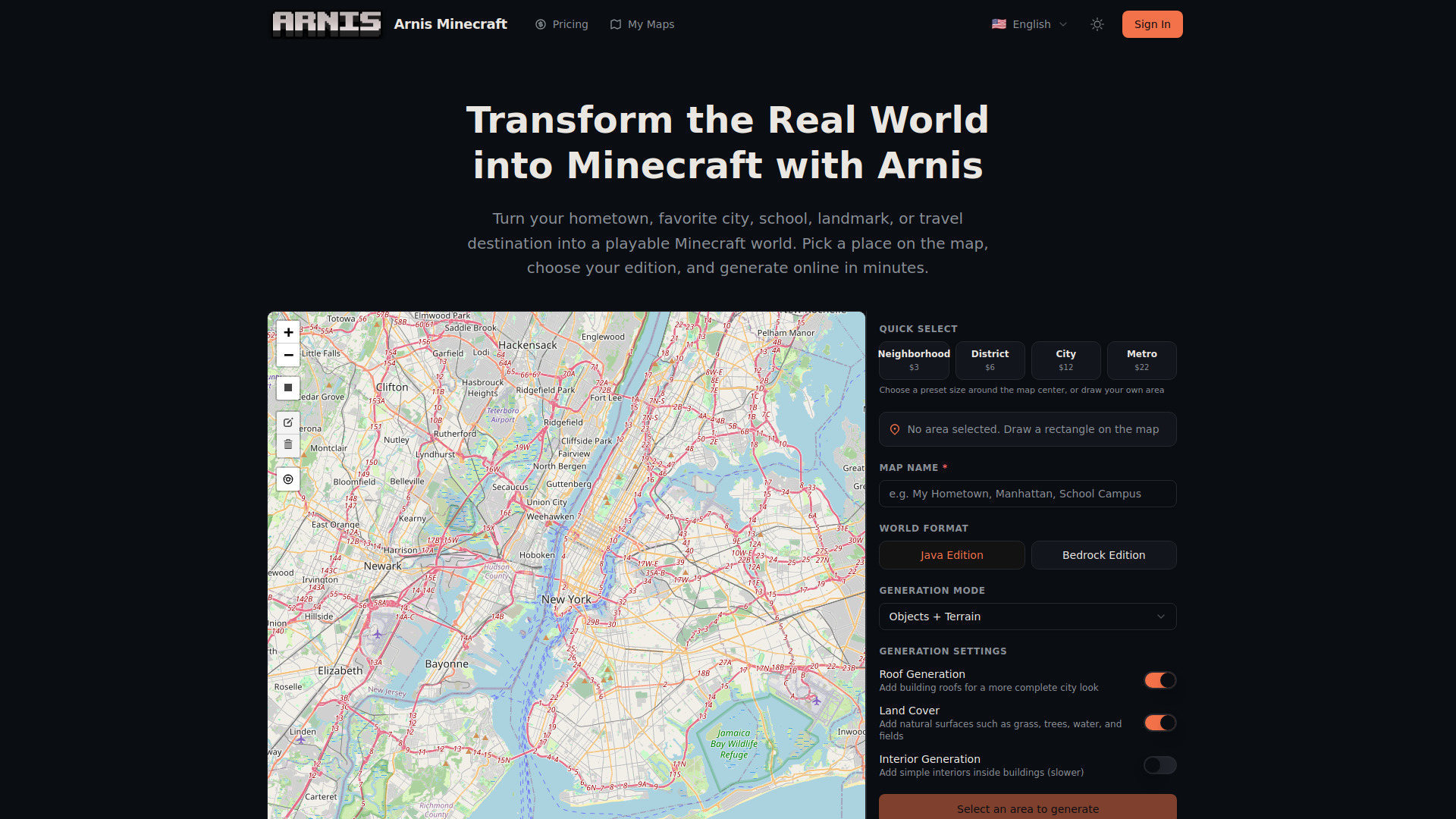
- Find Your Location: Search for a city, neighborhood, school, landmark, or travel destination. Move around the interactive map until the place you want to generate is centered.
- Select the Area: Use Quick Select for a preset size (Neighborhood, District, City, Metro), or drag a custom rectangle on the map. Smaller areas are great for homes, schools, and landmarks; larger areas work well for districts and city regions.
- Choose Your Settings: Name your map, choose Java Edition or Bedrock Edition, and adjust optional settings such as roof generation, land cover (grass, trees, water, fields), and interior generation. Then click Generate.
- Open It in Minecraft: When the world is ready, use the generated file in Minecraft. Java players receive a world folder, while Bedrock players receive a .mcworld file that can be imported directly.
Features of Arnis Minecraft
- Online Generation: Everything happens online in a clean, guided flow. Open the generator, choose a place, select your settings, and let Arnis create the world for you.
- Made for Java and Bedrock: Choose the Minecraft edition you play. Generate Java worlds for desktop play or Bedrock worlds for players who use Windows, mobile, console, or Minecraft Education Edition.
- Any Place You Care About: Generate your hometown, current city, school campus, favorite vacation spot, famous landmark, or a place you have only seen online.
- From Small Spots to Big Regions: Create a compact landmark area, a neighborhood, a town center, or a wide city region. Quick Select makes size choices easy, while custom selection gives you more control.
- Built for Fast Results: Arnis is made for quick experiments and serious projects alike. Try a small area first, then generate larger regions when you are ready for a bigger world.
- Great Starting Point for Builds: Use your generated world as a base for survival, creative builds, roleplay servers, school projects, city redesigns, or videos about real places in Minecraft.
Use Cases of Arnis Minecraft
- Explore Your Hometown: Recreate the neighborhood you grew up in, your city center, or a place you love. Walk through a Minecraft version of familiar streets and landmarks.
- Iconic World Landmarks: Generate the Eiffel Tower district, the Grand Canyon, Machu Picchu's surroundings, or the Tokyo skyline. Bring world-famous places into Minecraft.
- Education & Classrooms: Teachers can generate real cities for geography, urban planning, or environmental science lessons. Arnis worlds are compatible with Minecraft Education Edition.
- Multiplayer Server Projects: Create a realistic city base for your survival server, or use a real urban layout as the foundation for a PvP or roleplay world.
- Travel & Discovery: Virtually explore travel destinations you've visited or plan to visit. Arnis Minecraft lets you walk through real places from your living room.
- Creative Building Projects: Use real-world terrain and street layouts as a starting canvas. Build on top of actual geography for builds that feel grounded and immersive.
Pricing
Arnis offers preset sizes with fixed prices:
- Neighborhood: $3
- District: $6
- City: $12
- Metro: $22
FAQ
How accurate are the generated Minecraft worlds?
Generated worlds closely reflect real geographic data from OpenStreetMap — building footprints, road layouts, parks, rivers, and terrain elevation all follow actual geography. Major cities and popular regions produce the most detailed results, while rural areas or less-mapped locations may look simpler. It is a Minecraft-style recreation, not a perfect copy.
Can I generate my hometown in Minecraft?
Yes. Search for your hometown, center the map, select the area you want, choose your Minecraft edition, and generate.
What should I generate first?
Start with a place you know well: your home neighborhood, school, downtown area, favorite landmark, or a famous city center. Smaller selections are easier to explore and usually give a better first experience.
How large of an area can I generate?
You can generate anything from a small landmark area to a large city region. Quick Select presets make it easy to choose a size, and the generator will warn you if the selected area is too large.
How long does generation take?
Small areas are usually ready faster, while dense city centers and large regions take longer. The exact time depends on the size of your selection and the level of detail in the area.
What data does Arnis use to create Minecraft maps?
Arnis uses OpenStreetMap for roads, buildings, land use, water, and other visible map features, then combines that with terrain information to shape the world.
Where do I put the generated world in Minecraft?
For Java Edition, use the generated world folder in your Minecraft saves folder (usually %APPDATA%.minecraft\saves on Windows). For Bedrock Edition, open or import the generated .mcworld file.
Can I use the world for a server or video?
Yes. Generated worlds are useful as starting points for roleplay servers, creative builds, classroom activities, travel videos, challenge videos, and city exploration content.
Which Minecraft editions are supported?
Arnis supports Java Edition and Bedrock Edition. Choose Java if you play on desktop Java Edition, or Bedrock if you play on Windows Bedrock, mobile, console, or Minecraft Education Edition.