What is Block Poster AI
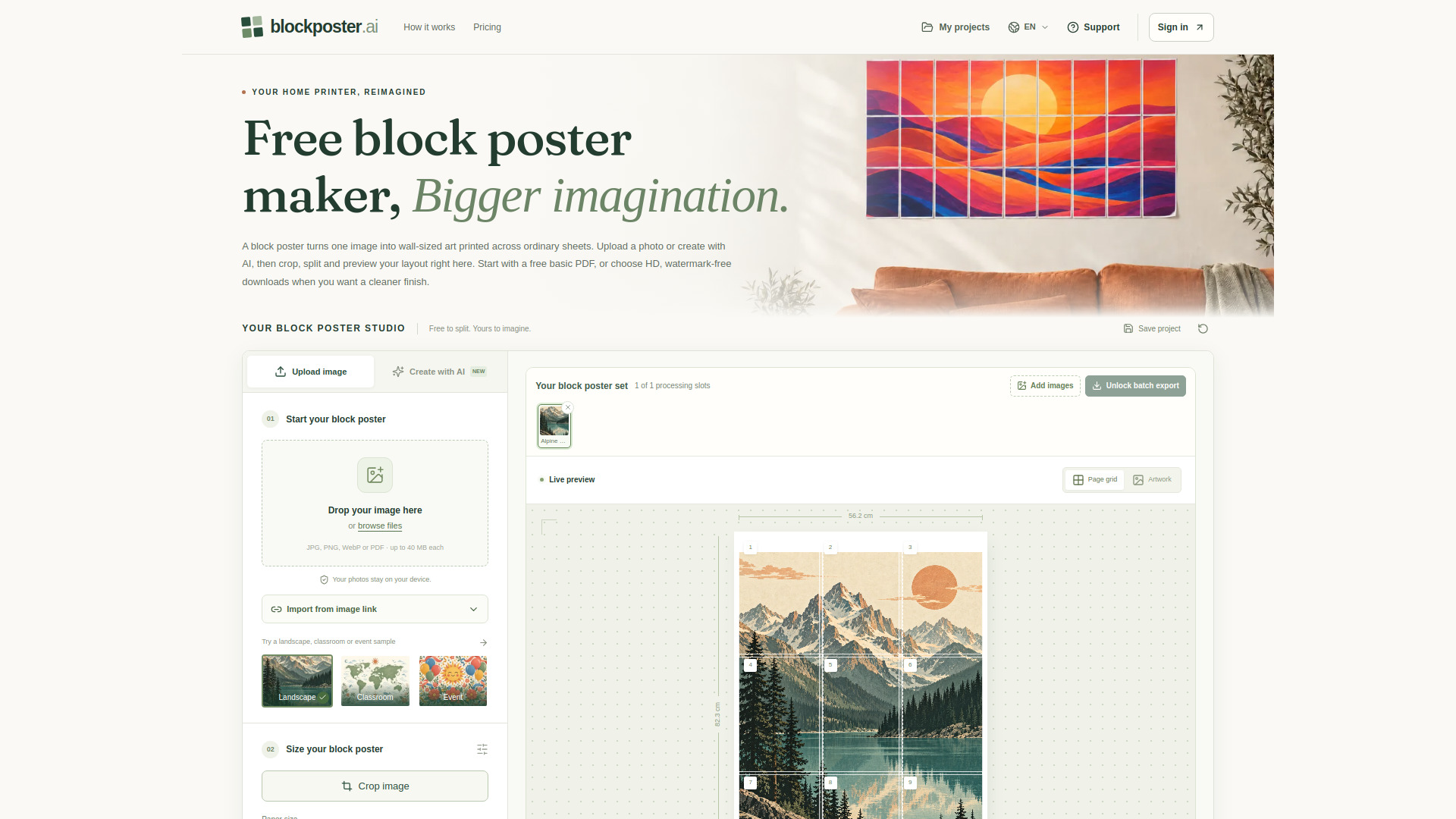
BlockPoster.ai is a free web-based tool that turns a single image into a large, wall-sized poster by splitting it across multiple printable sheets. It supports photos (JPG, PNG, WebP) and AI-generated art, and produces a tiled PDF that can be printed on a standard home printer and assembled into a block poster. The tool emphasizes local, private processing of ordinary uploads and offers both free and paid export options.
How to use Block Poster AI
- Start your block poster: Upload a JPG, PNG, or WebP image (up to 40 MB), or sign in to generate original artwork with AI. Ordinary uploads and PDF pages are processed locally in your browser.
- Size your block poster: Choose a paper size (A4, US Letter, A3, US Legal, or Tabloid), orientation (portrait or landscape), and set the number of pages wide (1–10). Adjust crop, margins, and overlap. The workspace calculates the page count and shows the effective image DPI.
- Print your block poster: Download the already-split PDF. Print each page at Actual size or 100%, one page per sheet, without additional tiling. Test one sheet first, then trim guides, align overlapping details, and tape the backs together.
Features of Block Poster AI
- Free basic PDF export: Single-image, multi-page PDF with a small brand watermark, capped at 150 DPI, no sign-in required.
- Five paper sizes: A4, US Letter, A3, US Legal, and Tabloid, in portrait or landscape.
- Customizable layout: Set pages wide (up to 10 for paid HD, 5 for free), margins, overlap, and crop.
- Live preview: See the page grid, finished dimensions, total pages, and effective DPI before downloading.
- Local photo processing: Ordinary JPG, PNG, WebP uploads and PDF pages are decoded, cropped, and split in the browser; originals are not uploaded.
- AI image generation: Create original artwork from prompts (costs 2 AI credits per successful image).
- Assembly aids: Page numbers, trim guides, and overlap marks in the PDF; page 1 is an assembly guide.
- Batch export (paid): Process multiple files in one ZIP (up to 10, 20, or 30 files depending on plan).
- Printer calibration page: Free downloadable page with rulers and a square to verify print scale.
- Project saving: Save projects and print presets locally in the browser.
Use Cases of Block Poster AI
- Classroom displays: Enlarge decorative maps, lesson illustrations, or student artwork for reading corners and project walls.
- Home decor: Turn family photos, travel landscapes, or original art into large wall pieces for living rooms or offices.
- Event backdrops: Create welcome displays, birthday backdrops, or seasonal decorations sized to the venue.
- DIY and craft projects: Enlarge visual references, mood boards, or templates across ordinary sheets (note: not for precision measurements).
- Educators and creators: Plan paper usage and assembly time by previewing page count before printing.
Pricing
- Free: $0. Single-poster PDF export, up to 5 sheets across, all 5 paper sizes, up to 150 DPI with watermark, local processing. AI credits and batch ZIP not included.
- Starter: $4.99/month. Unlimited HD watermark-free PDFs, up to 10 sheets across, up to 300 DPI, 20 AI credits/month (10 images), batch up to 10 files.
- Creator: $19.99/month. Same HD features, 200 AI credits/month (100 images), batch up to 20 files.
- Studio: $39.99/month. Same HD features, 1,000 AI credits/month (500 images), batch up to 30 files.
- One-time packs: $4.99 (1 HD unlock + 2 AI credits), $14.99 (5 unlocks + 20 credits), $39.90 (20 unlocks + 80 credits). No auto-renewal; credits and unlocks do not expire.
- Billing: Monthly or yearly (2 months free on yearly). Subscriptions renew until canceled; payments non-refundable except where required by law.
FAQ
What is a block poster?
A block poster is one enlarged image split across multiple printable sheets, then assembled into a single large picture. BlockPoster.ai creates a tiled PDF from your photo or AI artwork; you choose paper and dimensions, and the workspace calculates pages and shows the layout.
Can I make a block poster for free?
Yes. Upload, crop, split, and preview without paying, then download a free single-image PDF without signing in. Free exports are capped at 150 DPI with a small watermark. HD, watermark-free PDFs require a subscription or one-time unlock. Free supports up to 5 sheets across; paid HD supports up to 10.
Does splitting use AI credits?
No. Splitting, resizing, cropping, and PDF export use 0 AI credits. Only a successful Create with AI image uses 2 credits. Failed attempts release reserved credits.
Are my photos uploaded?
Ordinary JPG, PNG, WebP uploads and PDF pages are processed locally in your browser. Create with AI sends prompts and selected reference images online for generation and safety checks. Avoid sensitive personal information.
Which printer can print a block poster?
Any printer that accepts your selected paper size. Choose Actual size or 100%, not Fit to page, and print one page per sheet. The PDF is already tiled; no second tiling pass is needed.
How do I assemble a block poster?
Follow page numbers left to right and top to bottom. Trim where guides indicate, align repeated image detail in the overlap, and tape the backs together. A 10 mm overlap is a useful starting setting.
Why does my block poster look pixelated?
Enlarging a small source spreads pixels over a larger area; a 300 DPI export cannot create missing detail. Check the effective DPI in the preview, use a higher-resolution source, or reduce finished dimensions.
Can I download my block poster again?
Yes. Free basic PDFs can be downloaded repeatedly. Subscriptions provide unlimited HD downloads. A one-time HD unlock belongs to its source image, so re-exporting the same image at a different size does not spend another unlock.