What is CutoutBG AI
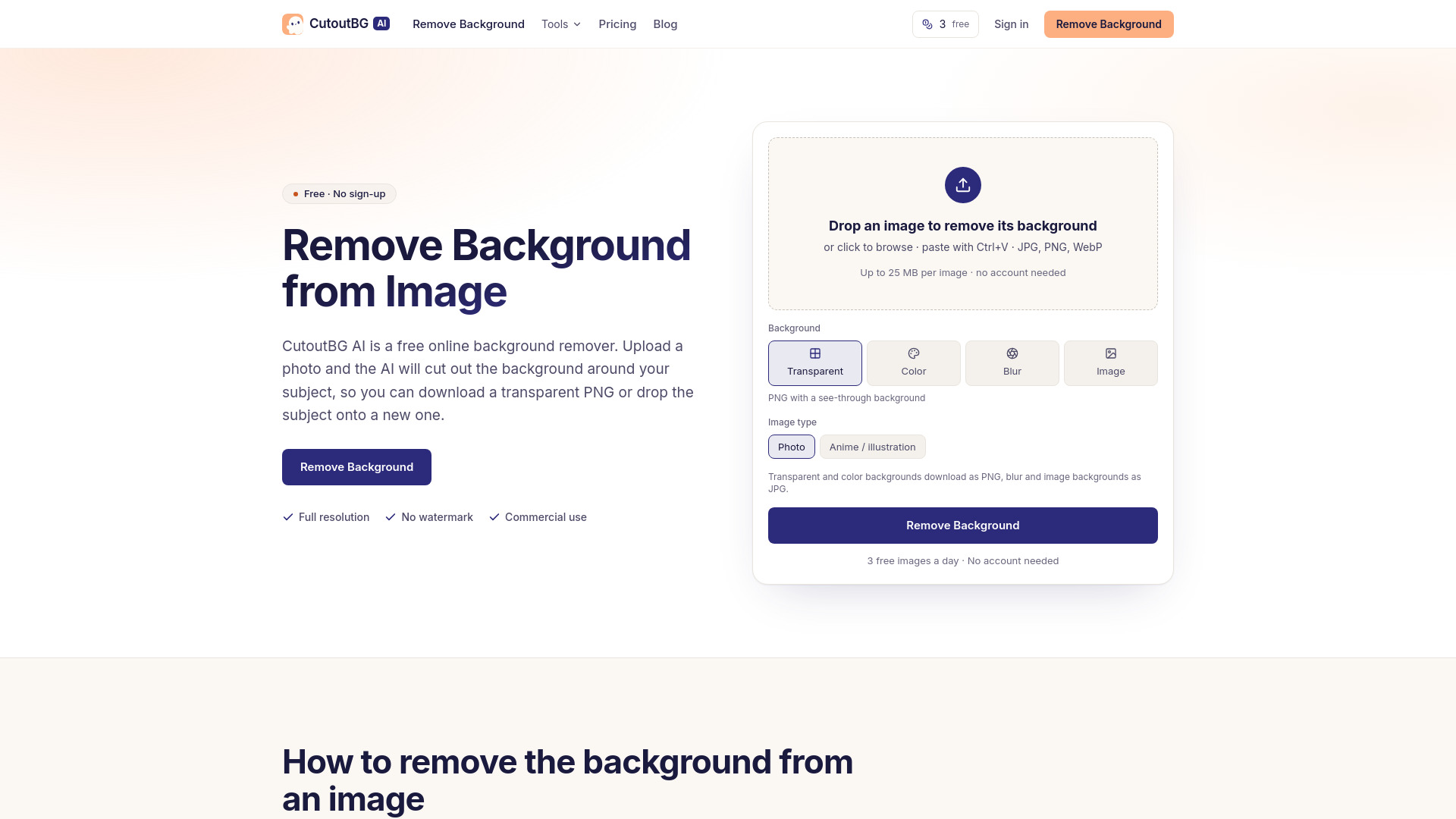
CutoutBG AI is a free online background remover that uses AI to automatically cut out the subject from any image. It allows you to download a transparent PNG or place the subject on a white background, a solid color, a blurred version of the original background, or another image of your choice. The tool works directly in your browser, requires no installation, and produces full-resolution results without watermarks.
How to use CutoutBG AI
- Upload your photo: Drag a JPG, PNG, or WebP file into the upload box, click to browse, or paste an image from your clipboard with Ctrl+V. The maximum file size is 25 MB on the free allowance.
- Let the AI cut out the subject: The AI model identifies the subject and separates it from the background, preserving soft edges like hair and fur. You can choose between "Photo" for real photographs or "Anime / illustration" for drawings.
- Download or change the background: Download the cutout as a transparent PNG, or select a background first—a solid color, the original photo blurred, or another image. You can compare the result with the original using a slider and download at the original size.
Features of CutoutBG AI
- AI-powered background removal: Automatically detects and removes backgrounds from images.
- Multiple output options: Transparent PNG, solid color background, blurred original background, or a custom background image.
- Image type selection: Choose between "Photo" and "Anime / illustration" for better results on different content types.
- Full-resolution downloads: Output images retain the same pixel size as the uploaded file.
- No watermark: Free and paid results are watermark-free.
- Commercial use allowed: Cutouts can be used commercially, even on the free plan.
- Supported input formats: JPG, PNG, and WebP.
- Maximum file size: 25 MB free, 50 MB with a plan or token pack.
- Maximum pixels: 36 megapixels (about 7000 × 5000).
- Output formats: PNG for transparent and solid-color backgrounds, JPG for blurred or replaced backgrounds.
- History: Results are stored for 7 days on the free allowance and 180 days on a plan or token pack.
- Batch processing: Paid plans allow processing up to 5 images at once.
Use Cases of CutoutBG AI
- People: Portraits, team photos, and full-body shots, including fly-away hair.
- Products: Clothing, bottles, furniture, and other items for clean marketplace photos.
- Logos and signatures: Scans and screenshots where you need to remove a white background.
- Drawings: Anime, illustrations, and game art, using the Anime / illustration image type.
- E-commerce: Create product images with transparent or white backgrounds for online stores.
- Presentations and mockups: Use transparent PNGs in slides, designs, and store listings.
- Badges and ID photos: Put subjects on a solid color background for school or staff badges.
- Social media: Blur the background to keep the setting readable but less distracting.
Pricing
CutoutBG AI offers both free and paid options:
- Free: 3 images per day without an account, 10 images per day when signed in. Free results are full resolution, no watermark, and can be used commercially.
- Subscription plans:
- Starter: 400 images per month, $9.99/month (or annual billing). Includes uploads up to 50 MB, 5 images at a time, and 180-day history.
- Creator: 1,200 images per month, lower price per image than Starter.
- Pro: 3,000 images per month, lowest price per image.
- Token packs (one-time purchase, valid for 12 months):
- Small pack: 100 images.
- Medium pack: 400 images.
- Large pack: 1,200 images.
All paid options include plan benefits while tokens last: 50 MB uploads, 5 images at a time, and 180-day history.
FAQ
How to remove background from image Upload the image and download the result once the AI has cleared everything around the subject. No installation or editing knowledge is needed. For drawings, switch the image type to Anime / illustration before starting.
What is the free AI tool to remove background? CutoutBG AI is free for 3 images a day without an account and 10 a day when you sign in. Free results come at full resolution with no watermark, and you may use them commercially. Other free options have different limits: Pixlr caps images at 4096 × 4096 pixels, Photoroom's free plan exports at up to 2000 × 2000 pixels, and Clipdrop allows 20 background removals per 24 hours.
How do I remove the background from a PNG? Upload the PNG and download the cutout. If the PNG already has transparent areas, they stay transparent. A PNG with a flat white background will also work, and you will get back a cutout with that white removed.
How to remove white background from image Upload the image and pick the Transparent output. The white area disappears and the subject keeps its own light tones. This is useful for logos or signatures.
Can I use the results commercially? Yes. Cutouts you make are yours to use, including in shops, ads, and client work, on the free allowance as well as on a paid plan. Some tools restrict this: remove.bg's free tier and Photoroom's free accounts are for personal use only.
Do you keep my images? Results stay in your history so you can download them again: 7 days on the free allowance, 180 days on a plan or token pack. You can delete any image from history yourself, and deletion removes both the original and the cutout.