What is Ferndesk
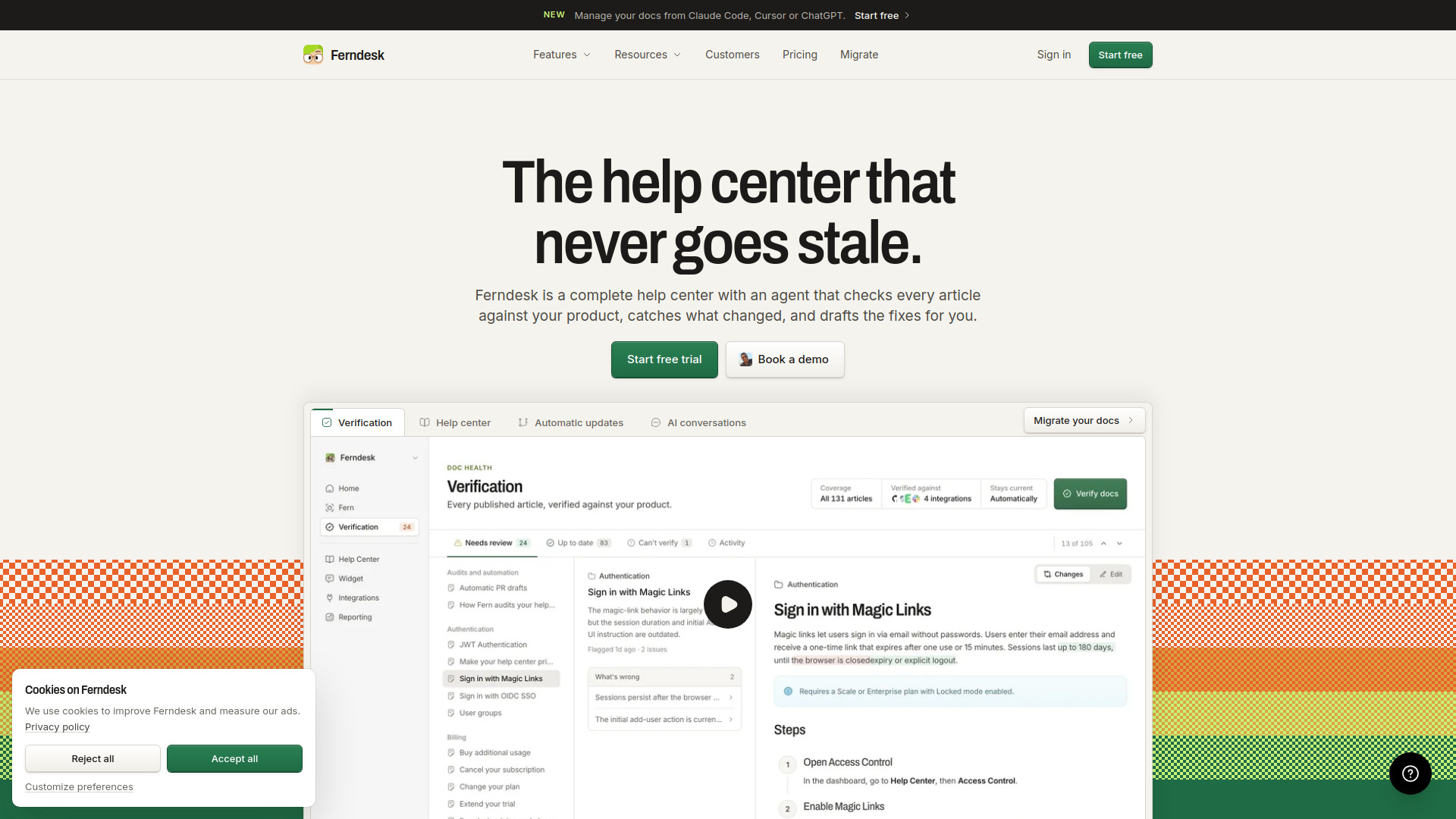
Ferndesk is a complete help center with an AI agent named Fern that verifies and updates product documentation. It checks every article against your product, catches what changed, and drafts the fixes for you. The help center stays up to date automatically, ensuring your documentation never goes stale.
How to use Ferndesk
- Import your existing help center: Ferndesk imports your existing help center, preserving URLs and creating redirects. This usually takes under ten minutes.
- Connect your sources: Fern reads repositories through GitHub with read-only access, and can also verify against your live website, support tickets, and other sources you connect.
- Verification runs: Fern checks every claim she can test against your product, such as navigation steps, setting names, feature behaviour, screenshots, and API shapes. Claims she can’t check are flagged, not guessed.
- Review drafts: Every drifted article comes back as a draft with changes highlighted. You can approve, edit, or dismiss the changes. Nothing publishes without your approval.
- Ongoing maintenance: Verification runs monthly on every plan, plus any time you click Verify. Pull requests are checked as they merge, so new releases don’t wait for the monthly pass.
Features of Ferndesk
- AI agent (Fern) that verifies and updates articles automatically
- Checks navigation steps, setting names, feature behaviour, screenshots, and API shapes
- Flags claims that can’t be verified against a source
- Monthly verification on every plan, plus on-demand verification
- Pull request checks as they merge
- Drafts with highlighted changes for review before publishing
- Preserves original URLs and creates 301 redirects for changes
- Handles sitemap and canonical tags
- Reads repositories through GitHub with read-only access, never stores source code
- Verifies against live website, support tickets, and other connected sources
- Custom domain support (e.g., help.yourcompany.com or yourcompany.com/help)
- Export entire help center as markdown in a zip or via API
Use Cases of Ferndesk
- Teams that need their help center to stay accurate as their product evolves
- Support teams that want to reduce outdated documentation and ticket volume
- Companies that want to maintain SEO by serving help content on their main domain
- Organizations that need to verify documentation against multiple sources (code, live product, support tickets)
- Teams looking for a help center that automatically updates without manual effort
Pricing
Ferndesk offers a Pro plan with monthly and annual options:
- Pro (monthly): $149 per month
- Pro (annual): $1,490 per year
Every plan starts with a 7-day free trial with full access, no card required.
FAQ
Can Fern maintain my existing docs where they are?
No. Fern verifies and updates articles that live in Ferndesk. You import your existing help center (URLs preserved, redirects created, usually under ten minutes), and from then on she keeps it accurate. Your support tool stays where it is, and Fern keeps reading tickets from it.
What does “verified” actually mean?
Fern checks every claim she can test against your product: navigation steps, setting names, feature behaviour, screenshots, API shapes. Claims she can’t check against a source, like pricing policy or third-party behaviour, are flagged, not guessed.
How often does verification run?
Monthly on every plan, plus any time you click Verify. Pull requests are checked as they merge, so new releases don’t wait for the monthly pass.
What if Fern gets something wrong?
Nothing publishes without you. Every drifted article comes back as a draft with the changes highlighted. Approve, edit or dismiss.
Will my URLs break when I import?
No. Original paths are preserved and 301 redirects are created for anything that changes. Sitemap and canonical tags are handled.
Is my codebase safe?
Ferndesk never stores your source. Fern reads repositories through GitHub with read-only access, and only when you ask her to check or draft.
What if we’re not on GitHub?
Fern verifies against your live website, your support tickets and any other source you connect. GitHub gives the most precise results.
Can I use my own domain?
Yes. Point help.yourcompany.com at Ferndesk, or serve it from yourcompany.com/help to keep the SEO on your main domain.
Is there a free trial?
Every plan starts with 7 days free and full access, no card required. Most teams have their help center live within the hour.
What if I leave?
Every article is yours at any time: export the whole help center as markdown in a zip, or pull it through the API. You’re never locked in.