LogoTop AI Hubs
icon of Free AI Text Humanizer & Detector

Free AI Text Humanizer & Detector

Turn ChatGPT text into human writing in one click. The most powerful free AI Humanizer to bypass robotic tones. Includes a built-in AI detector.

Introduction

What is Free AI Text Humanizer & Detector

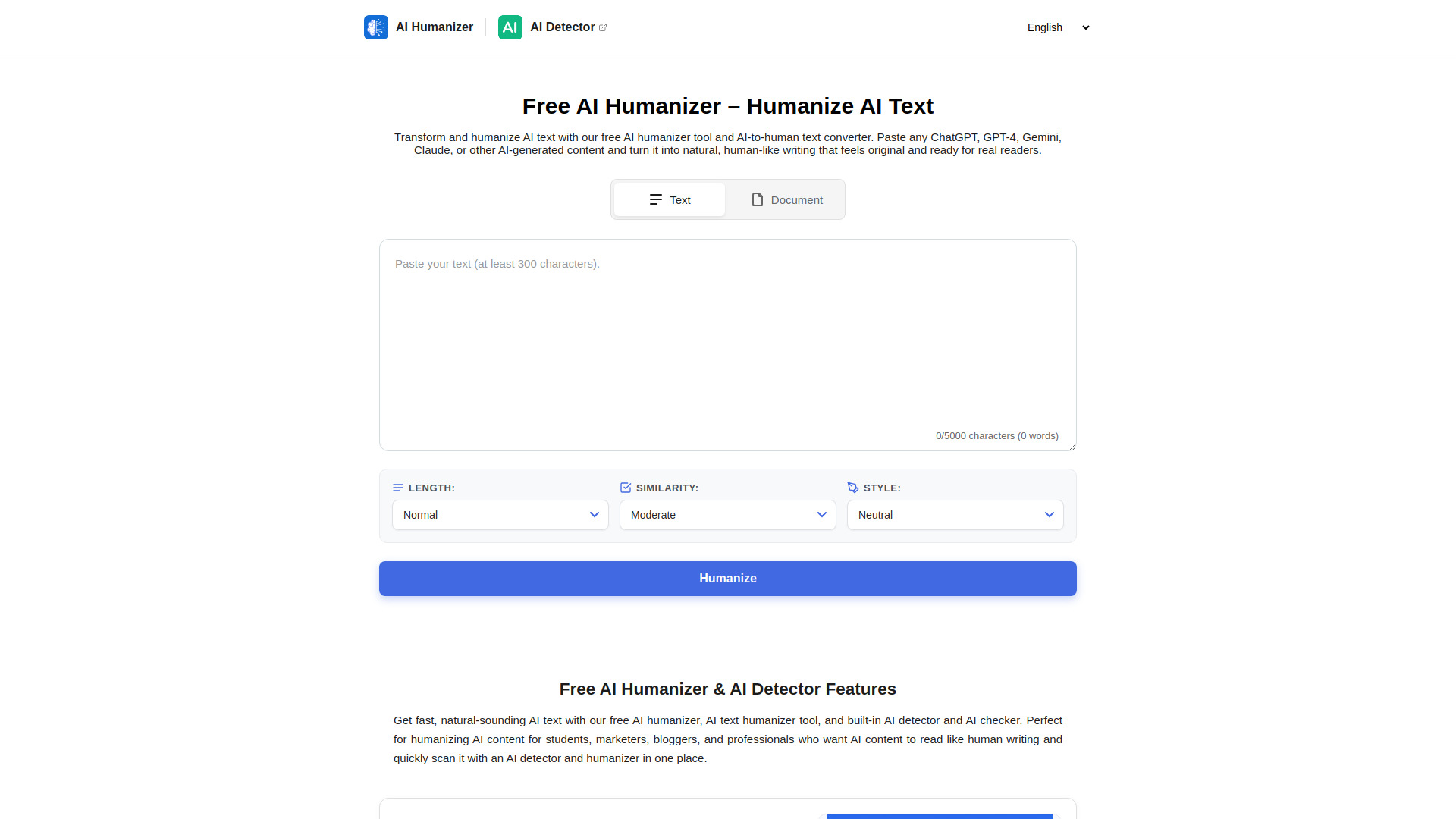
Free AI Text Humanizer & Detector is a tool designed to transform AI-generated text, such as that from ChatGPT, GPT-4, Gemini, or Claude, into natural, human-like writing. It aims to eliminate robotic tones and make content sound original and ready for human readers. The tool also includes a built-in AI detector and checker.
How to use Free AI Text Humanizer & Detector
  1. Copy the AI-generated text you wish to humanize.
  2. Paste the text into the AI humanizer input box on the website.
  3. Click the “Humanize Text” button to instantly receive a more natural, human-style version.
Features of Free AI Text Humanizer & Detector
  • Free and Easy to Use: Humanize AI text quickly without accounts, credit cards, or installations.
  • Adjustable Length: Choose between concise, normal, or expanded output lengths.
  • Tone Options: Select from 8 tone options (Neutral, Academic, Business, Creative, Technical, Friendly, Informal) to match content to occasion.
  • Purpose-Based Modes: Adapt AI text to specific needs with 9 purpose-based modes.
  • Multilingual Support: Humanize AI text in 12 different languages.
  • File Upload/Download: Option to upload files for bulk humanization and download the humanized text.
  • Built-in AI Detector: Includes an AI detector and checker to scan content within the same platform.
Use Cases of Free AI Text Humanizer & Detector
  • Making ChatGPT or other AI content sound natural and human.
  • Improving readability for students, marketers, bloggers, and professionals.
  • Polishing AI-generated text for essays, posts, emails, and other content.
  • Adapting AI text for academic, business, or creative purposes.
  • Humanizing text in multiple languages for global audiences.
  • Using humanized AI text for study notes, research summaries, and topic overviews.
FAQ
  • What is an AI humanizer tool? An online AI-to-human text converter that rewrites AI-generated text to sound more natural and human, preserving the original meaning.
  • How does the AI humanizer work? Paste AI text, choose options (length, tone, purpose), and click “Humanize.” Advanced models rephrase sentences and adjust word choice.
  • How can I use it for faster editing? Copy AI text, paste into the humanizer, click “Humanize Text,” review, and make final manual edits.
  • Can I use it with an AI detector? Yes, it includes a built-in AI detector. It improves tone and readability but doesn't guarantee bypassing detection systems.
  • Can I use humanized AI text for notes or studying? Yes, it works well for study notes, research summaries, and topic overviews.
  • Does it keep meaning, structure, and formatting? It preserves meaning and intent, usually keeps paragraph breaks and headings, but may restructure sentences for natural flow.
  • Can I edit the humanized text? Yes, you can edit, shorten, expand, or localize the humanized version after processing.
  • How long does it take? Processing usually takes a few seconds, depending on text length and server load.
  • Can I humanize and translate into other languages? Yes, it supports multiple languages for direct humanization.
  • Can I download or copy the humanized text? Yes, you can copy the text or download it in supported formats like TXT or DOC.

Newsletter

Join the Community

Subscribe to our newsletter for the latest news and updates