What is Genjutsu AI Video
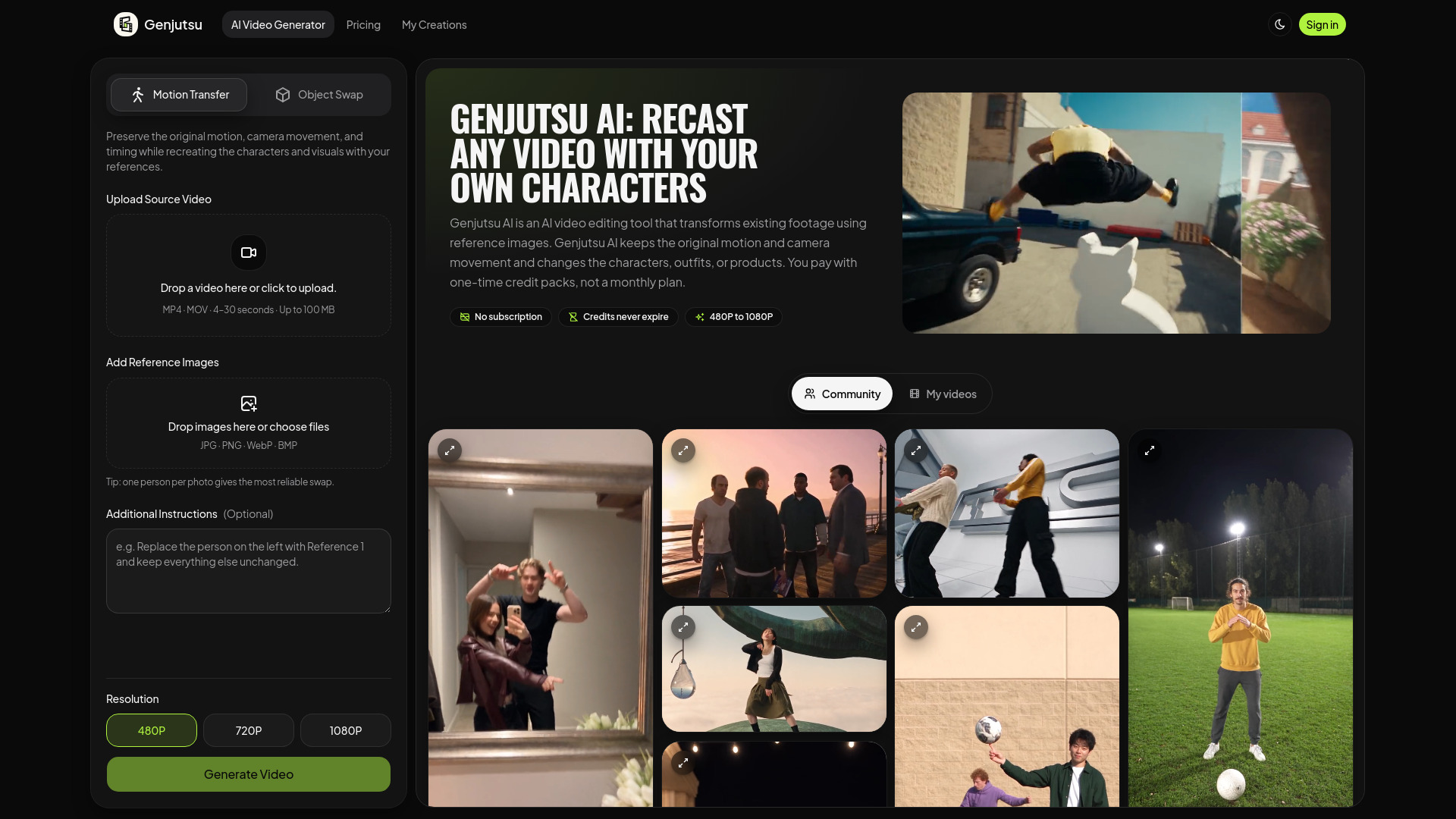
Genjutsu AI is an online AI video editing tool that transforms existing footage using reference images. It keeps the original motion and camera movement while changing the characters, outfits, or products in the video. The tool offers two modes: Motion Transfer, which rebuilds the whole video, and Object Swap, which changes one selected target. Genjutsu AI operates on a pay-per-video basis with one-time credit packs, not a monthly subscription.
How to use Genjutsu AI Video
- Upload a source video (MP4 or MOV, 4–30 seconds, up to 100 MB).
- Add reference images (JPG, PNG, WebP, BMP) – one person per photo gives the most reliable swap. Up to 20 photos per video are supported.
- Optionally, provide additional instructions (e.g., "Replace the person on the left with Reference 1 and keep everything else unchanged.").
- Choose the resolution: 480P, 720P, or 1080P.
- Click "Generate Video" to create the transformed video.
Features of Genjutsu AI Video
- Motion Transfer: Rebuilds the entire video with your characters while preserving the original motion, camera movement, and timing.
- Object Swap: Changes a single selected target (person, outfit, product, or object) in the video.
- Multiple reference images: Add up to 20 photos per video to replace multiple people or objects.
- Optional prompts: No prompt is required; a video and one reference photo are enough when one photo matches one subject.
- Resolution options: 480P, 720P, and 1080P.
- No subscription: Pay per video with credits that never expire.
- Free preview: Each new account gets one free 5-second, 1080P video with a watermark.
Use Cases of Genjutsu AI Video
- Replace a person in a video with AI using a photo.
- Replace several people in one video by providing multiple reference photos.
- Swap outfits or products in existing footage.
- Recast characters in dance videos, sports clips, comedy sketches, and more.
- Create personalized content for social media, marketing, or entertainment.
Pricing
Genjutsu AI uses a credit-based system with one-time purchases. Credits never expire. The available credit packs are:
- 400 credits for $4.99
- 1,200 credits for $14.99
- 3,000 credits for $29.99
- 7,200 credits for $59.99
A 5-second 480P video costs about $1.25 on the smallest credit pack, and higher quality costs more. The exact cost is shown before you generate.
FAQ
What is Genjutsu AI? Genjutsu AI is an online video tool that swaps the characters, outfits, products, or objects in an existing video using your reference photos. It keeps the original motion and camera. Genjutsu AI has two modes: Motion Transfer rebuilds the whole video, and Object Swap changes one selected target.
Is Genjutsu AI the same as Higgsfield Genjutsu? No. Genjutsu AI (genjutsu.video) is an independent website and is not affiliated with Higgsfield. Genjutsu AI offers the same kind of Motion Transfer and Object Swap video editing, paid per video with no subscription.
Is Genjutsu AI free? Genjutsu AI gives each new account one free preview: a 5-second, 1080P video with a watermark, made from your own video (its first 5 seconds) and your photos. Full videos use credits. A 5-second 480P video costs about $1.25 on the smallest credit pack, and higher quality costs more. Genjutsu AI shows the exact cost before you generate.
Can I replace a person in a video with AI? Yes. Upload the video and a photo of the new person to Genjutsu AI, then generate. Use Object Swap to change only that person, or Motion Transfer to rebuild the whole scene around the original motion. For videos with several people, say which photo goes to which person.
Can I replace several people in one video? Yes. Add one reference photo for each person, up to 20 photos per video. Genjutsu AI numbers the photos in upload order, so you can write "Use Reference 1 for the person on the left and Reference 2 for the person on the right."
Do I need to write a prompt? No. The prompt is optional in Genjutsu AI. A video and one reference photo are enough when one photo matches one subject. Add a prompt to pick a specific person, match several photos, or name a detail to keep.
Will the original motion and camera movement be preserved? Mostly, but not frame for frame. Genjutsu AI follows the movement, timing, and camera of the source video closely. Very fast motion, small subjects, and objects that block the subject can reduce accuracy.