What is Interior Design AI
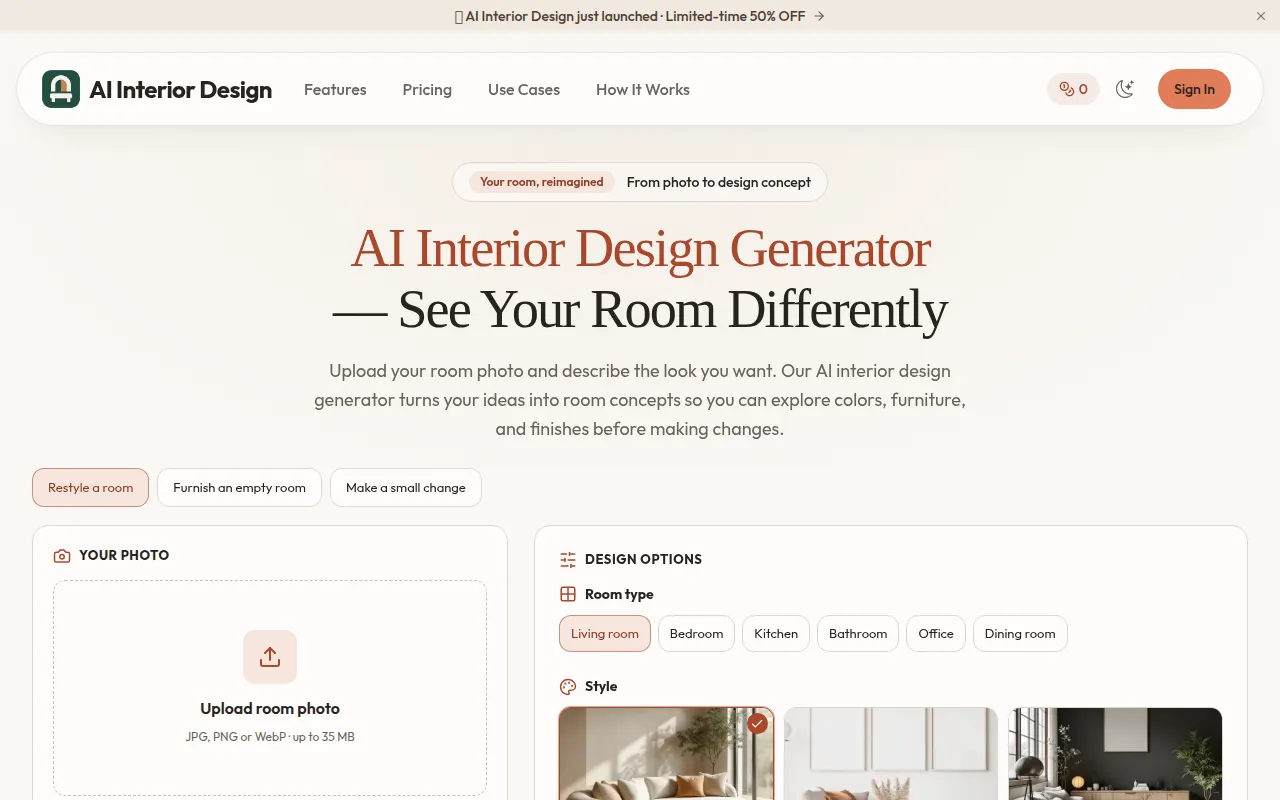
Interior Design AI is a generator that allows users to upload a room photo and describe their desired look. It then transforms these inputs into visual room concepts, enabling users to explore various furniture, colors, and finishes before making any physical changes.
How to use Interior Design AI
- Upload Your Room Photo: Start by uploading a clear, well-lit photograph of your room. Ensure the image shows the walls, windows, and existing furniture that you want the AI to reference.
- Describe Your Design Direction: Provide a detailed brief for the AI. Specify the room type, desired style, colors, and materials. You can also instruct the AI to keep certain elements like walls, doors, windows, or specific furniture pieces unchanged.
- Compare and Refine: Generate a room concept and review the results. You can refine your prompt based on the output and iterate until you achieve a satisfactory design. Save preferred concepts and verify real-world measurements before purchasing furniture.
Features of Interior Design AI
- Photo-to-Design Concept: Upload a room photo to generate visual redesign concepts.
- Text-to-Image Generation: Describe an imagined room to create a concept.
- Style Exploration: Explore various interior styles like modern, Japandi, Scandinavian, industrial, traditional, or coastal.
- Color Palette Selection: Choose from predefined color palettes or use the style default.
- Custom Instructions: Provide specific details about what to keep and what to change in the room.
- Real Room Makeovers: View examples of before-and-after transformations of actual rooms.
- Inspiration Templates: Use provided interior inspiration photos as starting points for prompts.
- Image Upscaling: Enlarge saved room concepts for mood boards or presentations.
- Background Removal: Remove the background from furniture photos to create cutouts.
- Image-to-Prompt: Convert inspiration images into text prompts for the AI.
- Video Generation: Create a simple motion presentation from a saved room concept.
Use Cases of Interior Design AI
- Room Redesign: Visualize changes to furniture, colors, and finishes in an existing room.
- Style Exploration: Experiment with different interior design styles to find a preferred aesthetic.
- Furnishing Empty Rooms: Generate ideas for furnishing an empty space based on a description.
- Client/Contractor Communication: Use AI concepts to explain visual directions to clients or contractors.
- Inspiration Gathering: Find and adapt design ideas from a library of interior photos.
- Quick Visualizations: Quickly generate multiple design options for a room before committing to changes.
Pricing
- Free Plan: Includes 16 starter credits for new accounts, allowing up to 3 AI image generations. Suitable for exploring the tools.
- Professional Plan: Priced at $12.9/month (discounted from $26/month for annual subscription). Includes 500 credits per month, up to 100 AI image generations, Advanced Quality images, watermark-free generation, and a commercial use license. Cancel anytime.
- Enterprise Plan: Priced at $59.9/month (discounted from $120/month for annual subscription). Includes 5000 credits per month, up to 1,000 AI image generations, Advanced Quality images, watermark-free generation, and a commercial use license. Designed for studios and teams. Cancel anytime.
FAQ
- What is an AI interior design generator? An AI interior design generator creates room concept images from a written description or an uploaded photo. Use it to explore furniture, colors, materials, and lighting before choosing a direction. The result is a visual reference, not a measured floor plan.
- Can I redesign my room from a photo? Yes. In the AI interior design generator, choose image-to-image mode, upload a clear room photo, and describe the changes you want. Include the room type, preferred style, and features to preserve. Review each result against your original photograph.
- Will it preserve my room layout? Ask the AI interior design generator to keep walls, doors, windows, and the camera angle unchanged. This guides the output but does not guarantee exact preservation. Check openings, proportions, and furniture placement before using the concept.
- How do I get a useful first result? Give the AI interior design generator a bright, sharp photograph with as much of the room visible as possible. Start with one clear direction rather than several conflicting styles. List what should change and what should stay, then refine the prompt after reviewing the result.
- Can I keep my existing furniture? Name the pieces you want to retain, such as the sofa, dining table, or built-in shelving. Describe their colors and positions. The AI interior design generator may still alter details, so compare the generated furniture with your reference.
- What should I write in my prompt? For your AI interior design generator prompt, try: Redesign this living room in a warm Scandinavian style, with oak accents, cream textiles, and soft lighting. Keep the windows, doorway, camera angle, and blue sofa. Change only the rug, coffee table, wall color, and decor.
- Which interior styles can I explore? Describe a style such as modern, Japandi, Scandinavian, industrial, traditional, or coastal. Add specific materials and colors to make the direction clearer. The AI interior design generator responds to your brief rather than a fixed catalog of furniture.
- Can I use it without a room photo? Yes. In the AI interior design generator, choose text-to-image mode and describe an imagined room. Include its purpose, style, materials, lighting, and viewpoint. A text-only concept explores an idea; it does not represent the dimensions or construction of your actual home.
- Is the AI interior design generator free? New accounts receive the starter credits shown in Pricing. Generation uses credits, and the amount depends on the model and settings displayed before you submit. Subscribe to get more credits.
- Can I furnish an empty room? Give the AI interior design generator the empty-room photo and describe its intended use, furniture, and style. Ask to retain the original walls and openings. Check scale and architecture in the result, and clearly identify altered imagery when sharing a furnished concept.
- Does it create floor plans or CAD files? The AI interior design generator produces images, not dimensioned CAD drawings or editable architectural models. Use a dedicated planning tool and verified measurements for layouts, clearances, construction drawings, and installation decisions.
- How should I review a room concept? Compare the AI interior design generator output with your original photo. Check doors, windows, wall positions, furniture scale, and walking routes. Verify materials and dimensions independently. A realistic-looking image can still include objects or arrangements that would not work in the real space.
- Can I share designs with a client or contractor? You can use AI interior design generator concepts to explain a visual direction, subject to the applicable terms and rights to your uploaded images. Label them as AI concepts. Your contractor or designer still needs actual measurements, specifications, and site conditions.
- What if I need a refund? Contact support within 7 days of purchase if less than 50 percent of your credits have been used, as described in the existing refund policy. A failed generation credit return and a payment refund are separate processes.
- What room photos should I upload? Upload only photos you own or have permission to use in the AI interior design generator. Remove personal documents, faces, valuables, and other sensitive details before uploading. Choose a sharp, well-lit view, and check the Privacy Policy for how uploads and service data are handled.
- Can the generator recommend exact furniture to buy? Generated furniture can be illustrative or invented. The AI interior design generator does not provide a verified shopping list or guarantee that a depicted item exists. Find similar products separately and check their dimensions, materials, price, and availability.
- Can an AI interior design generator replace a designer? It can help you explore and communicate visual ideas. It does not assess structural safety, building rules, electrical work, plumbing, or a complete project budget. For renovation decisions, combine the concepts with qualified advice and measured plans.