What is Jewelry Model AI
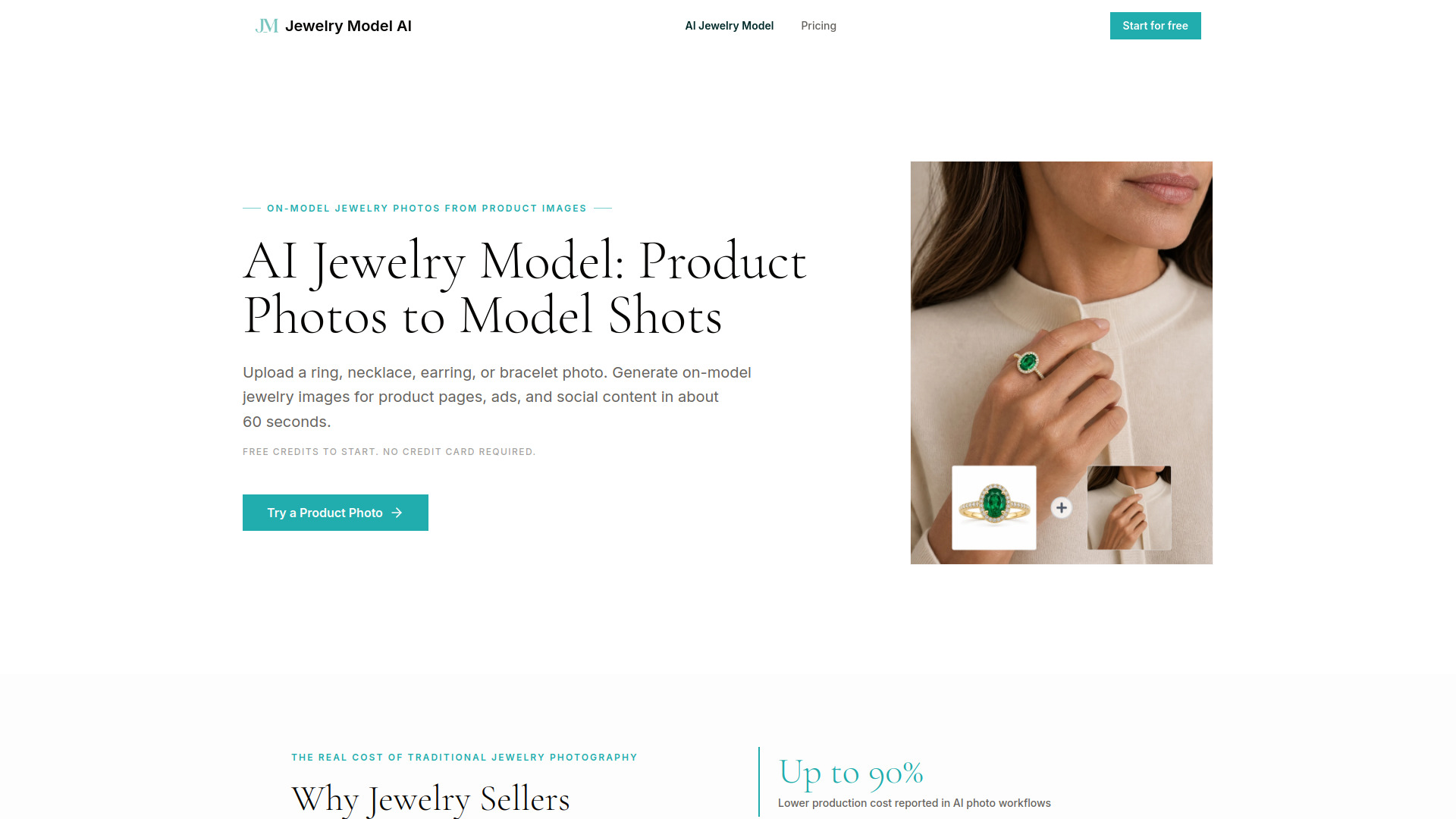
Jewelry Model AI is an AI-powered tool that turns jewelry product photos into photorealistic on-model images for ecommerce and marketing. Upload a ring, necklace, earring, or bracelet photo, choose a model scene, and generate a realistic product visual in about 60 seconds.
How to use Jewelry Model AI
- Choose Your Jewelry Type – Select Ring, Necklace, Earring, or Bracelet. Your choice determines available model presets and placement options.
- Upload Your Photo and Select a Model – Upload any clear jewelry photo, then pick a preset AI model or upload your own. You can position the jewelry manually or let the AI place it automatically.
- Preview and Download – Your image appears in the preview panel in about 60 seconds. Review the result, then download at full resolution for immediate commercial use.
Features of Jewelry Model AI
- Supports all four jewelry types: rings, necklaces, earrings, and bracelets with type-specific placement logic.
- Ring Try-On with Finger Placement Control: choose index, middle, ring, or pinky placement; auto mode sets a practical default, manual mode gives more control.
- Necklace Model Shots with Accurate Drape: controls for neckline, chain length, and pendant position; preserves chain, clasp, stone, and pendant details.
- Earring Try-On for Left, Right, or Both Ears: works for studs, hoops, and drop earrings.
- Bracelet Placement on Left or Right Wrist: placement controls match product category and wrist direction.
- Photorealistic output: designed to keep the jewelry photo as the main reference, preserving stone cuts, metal tone, prong settings, and engravings.
- Commercial use: paid outputs can be used for product pages, social media, ads, and other ecommerce marketing materials.
- Credit-based system: credits are only consumed on successful generations.
Use Cases of Jewelry Model AI
- Independent Designers: Etsy and Shopify sellers who need professional images without a professional budget.
- E-Commerce Brands: growing jewelry brands that need to scale visual content without scaling their team.
- Marketing Agencies: agencies managing multiple jewelry clients who need fast, consistent output.
Pricing
Jewelry Model AI uses a credit-based subscription model. New users receive free credits on sign-up without a credit card.
- Starter – $19/month: 500 credits/month (up to 50 standard generations), up to 4K output, basic support, standard queue access, commercial license.
- Pro – $49/month: 1,500 credits/month (up to 150 standard generations), up to 4K output, priority support, priority queue access, commercial license.
- Studio – $99/month: 4,000 credits/month (up to 400 standard generations), up to 4K output, fast-track support, highest queue priority, commercial license.
FAQ
What is AI Jewelry Model? AI Jewelry Model is an AI-powered tool that turns jewelry product photos into on-model images for ecommerce and marketing. Upload a ring, necklace, earring, or bracelet photo, choose a model scene, and generate a realistic product visual with the uploaded jewelry image used as the key reference.
Will the AI change or distort my jewelry design? AI Jewelry Model is designed to reduce product detail drift by using the uploaded jewelry photo as the core reference. Clear, well-lit product images give the system more information to preserve visible stone cuts, metal tone, prong settings, and engravings. Like any AI image workflow, outputs should still be reviewed before commercial use.
Which jewelry types does AI Jewelry Model support? AI Jewelry Model supports rings, necklaces, earrings, and bracelets. Each type has dedicated placement controls: rings can target specific fingers, earrings can use the left ear, right ear, or both ears, bracelets can target the left or right wrist, and necklaces are positioned around neckline and pendant placement.
How long does it take to generate an image? Most generations are designed to complete in about 60 seconds.
Can I use the generated images commercially? Paid outputs can be used for product pages, social media, ads, and other ecommerce marketing materials, subject to our Terms of Service. You must have the rights to any jewelry, model, portrait, logo, brand, or reference material you upload.
What image quality should I upload for best results? A clear, well-lit photo with the jewelry as the main subject works best. White-background product shots, flat lays, and clean smartphone photos all work well. The higher the quality of your input image, the more detail the AI can preserve in the output.
How does AI Jewelry Model pricing work? AI Jewelry Model uses a credit-based system. New users receive free credits on sign-up to try the tool without a credit card. Paid plans include a monthly credit allowance, and active subscribers can add extra credits for higher-volume needs. Credits are only consumed on successful generations.
Is AI Jewelry Model suitable for high-volume catalog production? AI Jewelry Model is designed for repeatable catalog workflows. It can help teams create model shots across many SKUs without scheduling a new shoot for every product, while still requiring review for product accuracy before publishing.