LogoTopAIHubs
icon of kling motion control -1

kling motion control -1

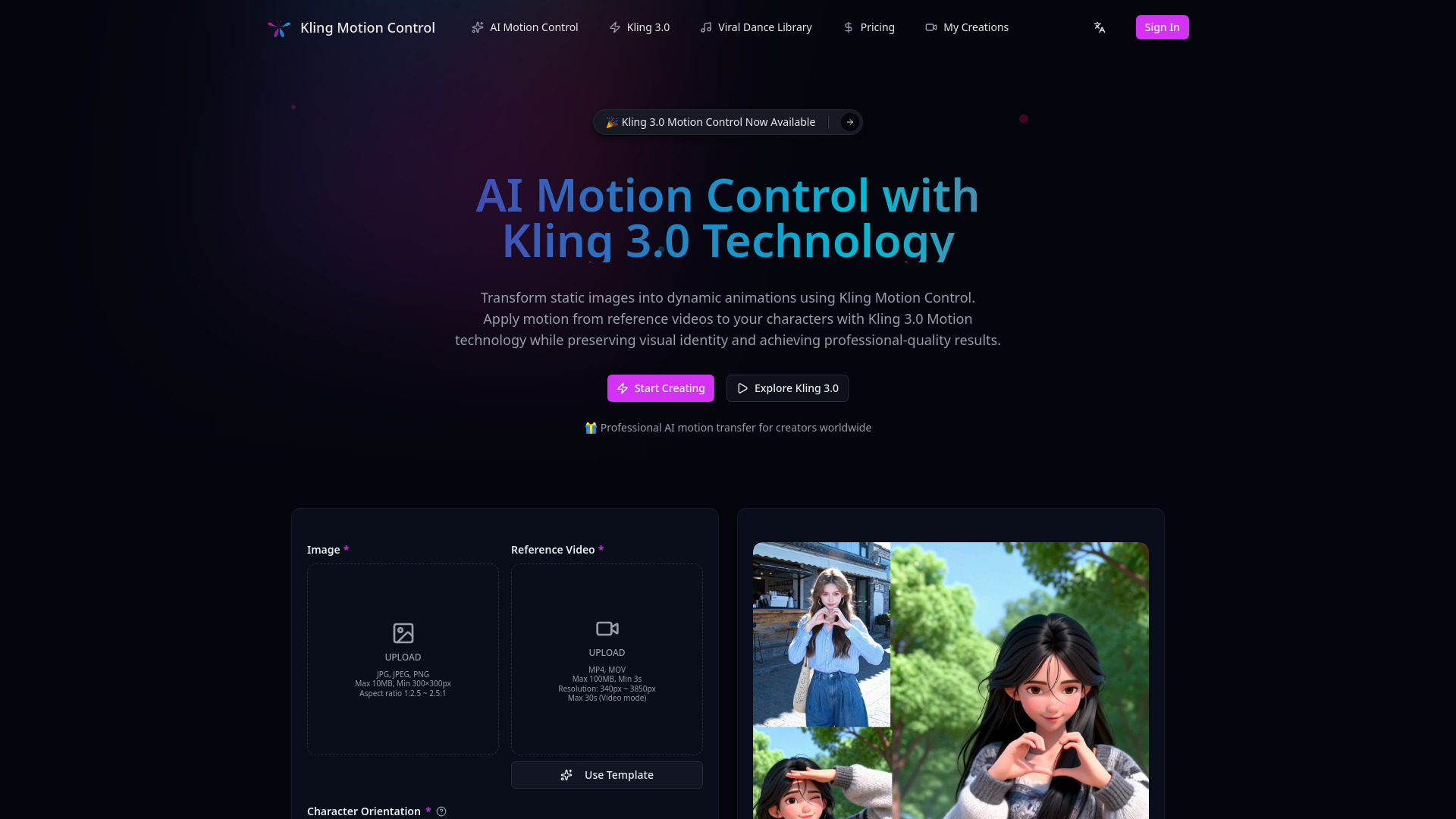
AI motion transfer tool transforming static images into animations using Kling 3.0 technology.

Introduction

What is kling motion control -1

Kling Motion Control is an advanced AI-powered motion transfer system built on Kling 3.0 technology. It enables creators to apply movement from reference videos to static character images, generating realistic animations while maintaining consistent visual identity. With Kling AI Motion Control, you can create professional-quality character animations with precise motion control and predictable results.
How to use kling motion control -1
  1. Upload Your Character Image: Start by uploading a static character image. The system accepts illustrations, photos, and digital art.
  2. Select a Reference Motion Video: Choose a reference video containing the desired motion. Videos between 3 and 30 seconds are recommended.
  3. AI Motion Control Processing: The Kling 3.0 AI motion control engine extracts motion keypoints from the reference video and maps them onto your character, preserving visual identity.
  4. Download Your Animation: Preview and download the animated character video.
Features of kling motion control -1
  • Kling 3.0 Motion Technology: Advanced motion extraction with full-body accuracy, including fine hand gestures. Analyzes motion patterns from any reference video (3-30 seconds).
  • Character Identity Preservation: Maintains consistent character identity, visual features, style, and appearance across all frames.
  • Predictable Motion Transfer: Extracts explicit motion data rather than generating probabilistic movement, leading to predictable and accurate results.
  • Professional Workflow Integration: Designed for character animation, product videos, storyboarding, pre-visualization, and social media content creation.
  • Full-Body AI Motion Control: Captures complete body movements, including arms, legs, torso rotation, and weight distribution.
  • Hand Gesture Precision: Accurately captures individual finger movements and hand gestures.
  • Character Identity Lock: Preserves character's face, hair, clothing, and style across all frames.
  • Audio Sync Support: Option to keep original audio synchronized with the AI motion control output.
  • Prompt-Guided Scenes: Use text prompts to control background environments, lighting, and scene composition.
Use Cases of kling motion control -1
  • Character animation and illustrations
  • Product and brand videos
  • Storyboards and pre-visualization for film production
  • Social media content creation (Instagram, TikTok)
  • Advertising campaigns
  • Music videos with audio preservation
FAQ
  • What is Kling Motion Control and how does it work? Kling Motion Control is an advanced AI-powered motion transfer system that applies movement from reference videos to static character images. Using Kling 3.0 Motion technology, it analyzes motion patterns in your reference video (3-30 seconds) and transfers them to your character while preserving visual identity. The AI motion control system extracts explicit motion data rather than generating probabilistic movement, ensuring predictable and accurate results.
  • What makes Kling 3.0 Motion Control different from other AI animation tools? Kling AI Motion Control stands out through its focus on control and predictability. Unlike generic AI animation tools, Kling 3.0 Motion explicitly extracts motion paths that stay true to the source while preserving character identity. It offers full-body motion accuracy including fine hand gestures, optional audio preservation, two character orientation modes, and prompt-guided scene refinement. This professional approach reduces trial-and-error and delivers consistent, production-ready results.
  • What types of projects can I create with Kling Motion Control? Kling Motion Control is versatile and supports various creative applications. You can create character animations and illustrations, product and brand videos, storyboards and pre-visualization for film production, social media content for platforms like Instagram and TikTok, advertising campaigns, music videos with audio preservation, and professional animation projects. The Kling 3.0 Motion technology adapts to both quick social media clips and complex professional productions.
  • How long does it take to create an animation with Kling AI Motion Control? With Kling Motion Control, you can create professional-quality animations in minutes instead of days or weeks required by traditional animation methods. The AI motion control system automates the complex process of motion transfer, allowing you to focus on creative decisions. Processing time depends on video length and complexity, but most animations are ready within minutes using Kling 3.0 Motion technology.
  • Do I need animation experience to use Kling 3.0 Motion Control? No, Kling Motion Control is designed to be accessible to creators of all skill levels. While animation experience can help you make better creative decisions, the AI motion control system handles the technical complexity of motion transfer automatically. Simply provide a reference video and a character image, and Kling 3.0 Motion technology will generate professional-quality animations. The system is intuitive enough for beginners yet powerful enough for professional animators.
  • Can I use Kling Motion Control for commercial projects? Yes, Kling Motion Control offers commercial licensing options. Professional and higher-tier plans include commercial licensing, allowing you to use your Kling AI Motion Control animations in client projects, advertising, product videos, and other commercial applications. The Kling 3.0 Motion technology produces production-ready output suitable for professional use, and our API access enables integration into commercial workflows.

Newsletter

Join the Community

Subscribe to our newsletter for the latest news and updates