What is LeanImg - unlimited image processing
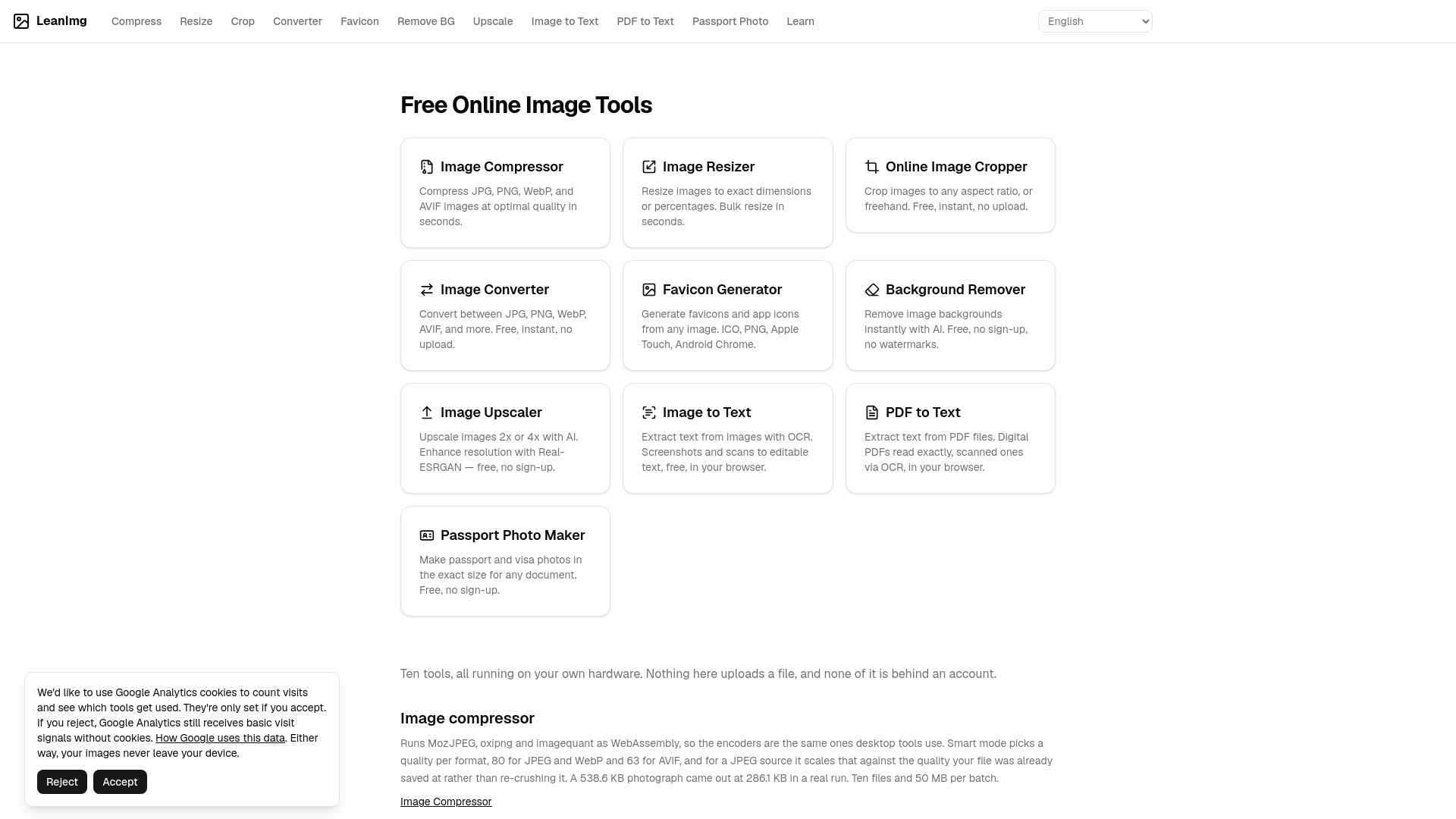
LeanImg is a suite of free, browser-based image tools that run entirely on your own hardware. It includes ten tools for compressing, resizing, cropping, converting, upscaling, and removing backgrounds from images, as well as extracting text from images and PDFs. Nothing is uploaded to a server, no account is required, and there are no watermarks or resolution limits.
How to use LeanImg - unlimited image processing
- Open the LeanImg website in your browser.
- Select the tool you need from the homepage or navigation menu.
- Upload or drag and drop your image or PDF file into the tool.
- Adjust settings as needed (e.g., dimensions, quality, format).
- Process the file; all work happens locally in your browser.
- Download the result directly to your device.
Features of LeanImg - unlimited image processing
- Image Compressor: Compress JPG, PNG, WebP, and AVIF images using MozJPEG, oxipng, and imagequant as WebAssembly. Smart mode picks quality per format (80 for JPEG/WebP, 63 for AVIF). Batch up to 10 files and 50 MB.
- Image Resizer: Resize to exact dimensions or percentages, with 15 presets for social media. Three fit modes: Cover, Contain, Stretch. PNG output stays lossless; others re-encoded at quality 90.
- Image Cropper: Crop with drag-and-drop, lock to eight aspect ratios or custom W:H. One image at a time, up to 10 MB. Lossy formats re-encoded at quality 92; GIF becomes single-frame PNG.
- Image Converter: 24 conversion pairs across 11 formats. Reads HEIC, SVG, TIFF, BMP, GIF, ICO; writes JPG, PNG, WebP, AVIF, PDF. Transparency flattened to white for JPG/PDF; PDF embeds JPEG at quality 92.
- Favicon Generator: Generates seven files from one image: favicon.ico (16, 32, 48 px), 16 and 32 px PNGs, 180 px Apple Touch icon, 192 and 512 px Android icons, and site.webmanifest, delivered as a ZIP with link tags.
- Background Remover: Uses IS-Net model in-browser to return same-size PNG with transparent background. Model cached after first run. Uses WebGPU where available. Batch up to 10 images and 50 MB.
- Image Upscaler: Uses Real-ESRGAN (realesr-general-x4v3) to upscale 2x or 4x, reconstructing detail. Output always PNG. With WebGPU supports up to 32 megapixels; without, about 1.1 megapixels.
- Image to Text: Tesseract WebAssembly OCR for printed text in nine languages. Models cached after first run. Screenshots and clean scans yield high accuracy.
- PDF to Text: Extracts text from digital PDFs via text layer (exact) and scanned pages via OCR, up to 25 pages per file. Files never leave your device.
- Passport Photo Maker: Creates passport and visa photos in exact sizes for any document.
Use Cases of LeanImg - unlimited image processing
- Compressing images for faster website loading without losing quality.
- Resizing photos for social media platforms like Instagram, YouTube, LinkedIn, X, TikTok, Facebook, and Pinterest.
- Cropping images to specific aspect ratios for print or web.
- Converting between image formats, including HEIC from iPhones, for compatibility.
- Generating favicons and app icons for websites and mobile apps.
- Removing backgrounds from product photos or portraits for e-commerce or design.
- Upscaling low-resolution images for printing or high-DPI displays.
- Extracting text from screenshots, scans, or photos for editing or archiving.
- Extracting text from digital or scanned PDFs, such as bank statements or contracts, without uploading sensitive documents.
- Creating passport or visa photos that meet official size requirements.
Pricing
LeanImg is completely free. There are no accounts, no daily credits, no watermarks, and no resolution limits. All processing runs on your own hardware, so there are no server costs to recover.
FAQ
Do I need to create an account?
No, LeanImg never requires an account.
Are my files uploaded to a server?
No, all processing happens in your browser. Your files never leave your device.
Is there a limit on file size or number of files?
Some tools have batch limits (e.g., 10 files and 50 MB per batch for compressor and background remover). The cropper accepts one image up to 10 MB. PDF to Text handles up to 25 pages per file.
What formats are supported?
Input formats include JPG, PNG, WebP, AVIF, HEIC, SVG, TIFF, BMP, GIF, ICO, and PDF. Output formats vary by tool.
Does the upscaler work on any device?
The upscaler uses WebGPU when available, supporting up to 32 megapixels. Without WebGPU, the limit is about 1.1 megapixels.
How accurate is the OCR?
For clean screenshots and scans, accuracy can be 100%. Blurred or rotated images may reduce accuracy (e.g., 92.4% in a test).
Can I use LeanImg for commercial purposes?
The tools are free to use, but check the source code license for details.