What is MAGI-2
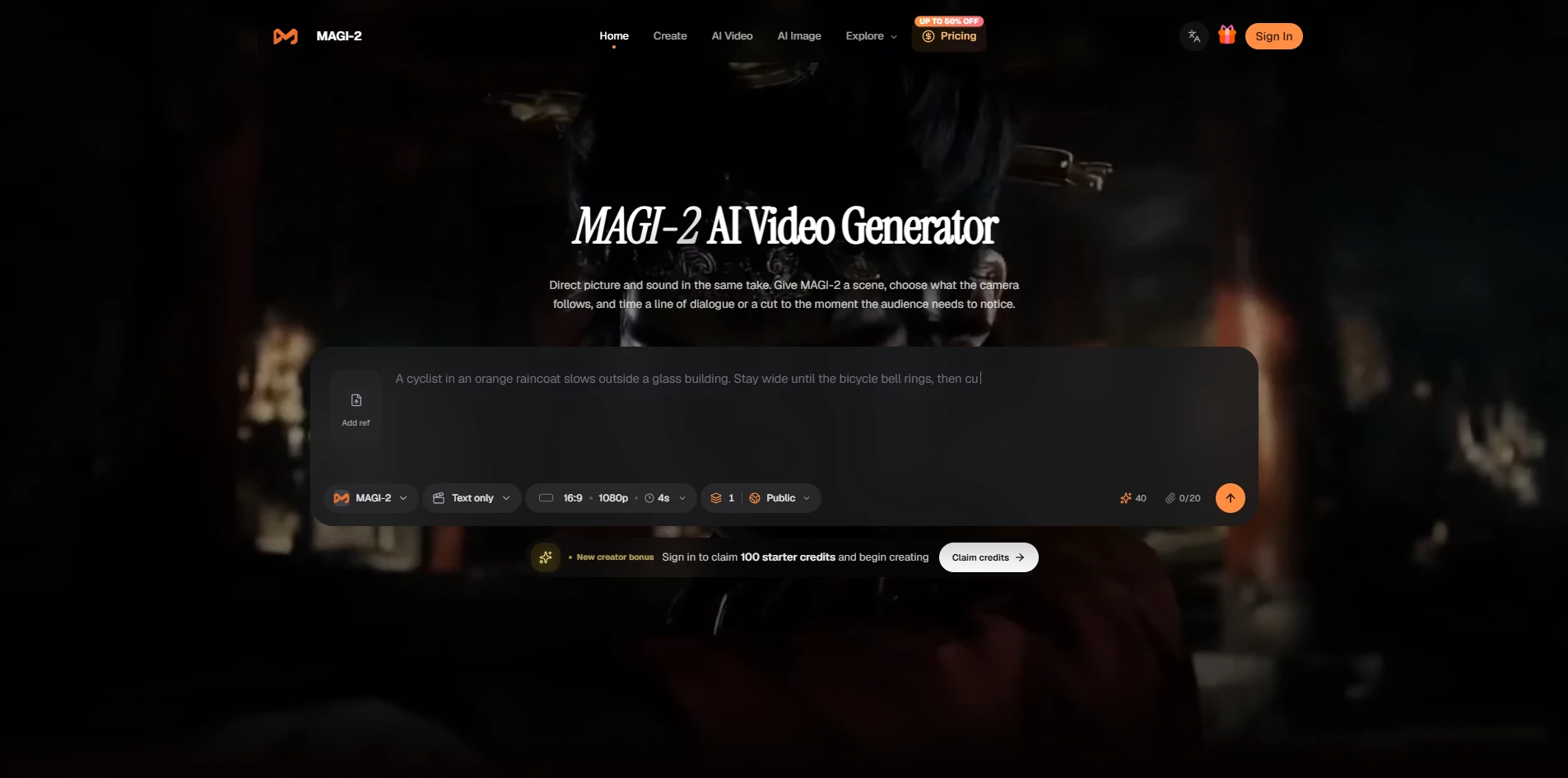
MAGI-2 is an AI video generator that enables users to direct picture and sound in the same take. It creates scenes using text, images, video, and audio, allowing users to plan cuts, direct dialogue, and edit existing footage. The tool generates up to 30 seconds of 1080p video at 25 frames per second, providing room for an entrance, an exchange, and a reaction within a single scene.
How to use MAGI-2
- Start with a scene description: Describe the subject, what changes on screen, and what you hear. For example, "a baker squeezes the paper bag and looks up as the shop bell rings" gives MAGI-2 a sound source, a reason to move, and a clear place to point the camera.
- Add reference materials: Upload images, video, or audio files to guide the generation. You can use up to 20 reference files.
- Choose settings: Select aspect ratio (e.g., 16:9), resolution (1080p), and duration (up to 30 seconds).
- Direct the camera and sound: Specify cut points, dialogue, and sound cues. For timed reveals or music cues, give exact cut points; for exploratory storytelling, provide just the beats and let MAGI-2 suggest viewpoints.
- Generate and review: Submit the prompt to generate the video. Review the output at normal speed, then examine frames around fast movements or cuts to ensure clarity.
- Edit existing footage: To edit a video, describe the detail to change and the details that should carry over. For costume changes, review moments where a hand passes in front of the fabric.
Features of MAGI-2
- Dialogue with lip movement: Generate speech with lip synchronization, allowing you to direct lines and judge reactions.
- Sound generation with on-screen sources: Create music, ambience, and object sounds (e.g., a soft knock when a cup touches wood) that are distinct and legible.
- Composition that survives cuts: Choose from six aspect ratios and direct subject entry and visibility during camera moves.
- Shot timing and cut planning: Specify exact cut points for timed reveals or music cues, or let MAGI-2 plan coverage from beats.
- Reference-based generation: Use image references to fix costume and setting details across multiple shots.
- Video editing: Edit existing footage by describing changes and preserving desired details.
- Up to 30 seconds of 1080p video at 25 fps: Provides ample time for a scene with an entrance, exchange, and reaction.
Use Cases of MAGI-2
- Continuous shot with style changes: A hand brushes past painted leaves on a riverside walk, and MAGI-2 carries the movement into the next painting as the palette and brushwork change.
- Image references for consistent characters and settings: A traveler pauses beneath a bloom taller than she is; a reference sheet fixes her costume and three settings, and MAGI-2 carries those details from an iris hillside to a rose garden and a lily valley.
- Shot timing with a visible timeline: A skateboarder passes a bus on a snowy street, and the edit timeline underneath the film shows where each new shot begins.
- Video editing: Erase one word from a recording and pull the page into a black hole, leaving the title on black.
- Dialogue scenes: A guest asks for the last table, and the camera stays on the host to capture a reaction.
- Sound design: A potter sets a cup on a wooden table with a soft knock and the wheel humming in the background.
Pricing
MAGI-2 uses a credit-based system. Generating a video costs 40 credits. New users can sign in to claim 100 starter credits. Pricing plans offer up to 50% off.
FAQ
Can I start a MAGI-2 scene with text alone?
Yes. Describe the subject, what changes on screen, and what you hear. A line such as "a baker squeezes the paper bag and looks up as the shop bell rings" gives MAGI-2 a sound source, a reason to move, and a clear place to point the camera.
When should I edit an existing video with MAGI-2?
Choose a MAGI-2 edit when a take already has a performance or camera move you want. Describe the detail to change and the details that should carry over. For a change of costume, review moments where a hand passes in front of the fabric.
How much camera direction does MAGI-2 need?
Give MAGI-2 exact cut points for a timed reveal or a music cue. When exploring a story, try giving MAGI-2 just the beats. Its camera planning can suggest viewpoints you can evaluate before committing to a detailed shot list.
How do I review a shot with fast movement?
Watch the MAGI-2 clip at normal speed first. Then look at the frames before and after a fast turn or an object passing behind another subject. If the direction becomes hard to follow, widen the framing or split the action across two shots.