LogoTopAIHubs
icon of Manga Maker

Manga Maker

Browser-based AI manga creator that generates consistent characters, panels, and layouts—produce full manga pages in minutes.

Introduction

What is Manga Maker

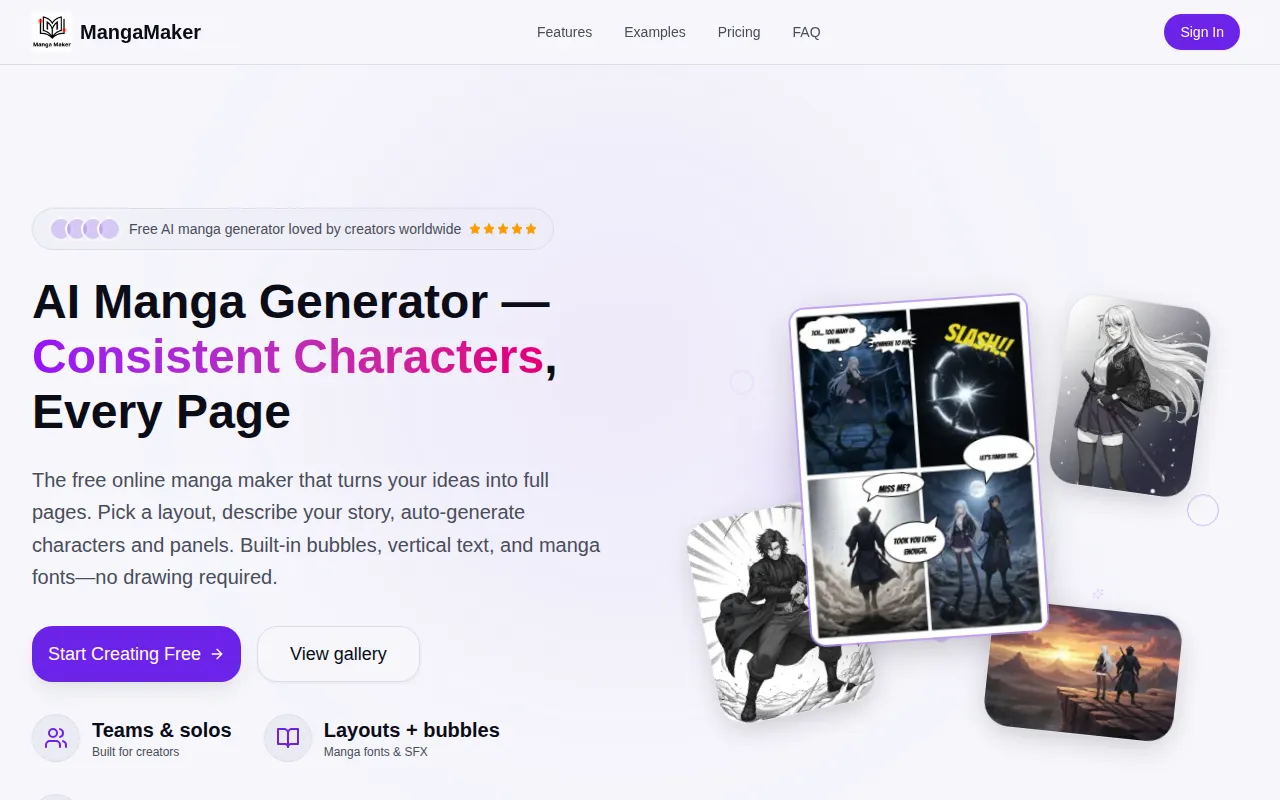
MangaMaker is a free online AI manga generator and comic maker that allows users to create manga, comics, webtoons, and anime-style art. It combines AI-powered tools, including a manga canvas editor, text-to-image generator, and a character consistency system, enabling users to create full manga and comic pages without needing drawing skills.

How to use Manga Maker
  1. Choose a layout: Select a grid or 4-koma preset, or create your own panel layout. Adjust panels by dragging to resize and reorder them.
  2. Generate with AI: Describe the content for each panel using text prompts. The AI can generate characters and panel art based on these descriptions, maintaining character consistency.
  3. Edit & Export: Add speech bubbles, text, and SFX. Fine-tune panel order, spacing, and color grades. Export pages as PNGs or print-ready files.
Features of Manga Maker
  • AI Manga Canvas: Intuitive canvas editor with drag-and-drop panels, speech bubbles, and professional manga layouts.
  • Text-to-Manga Art: Transform text descriptions into manga-style artwork using advanced AI models.
  • Character Consistency: Create characters once and maintain their appearance across all panels automatically.
  • Panel Layouts: Choose from over 10 panel templates or create custom layouts.
  • Text & Bubbles: Utilize multiple speech bubble styles and 28 manga fonts.
  • Style Control: Supports Manga, Comic, and Webtoon styles.
  • AI Generation: Generate panels with AI using text prompts.
  • Character Library: Save and reuse character references for consistent appearance.
  • Easy Updates: Modify character designs, and they update across the comic.
  • Multiple Art Styles: Access over 20 art styles.
  • High Resolution Export: Export pages in high resolution.
  • Browser-Based: Works in any modern web browser, including mobile browsers (though desktop/tablet recommended for the canvas editor).
Use Cases of Manga Maker
  • Creating full manga pages quickly (approx. 5 minutes per page).
  • Generating comic strips for social media content.
  • Developing game cutscenes with consistent character art.
  • Bringing stories to life for users without drawing skills.
  • Producing professional-looking manga and comic pages for web or print.
Pricing

MangaMaker offers a free tier with access to all features. Premium plans are also available for users needing additional credits, higher resolution outputs, and priority generation.
FAQ
  • What is MangaMaker? MangaMaker is a free online AI manga maker and comic generator that lets you create manga, comics, webtoons, and anime-style art. It combines AI-powered tools including a manga canvas editor, text-to-image generator, and character consistency system, so anyone can create full manga and comic pages without drawing skills.
  • How does AI manga generation work? Describe what you want in each panel using natural language. The AI understands your descriptions and generates manga-style artwork, allowing specification of characters, poses, expressions, backgrounds, and art styles. Character consistency across panels is maintained automatically.
  • Can I use the content I create for commercial projects? Yes, all content created with MangaMaker is yours to use for commercial purposes, including publishing online or selling printed copies.
  • What makes MangaMaker different from other AI manga generators? MangaMaker offers character consistency across panels, professional manga and comic layout tools, speech bubbles and text styling, multiple manga-specific art styles, and an all-in-one canvas editor.
  • Is MangaMaker free to use? Yes, MangaMaker offers a generous free tier. Premium plans are available for power users.
  • Can I use MangaMaker on mobile devices? MangaMaker works in any modern web browser, but a desktop or tablet is recommended for the best experience with the canvas editor.
  • How do I maintain character consistency? Create characters in the Character Library with reference images and descriptions. Select your characters when generating panels, and MangaMaker's AI will maintain their appearance.

Newsletter

Join the Community

Subscribe to our newsletter for the latest news and updates