What is 秒聽錄音(Tinrec)
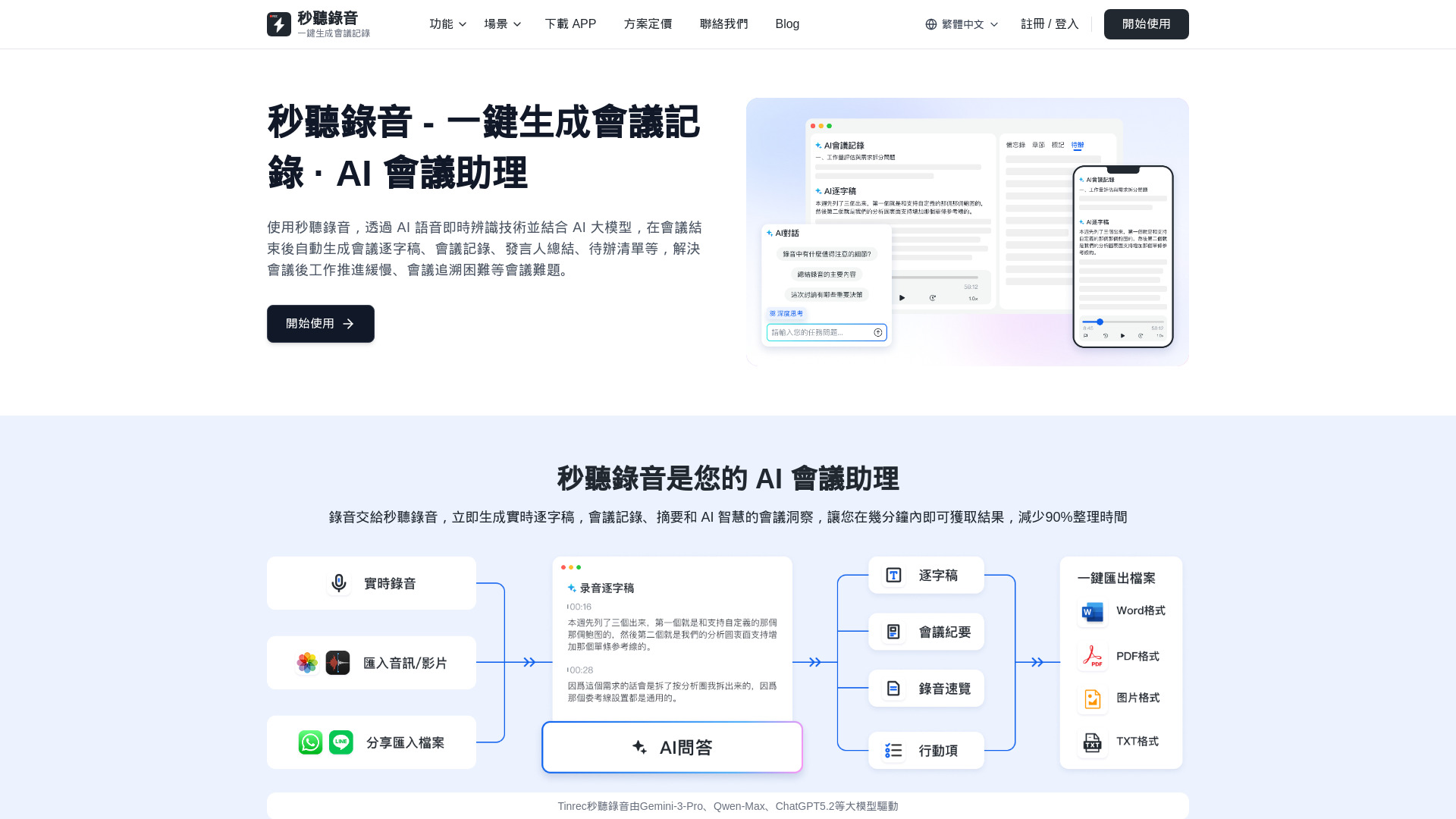
Tinrec (秒聽錄音) is an AI meeting assistant that uses AI voice real-time recognition technology combined with AI large models to automatically generate meeting transcripts, meeting minutes, speaker summaries, and to-do lists after the meeting. It aims to solve problems such as slow post-meeting work progress and difficulty in meeting traceability.
How to use 秒聽錄音(Tinrec)
- Start Recording or Upload Audio/Video: Begin a real-time recording or upload existing audio/video files (MP3, WAV, M4A, MP4, etc.). You can also paste links from platforms like YouTube, TikTok, and Xiaohongshu.
- AI Processing: Tinrec uses AI voice recognition and large models to process the audio/video.
- Generate Outputs: Automatically receive meeting transcripts, meeting minutes, speaker summaries, and to-do lists.
- Analyze and Export: Utilize AI chat for in-depth queries about the content and export the generated information in various formats (Word, PDF, TXT, SRT, etc.).
Features of 秒聽錄音(Tinrec)
- AI Meeting Minutes Generation: Automatically generates meeting minutes including main conclusions, decisions, and action items with assigned individuals and deadlines.
- Real-time Transcription: Provides real-time transcription with high accuracy (up to 98%) in multiple languages (Chinese, English, Japanese, Cantonese, Taiwanese, etc.).
- Multi-language Support: Automatically recognizes and transcribes various languages.
- Network Link Parsing: Extracts transcripts and AI summaries from video links on platforms like YouTube, TikTok, and Xiaohongshu.
- Audio/Video File Import: Supports importing and transcribing local audio and video files in multiple formats.
- To-do Item Extraction: Automatically identifies and lists action items, responsible persons, and deadlines.
- AI Chat: Allows users to ask questions about the recorded content for deeper insights.
- Multi-format Export: Exports meeting minutes, transcripts, notes, and to-do lists in formats like Word, PDF, TXT, and SRT.
- Speaker Separation: Distinguishes between different speakers in the recording.
- AI Chapter Generation: Segments and summarizes transcriptions into chapters.
- Cross-device Synchronization: Available on iOS, Android, and web versions.
Use Cases of 秒聽錄音(Tinrec)
- Meeting Recording: Automatically generate meeting minutes, transcripts, and action items.
- Interview Transcription: Quickly organize interview content and Q&A records.
- Sales Calls: Record and analyze customer needs, generate follow-up actions.
- Classroom Lectures: Generate lecture records, key summaries, and knowledge structures.
- Product Research: Transcribe user interviews and extract product requirements and pain points.
- Engineering Meetings: Record technical discussions, extract decisions, and generate task lists.
- Online Video Analysis: Extract transcripts and summaries from video links.
Pricing
Tinrec offers a free version and paid plans. The free version includes basic transcription features with limitations on transcription minutes and file imports per month. Paid plans (Pro) offer more transcription minutes, unlimited file imports, and advanced features.
FAQ
- What file formats does Tinrec support? Tinrec supports various audio and video formats like MP3, WAV, M4A, WMA, AAC, MP4, MOV, AVI, and also accepts links from platforms like YouTube, Facebook, and TikTok.
- How accurate is the transcription? Tinrec uses advanced AI speech recognition technology, achieving over 95% accuracy in clear recording environments. Accuracy can be affected by recording quality, background noise, speaking speed, and accent.
- What languages does Tinrec support? Tinrec supports multiple languages including Chinese (Simplified and Traditional), English, Japanese, and Korean. The system can auto-detect languages, or you can manually select a language for better accuracy.
- How do I start using Tinrec? Register for an account to receive 60 minutes of free transcription credits. You can use Tinrec via the web, iOS app, or Android app. Upload files or paste video links, and the system will automatically transcribe the content.
- How does the AI meeting minutes feature work? The AI automatically analyzes the recording to extract key points, decisions, and action items, generating structured meeting minutes. You can view the AI summary after transcription or use the AI chat feature to ask questions about the content.