What is Nana Banana AI Photo Editor
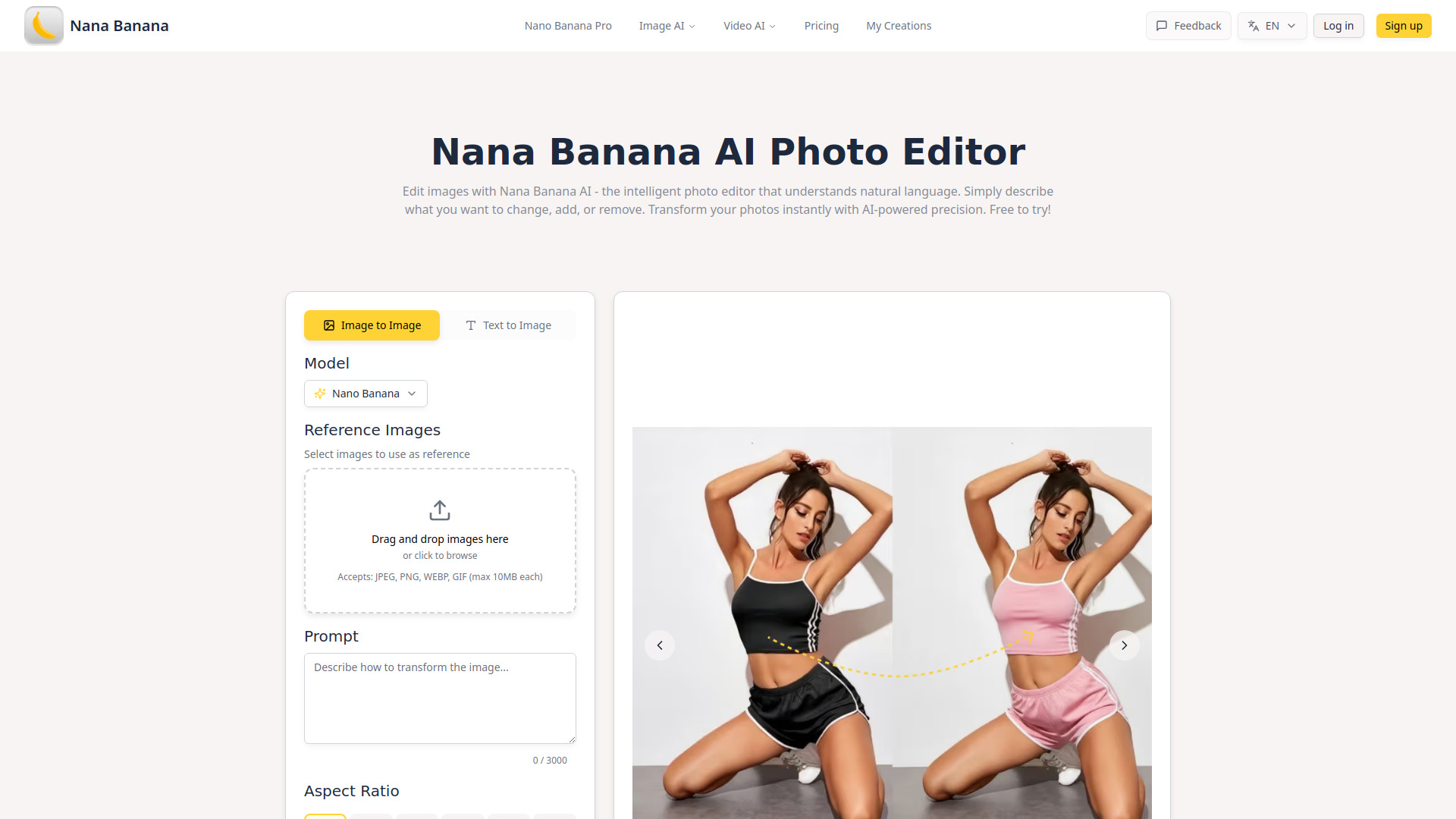
Nana Banana AI Photo Editor is an AI-powered tool that transforms images using simple natural language text commands. It allows users to edit images by describing the desired changes, such as removing backgrounds, changing colors, or adding filters, with professional-grade results delivered quickly.
How to use Nana Banana AI Photo Editor
- Input Your Image or Idea: Upload any photo or describe what you want to create using text prompts.
- AI Processing Magic: The AI analyzes your request and applies professional edits automatically, from color correction to object removal.
- Export Enhanced Results: Get your edited image in seconds and export it in your desired format.
Features of Nana Banana AI Photo Editor
- Face & Character Preservation: Flawlessly preserves facial features and personal characteristics.
- Ultra-Speed Processing: Delivers results in under 15 seconds.
- Intelligent Style Transformation: Converts images between artistic styles (photos, paintings, sketches, digital art).
- Full Commercial Rights: All edited images can be used commercially without licensing restrictions.
- AI Background Removal Tool: Removes cluttered backgrounds with high accuracy.
- Lifestyle Scene Generator: Places products in AI-generated lifestyle environments.
- Batch Color Variation Editor: Generates multiple product color variants with one click.
- Smart Catalog Optimizer: Resizes and crops product catalogs while maintaining composition.
- AI Thumbnail Maker: Generates compelling video thumbnails.
- Brand Style Photo Filters: Apply signature looks with custom filters and presets.
- Trending Photo Effects: Access viral trends with AI-powered effects and real-time filters.
- A/B Test Image Creator: Creates multiple ad creative variations instantly.
- Multi-Channel Asset Generator: Generates consistent brand visuals across marketing channels.
- Localized Content Adapter: Adapts visuals for different markets and demographics.
- Performance-Based Design Tool: Designs conversion-focused creatives based on data and AI insights.
- AI Portrait Enhancer: Transforms casual photos into polished business headshots.
- Marketing Material Designer: Designs flyers, brochures, and promotional content.
- Review Graphics Generator: Creates testimonial cards and review showcases.
- Event Photo Creator: Generates visuals for product launches and events.
Use Cases of Nana Banana AI Photo Editor
- E-commerce Sellers: Use AI Background Removal Tool for clean product shots, Batch Color Variation Editor for multiple SKUs, and Smart Catalog Optimizer for resizing catalogs.
- Content Creators & Influencers: Utilize Social Media Photo Templates, AI Thumbnail Maker, Brand Style Photo Filters, and Trending Photo Effects.
- Marketing Teams & Agencies: Leverage A/B Test Image Creator, Multi-Channel Asset Generator, Localized Content Adapter, and Performance-Based Design Tool.
- Small Business Owners: Benefit from AI Portrait Enhancer for professional headshots, Marketing Material Designer for promotional content, Review Graphics Generator for social proof, and Event Photo Creator for event visuals.
FAQ
- Can I try Nana Banana AI Photo Editor for free? Absolutely! Nana Banana AI Photo Editor offers a free trial with no credit card required. You can start editing photos instantly and experience our AI-powered features. We provide flexible subscription plans for individuals, professionals, and teams to unlock unlimited editing capabilities.
- How does Nana Banana AI Photo Editor work? Nana Banana AI Photo Editor uses advanced machine learning algorithms to understand your editing instructions. Simply describe what you want in plain language - like 'remove the background', 'make it sunset', or 'add a vintage filter'. Our AI interprets your request and applies professional-grade edits instantly. It's like having a photo editing expert who understands exactly what you want!
- What file formats does Nana Banana AI support? Nana Banana AI Photo Editor supports all major image formats including JPG, PNG, WebP, GIF, BMP, and TIFF. You can upload images up to 50MB each. Export your edited photos in any format you need, with customizable quality settings and resolution options for optimal results.
- What AI editing capabilities does Nana Banana offer? Nana Banana AI Photo Editor excels at background removal with 99% accuracy, AI-powered style transfers, object removal and replacement, color correction, face enhancement, artistic filters, and batch editing. Our unique features include one-click background replacement with AI-generated scenes, intelligent object detection, and advanced portrait retouching that maintains natural skin texture.
- Can I use Nana Banana AI edited photos for commercial purposes? Yes! All images edited with Nana Banana AI Photo Editor come with full commercial usage rights. No attribution required. Whether you're a freelancer, business owner, or content creator, you can use your edited photos for client work, marketing materials, social media, or any commercial purpose. AI-generated elements and backgrounds are unique and royalty-free.
- How does Nana Banana AI compare to other photo editors? Nana Banana AI Photo Editor is like having Photoshop's power without the complexity. While traditional editors require technical skills and hours of learning, Nana Banana AI delivers professional results through simple text commands. You get instant edits that would take 30+ minutes in Photoshop. Many professionals use Nana Banana AI for rapid editing and creative exploration, then fine-tune in traditional software if needed.
- What special features does Nana Banana AI Photo Editor have? Nana Banana AI Photo Editor offers unique features you won't find elsewhere: AI-powered background generation that creates custom scenes from text descriptions, smart object removal that automatically fills gaps naturally, style transfer that preserves important details, and our exclusive 'Magic Enhance' that intelligently improves photos based on content type. Plus, batch processing with consistent styling across multiple images.
- How fast is Nana Banana AI Photo Editor? Lightning fast! Nana Banana AI processes most edits in under 5 seconds. Complex operations like style transfers or AI background generation take just 10-15 seconds. Batch editing? Process 100 photos in minutes, not hours. Each image is optimized individually for the best quality while maintaining incredible speed. No more waiting for renders - see your edits instantly!