What is Panda Office
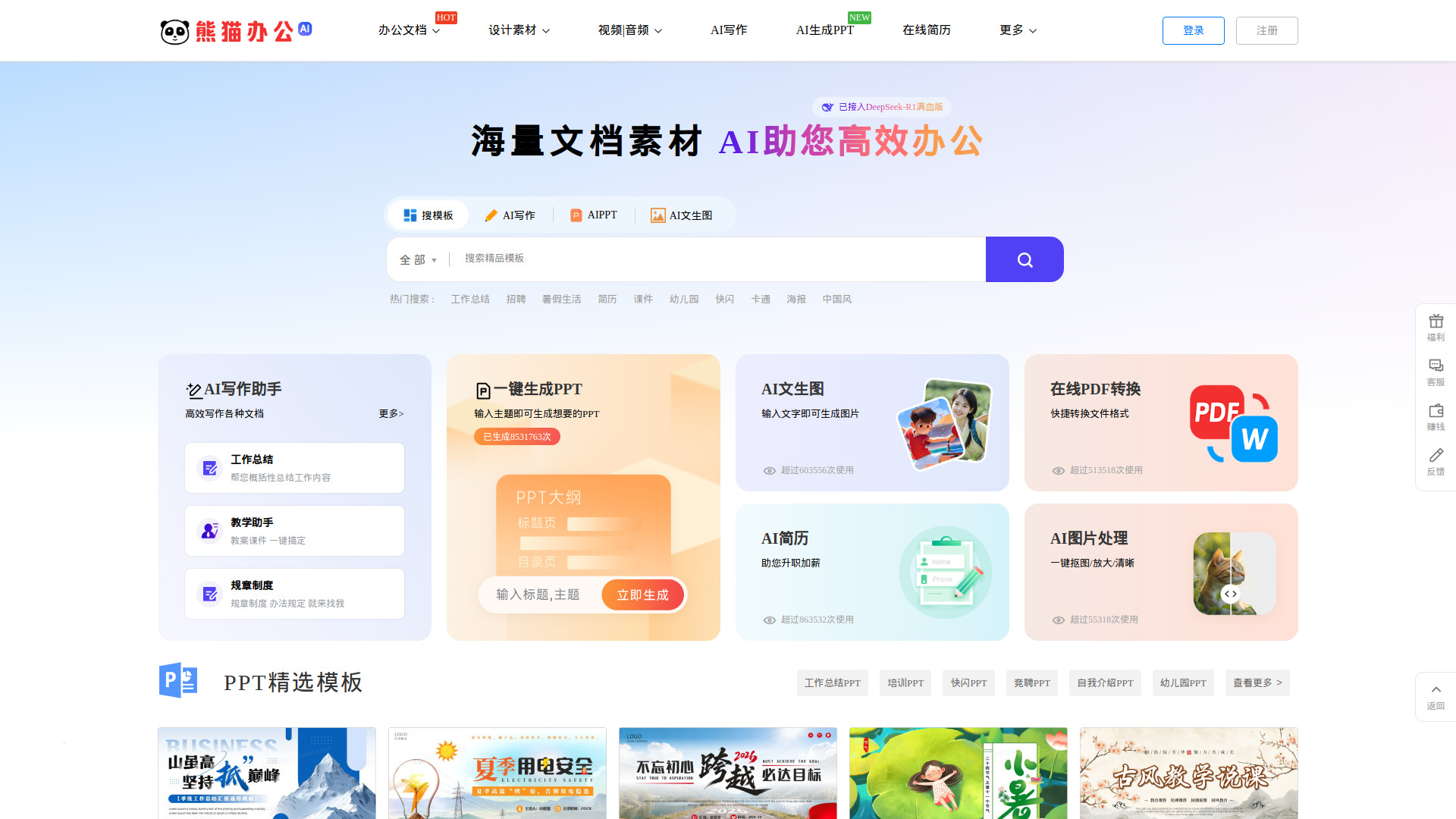
Panda Office is a comprehensive platform offering creative design templates and AI-powered tools for efficient document and design work. It provides a vast collection of high-quality PPT templates, Word templates, Excel templates, design elements, video templates, audio materials, and fonts. Additionally, it integrates AI writing, AI PPT generation, AI image generation, and AI image processing services to enhance productivity.
How to use Panda Office
- Search for Templates: Use the search bar on the homepage to find templates by keyword or browse categories such as PPT, Word, Excel, design elements, video, audio, and more.
- Use AI Tools: Select from AI writing, AI PPT generation, AI image generation, or AI image processing. Enter your requirements in the provided text area and click the submit button to generate content.
- Download or Edit: Once you find a template, you can download it directly or use online editing features (if available). For AI-generated content, you can refine and export as needed.
- Login/Register: To access downloads and personalized features, you need to log in or register via WeChat, QQ, or phone number.
Features of Panda Office
- Extensive Template Library: Includes PPT, Word, Excel, design elements, video templates, audio, and fonts.
- AI Writing Assistant: Helps generate documents like work summaries, teaching plans, and regulations.
- AI PPT Generation: Automatically creates PPT presentations based on a given topic.
- AI Image Generation: Generates images from text descriptions.
- AI Image Processing: Offers one-click background removal, image enlargement, and enhancement.
- AI Resume Builder: Assists in creating professional resumes.
- Online PDF Conversion: Converts files to and from PDF format.
- DeepSeek-R1 Integration: Enhanced AI capabilities for smarter content generation.
- Daily Updates: New templates and content are added regularly.
- Customer Support: Professional customer service to resolve issues.
Use Cases of Panda Office
- Business Presentations: Create professional PPTs for work summaries, project proposals, and annual reports.
- Educational Materials: Generate teaching courseware, lesson plans, and classroom presentations.
- Marketing and Advertising: Design posters, banners, and promotional materials using templates and AI tools.
- Personal Projects: Make resumes, invitations, and social media graphics.
- Content Creation: Write articles, reports, and scripts with AI writing assistance.
- Video Production: Use video templates for event openings, promotional videos, and background clips.
FAQ
Q: Do I need to register to download templates?
A: Yes, registration is required to download templates. You can log in via WeChat, QQ, or phone number.
Q: Are there free templates available?
A: Yes, the platform offers free templates, but some premium content may require payment or VIP membership.
Q: How does AI PPT generation work?
A: Enter a topic or description, and the AI will automatically generate a complete PPT presentation with slides and content.
Q: Can I use the AI tools without registration?
A: Some AI tools may be accessible without login, but full features and downloads require registration.
Q: Is there customer support?
A: Yes, professional customer service is available to assist with any issues.