What is PhotoMemorial AI
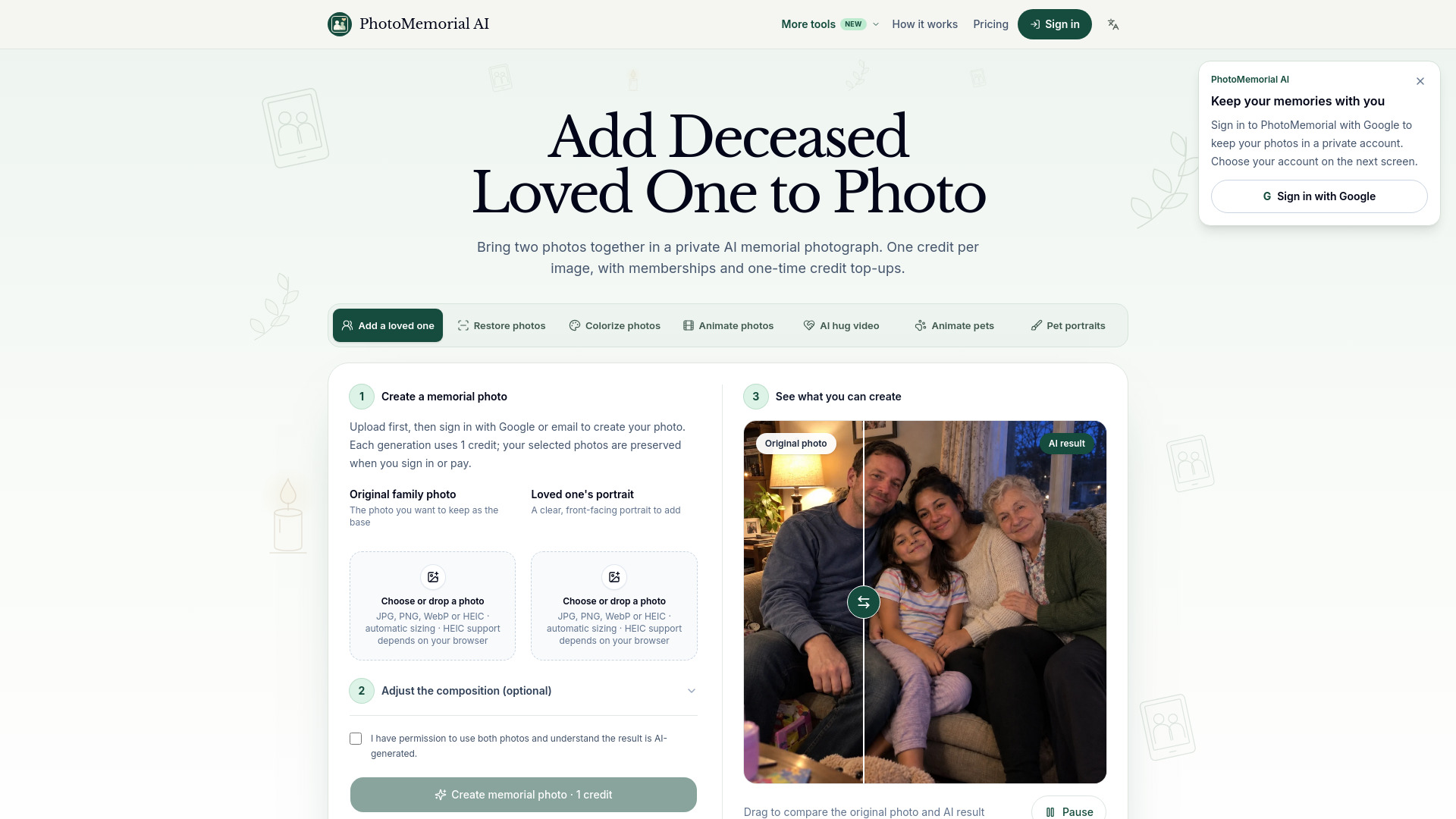
PhotoMemorial AI is a web-based tool that uses artificial intelligence to create memorial photographs by combining two images: a base family photo and a separate portrait of a deceased loved one. The service aims to produce a believable family photograph with consistent identity, lighting, perspective, skin tone, and grain, rather than a sticker-like collage. It also offers additional tools such as photo restoration, colorization, animation of old photos, AI hug videos, and pet memorial portraits. All generations require sign-in and paid credits, and videos are silent, run about five seconds, and require Family or Legacy plans.
How to use PhotoMemorial AI
- Choose two photos: Upload the family photo you want to keep as the base, then a separate portrait of your loved one. Supported formats include JPG, PNG, WebP, and HEIC (HEIC support depends on your browser). Image size is adapted automatically. Ensure both faces are sharp and you have permission to use both images.
- Adjust the composition (optional): Select from side-by-side, close together, or portrait arrangements.
- Sign in and create with one credit: Confirm permission, sign in with Google or email, and generate the photo. Each new photo uses one credit. Your selected photos stay in your browser until submission.
- Review and keep: Check the faces, body scale, hands, and lighting before downloading. Your completed photo is saved in My photos & history. Re-downloading is free; another generation or AI refinement uses one credit.
Features of PhotoMemorial AI
- Add deceased loved one to photo: Combine two images into a memorial family photograph.
- Restore old photos: Repair scratches, tears, and fading without changing the original color treatment.
- Colorize black-and-white photos: Add natural-looking color to black-and-white family photos.
- Animate old photos: Turn one portrait into a short, silent video with a gentle blink or a small smile.
- AI hug video: Bring two separate photos into a short, imagined embrace (five-second silent video, 15 credits).
- Animate pet photos: Animate one dog or cat photo into a five-second silent keepsake (10 credits with eligible video access).
- Pet memorial portrait: Turn a favorite pet photo into an oil painting or soft watercolor-style digital keepsake.
- Private history: Completed photos are saved in My photos & history with download, deletion, and storage deadlines.
- Composition options: Side-by-side, close together, or portrait arrangements.
- Refinement controls: After a paid result, describe one specific change (e.g., softer lighting) for one credit.
Use Cases of PhotoMemorial AI
- Family photographs: Add a deceased loved one beside the family in an existing photo.
- Graduation keepsake: Imagine a parent present at a graduation ceremony.
- Wedding day: Include a loved one in a wedding photograph.
- Family reunion: Bring a grandmother into a multigenerational gathering.
- Everyday moments: Create a quiet family photograph at home with a loved one added.
- Pet memorials: Create a painted-style portrait or animated video of a deceased pet.
- Photo restoration and colorization: Repair and colorize old family photos.
Pricing
- Memberships (renew automatically):
- $4.90 per month for 14 credits.
- $14.90 per month for 45 credits.
- $27.90 per month for 90 credits.
- One-time top-up: $9.90 for 20 credits.
- Credit usage: Each memorial photo generation or AI refinement uses 1 credit. Downloading an existing result is free. Video tools require additional credits (AI hug video: 15 credits; animate pet photos: 10 credits) and eligible video access (Family or Legacy plans).
- Credit expiration: One-time and historical credits do not expire. Each monthly credit batch lasts 90 days.
- Refunds: Within 14 days of payment, unused credits may qualify for a proportional refund. Credits spent on successful generations are non-refundable. Confirmed technical failures return reserved credits.