What is Scenetra
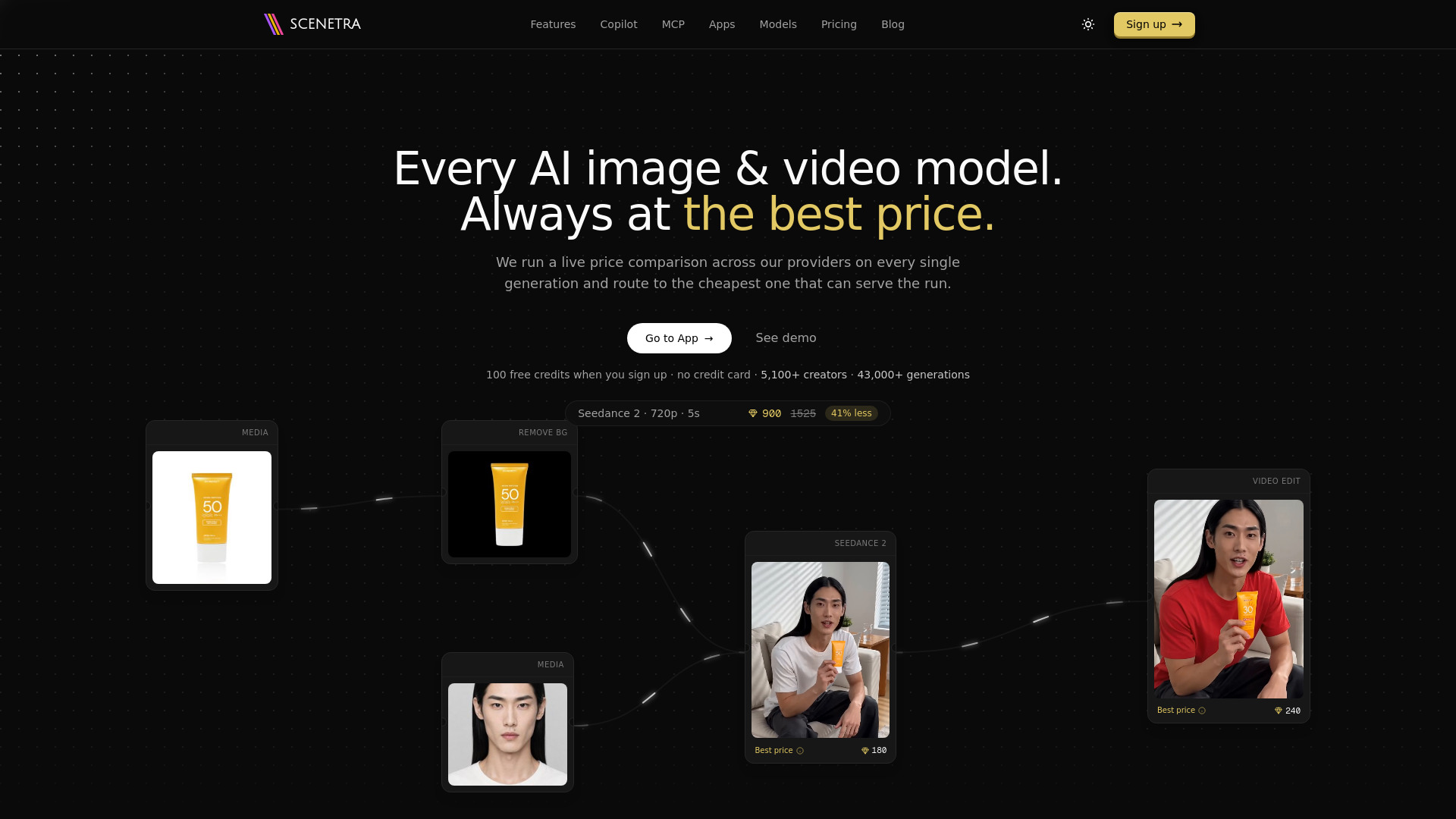
Scenetra is a visual AI workspace for generating images, videos, and audio using 50+ AI models through a node-based interface. It runs a live price comparison across 16 providers on every generation and routes to the cheapest one, billing at provider cost with 0% markup. The platform is designed to democratize generative AI by offering leading models at the best price, and it can be driven by agents via MCP (Model Context Protocol).
How to use Scenetra
- Sign up for a free account to receive 100 welcome credits (no credit card required).
- Access the visual workspace at app.scenetra.com to build node-based workflows.
- Describe what you want to generate—the Copilot can design the workflow, pick models, write prompts, and wire the board.
- Run generations; each run automatically routes to the cheapest provider that can serve it.
- Alternatively, use ready-made apps for specific tasks (e.g., product photography, fashion shoots) by uploading inputs and filling a short form.
- Connect Claude, Cursor, or any MCP agent to Scenetra to build and run boards via natural language.
Features of Scenetra
- 50+ AI models for image, video, and audio generation from providers like OpenAI, Google, Kling, ByteDance, Black Forest Labs, MiniMax, Luma, Qwen, and more.
- Best-price engine: live price auction across 16 providers on every generation, with 0% markup on usage.
- Node-based visual workflow editor for building complex generative pipelines.
- Scenetra Copilot: an AI assistant that plans workflows, selects models, writes prompts, and builds boards from natural language.
- MCP server integration for connecting AI agents (e.g., Claude Code) to build and run boards.
- Ready-made apps for tasks like product photography, fashion photoshoots, virtual try-on, UGC videos, character creation, and interior design.
- Template library and batch processing capabilities.
- API access for programmatic use.
Use Cases of Scenetra
- Product Photography: Upload a product photo and generate professional lifestyle scenes with background removal and upscaling.
- Fashion Photoshoot: Create AI-generated models wearing your garments across styled, cinematic shots.
- Virtual Try-On: See clothes on yourself by uploading a photo and up to four garments.
- UGC Videos: Turn a face photo into ready-to-post UGC-style videos with consistent AI creators.
- Character Creation: Generate consistent character reference sheets from text descriptions or face photos.
- Interior Design: Redesign a room photo in multiple interior styles at once.
- Video Generation: Create cinematic AI videos from text prompts using models like Seedance 2, Kling 4.0, and Wan 3.0.
- Agent-Driven Workflows: Use MCP to let AI agents build and execute generative workflows on your behalf.
Pricing
Scenetra offers a free tier and three subscription plans:
- Free: 100 welcome credits, no credit card required.
- Starter: $20/month for 17,400 monthly credits, models billed at provider cost with no markup.
- Plus: $45/month for 40,000 monthly credits, models billed at provider cost with no markup.
- Pro: $80/month for 72,500 monthly credits, models billed at provider cost with no markup.
All paid plans include access to 50+ models at provider cost with 0% markup.
FAQ
What is the best-price engine? Every generation runs a live price auction across 16 providers and automatically selects the cheapest one that can serve the run, ensuring you always get the best price without comparing manually.
Do I need a credit card to start? No, you get 100 free credits upon signup without a credit card.
Can I use Scenetra with AI agents? Yes, Scenetra provides an MCP server that connects to agents like Claude Code, allowing them to build and run boards programmatically.
What models are available? Scenetra offers 50+ models from major providers including OpenAI (GPT Image), Google (Nano Banana, Gemini), ByteDance (Seedance, Seedream), Kling, Black Forest Labs (FLUX), MiniMax, Alibaba (Wan), and xAI (Grok).
Is there a markup on model usage? No, all models are billed at provider cost with 0% markup.