What is Seedance 2.5 - kr
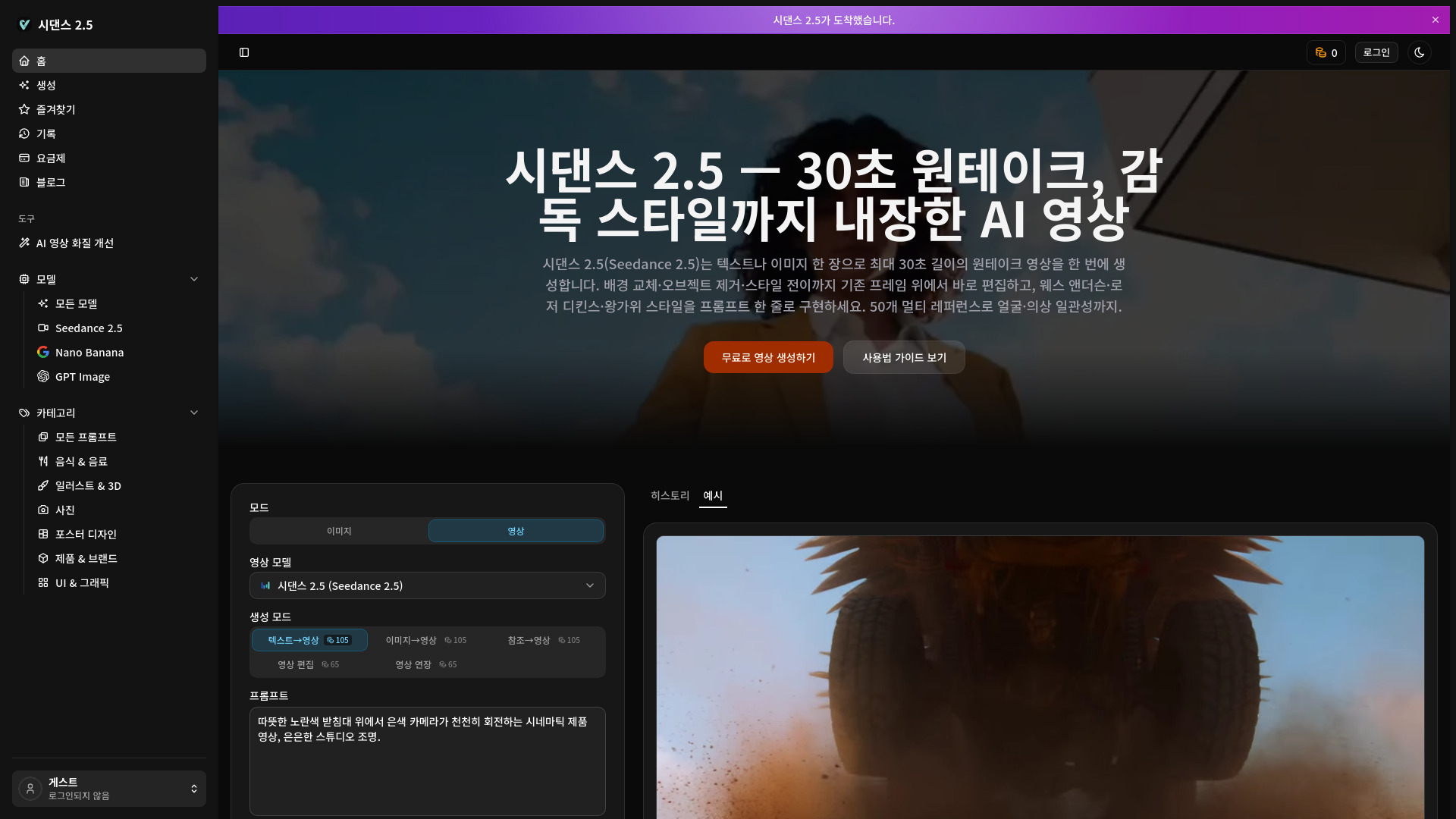
Seedance 2.5 is an AI video generation platform that creates up to 30-second videos from text prompts or images. It supports both text-to-video and image-to-video modes, and includes frame-based editing features like background replacement, object removal, and style transfer. The platform also offers multi-reference support (up to 50 references) for maintaining character and outfit consistency, and includes built-in director styles (e.g., Wes Anderson, Roger Deakins, Wong Kar-wai) for cinematic output.
How to use Seedance 2.5 - kr
- Input your prompt or reference: Describe the scene you want or upload an image. You can add up to 50 references (images, videos, audio) to lock characters, outfits, props, and scenes.
- Generate the video: Seedance 2.5 renders a video up to 30 seconds in one take. Output is in high-bitrate MP4 or MOV formats.
- Edit and export: Use frame-based editing (background replacement, object removal, style transfer) directly on existing frames, then download the final video for commercial use.
Features of Seedance 2.5 - kr
- 30-second one-take generation: Create long videos in a single pass, unlike many tools that only produce short clips.
- Text-to-video and image-to-video: Generate scenes from prompts or animate a single image.
- Multi-reference support: Use up to 50 references (images, videos, audio) to maintain consistency in faces, outfits, and props.
- Frame-based editing: Edit existing frames with background replacement, object removal, and style transfer without regenerating from scratch.
- Built-in director styles: Apply cinematic styles from famous directors with a single prompt.
- High bitrate output: Videos are rendered with 3-5x higher bitrate than previous versions, supporting MP4 and MOV formats.
- Resolution options: Currently supports 480p and 720p, with 1080p and 4K on the roadmap.
- AI audio generation: Option to generate matching sound for videos.
- Web search: Optional web search to enhance prompts.
- Commercial use: Generated videos can be used commercially.
Use Cases of Seedance 2.5 - kr
- Short dramas: Create cinematic short-form dramas without filming.
- Advertising: Produce product commercials or promotional videos.
- E-commerce: Generate outfit videos for online stores.
- Contest submissions: Create videos for competitions.
- Short-form content: Make engaging short videos for social media.
FAQ
What can I create with Seedance 2.5? You can create up to 30-second videos from text or images, with frame-based editing for background replacement, object removal, and style transfer. It's suitable for short dramas, ads, e-commerce videos, contest entries, and short-form content.
Is it free to use? Yes, new accounts receive free credits to try video generation. No credit card is required to start. Paid plans offer more credits and priority processing.
Can I create videos from text only? Yes, both text-to-video and image-to-video are supported. You can also use up to 50 references for consistency.
How is it different from other AI video tools? Seedance 2.5 generates 30-second one-take videos in a single pass, supports 50 multi-references for consistency, and offers frame-based editing without full regeneration. It also includes built-in director styles.
What are the pricing plans? There is a free plan with credits. Paid plans start at $19.80 per month, offering more credits, priority processing, and higher resolutions.
Are there limits on the number of videos I can generate? Limits depend on your credit balance. Free accounts get credits on signup, and paid plans receive monthly credits with rollover in most plans.
What resolutions and lengths are supported? Currently 480p and 720p, with up to 30 seconds per video. 1080p and 4K are planned. Output is high-bitrate MP4 or MOV.
Is my data private? Yes, uploaded references and generated results are kept private in your account. Your content is not used to train models.
How do I cancel my subscription? Go to the billing management page, click "Manage Subscription," and select cancel in the Stripe customer portal. Auto-renewal stops after the current period.
How do I request a refund? Refunds are supported within 3 days of payment. Email support@seedance25.kr to request one.