What is stivio ai
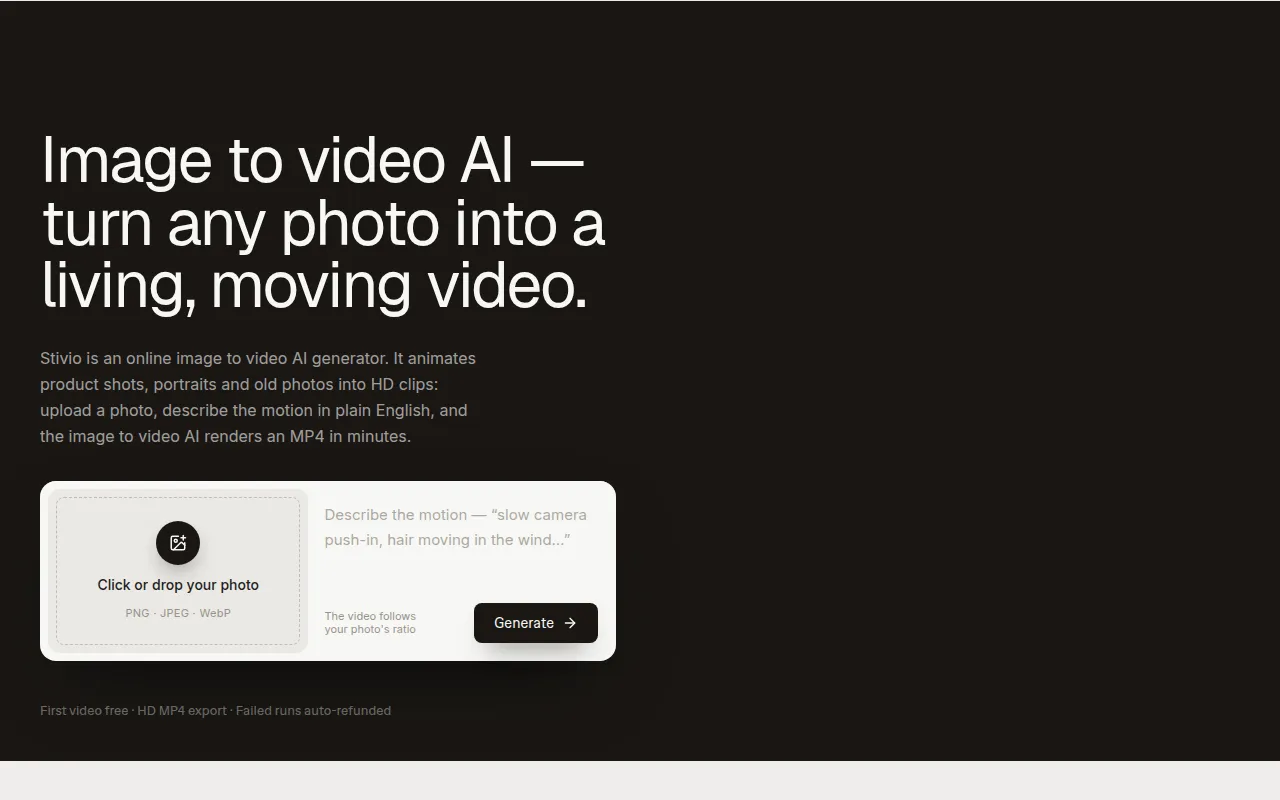
Stivio is an online image to video AI generator that transforms static images into dynamic HD MP4 clips. It allows users to upload a photo, describe the desired motion in plain English, and have the AI generate a video.
How to use stivio ai
- Upload a Photo: Drag and drop or click to upload an image (PNG, JPEG, WebP up to 10 MB). This image will serve as the first frame of the video.
- Describe the Motion: In the provided text area, describe the desired movement, camera actions, and mood in a sentence. For example, "slow camera push-in, hair moving in the wind…".
- Generate and Download: Click the 'Generate' button. The AI will process the request and render an HD MP4 video clip, typically within 1-5 minutes. The finished video can be previewed and downloaded.
Features of stivio ai
- Any Photo Input: Supports PNG, JPEG, and WebP formats up to 10 MB.
- Plain-English Prompts: Animate images by describing motion in simple text.
- Variable Clip Length: Generates clips ranging from 3 to 30 seconds.
- HD MP4 Output: Downloads videos in High Definition MP4 format.
- Watermark-Free on Paid Plans: Free videos may have a watermark, removed on paid plans.
- Persistent Share Links: Generated videos are stored on a CDN with a stable link for one year.
- Privacy Focused: Uploads, prompts, and generated videos are private by default and not used for training or shared.
- Multiple AI Models: Integrates six leading AI video models, including Kling, Seedance, and Wan.
Use Cases of stivio ai
- E-commerce: Turn product shots into engaging videos for listings and ads.
- Creators & Marketers: Generate B-roll, intros, and social media clips (Reels, TikTok) from still images.
- Personal Use: Animate old photos, portraits, and travel shots to bring memories to life.
Pricing
- Free Tier: Offers 10 free credits upon signup, sufficient for one 5-second video with a watermark.
- Pro Plan: Starts at $19/month, includes 200 credits (up to 20 videos per month), and removes watermarks.
- Team Plan: Priced at $59/month, includes 800 credits (up to 80 videos per month) and email support.
- Credit System: Credits are charged per second of video. Standard models cost 2 credits/second, while premium models may cost more. The exact price is displayed before generation.
- One-time Packs: Credits can be purchased in one-time packs that never expire.
- Monthly/Yearly Plans: Monthly credits reset each cycle; yearly plans grant credits upfront that do not expire.
FAQ
- What is Stivio's image to video AI? It's an AI generator that converts a single photo and a motion description into an HD MP4 video clip (3-30 seconds), utilizing models like Kling, Seedance, and Wan. Google sign-in is required, and signup includes 10 free credits for a first video.
- Is there a free image to video AI generator? Yes, signing up provides 10 free credits for a cost-free video. Free videos include a small watermark, which is removed on paid plans.
- Which AI model is best for image to video? Stivio offers six models. Kling, Wan, and MiniMax are standard (2 credits/sec), while Seedance is a cinematic option for longer storytelling (up to 30 seconds). Model choice affects price, which is shown before generation.
- How long does the image to video AI take? Typically 1-5 minutes, depending on queue load and clip length. Finished videos appear in the dashboard history.
- What does image to video conversion cost? Credits are charged per second. Standard models cost 2 credits/sec (e.g., 10 credits for a 5-sec clip). Premium models like Seedance may cost more. The price is shown before generation, and failed runs are automatically refunded.
- Do unused credits roll over? Monthly plan credits reset. One-time top-up credits and yearly plan credits never expire.
- What if I run out of credits? You can purchase one-time top-up packs or upgrade your plan.
- What is your refund policy? Failed generations are refunded in credits. Unused credit packs can be refunded within 14 days. No hidden fees.
- Do I own the videos? Can I use them commercially? Paid plans grant full personal and commercial use rights.
- Do you train AI models on my photos? No, uploads, prompts, and videos are private and not used for training or shared for advertising. They are only sent to AI providers for rendering.