What is Video Upscaler - 1
Video Upscaler - 1 is an AI-powered tool designed to enhance and upscale MP4 videos. It improves clarity and enlarges videos up to 4x, offering both a fast browser preview and a high-quality cloud enhancement option.
How to use Video Upscaler - 1
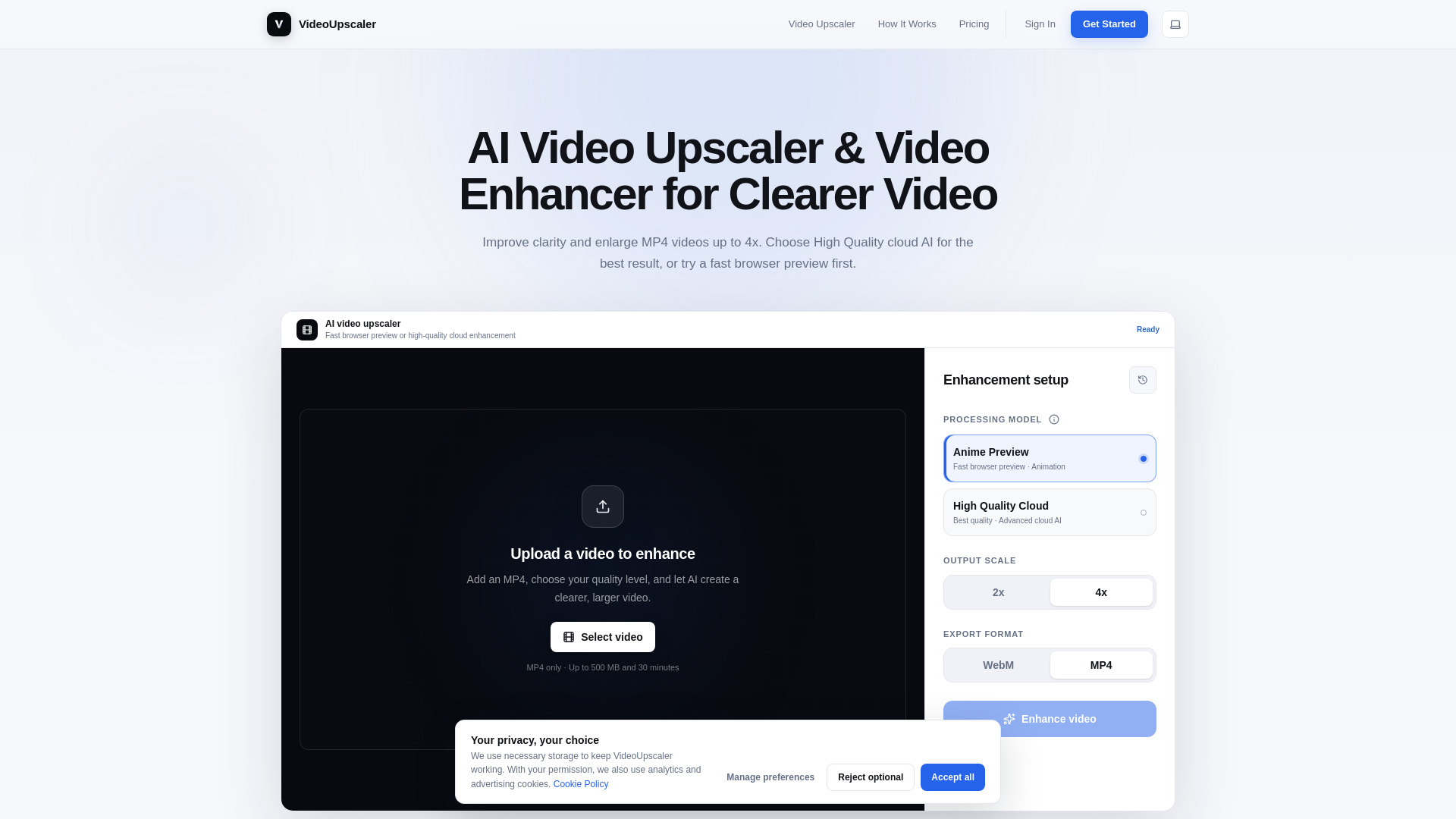
- Upload your video: Choose an MP4 file up to 500 MB and 30 minutes long. You can also trim the video if you only need to enhance a specific part.
- Choose your quality: Select either 'Anime Preview' for a fast browser-based preview (ideal for animated content) or 'High Quality Cloud' for the best possible result using advanced cloud AI.
- Select output scale: Choose between 2x or 4x enlargement depending on your needs.
- Download the result: Once processing is complete, preview and download your enhanced video as an MP4 file.
Features of Video Upscaler - 1
- AI-powered upscaling: Enlarge videos up to 4x while improving clarity and detail.
- Two processing models:
- Anime Preview: Fast, browser-based preview that runs locally on your device, ideal for testing animated videos without uploading.
- High Quality Cloud: Advanced cloud AI processing for the highest quality output, recommended for final results.
- Privacy: Browser previews keep your source video on your device; cloud processing uploads securely.
- File support: MP4 format, up to 500 MB and 30 minutes in length.
- Trimming: Ability to trim videos before enhancement.
- Export options: Download as MP4 (or WebM for browser previews).
- History: Access completed cloud enhancements from your history.
Use Cases of Video Upscaler - 1
- Anime & animation: Enhance lines, faces, and animated details for a clearer, larger result.
- Old recordings: Upscale older, low-resolution clips for better viewing on modern screens.
- Outdoor footage: Improve visible detail in landscapes, people, skies, and distant subjects.
- Sports & fast motion: Make players, subjects, and scene details easier to see in action footage.
Pricing
Pricing information is not explicitly detailed on the page, but the tool offers a free tier (as indicated by the price of $0 in the schema) and mentions credits for cloud processing. Users can sign in to access cloud features and manage credits.
FAQ
What does an AI video upscaler and video enhancer do? An AI video upscaler enlarges a video while a video enhancer improves visible clarity and detail. This tool combines both: choose 2x or 4x enlargement and use High Quality cloud AI for the strongest enhancement.
Which model gives the best video quality? High Quality Cloud is the recommended model for the best result. It uses more advanced AI processing than the browser previews, so it takes longer and uses credits, but it provides the highest available quality.
Is Anime Preview the final result? No. They are fast, convenient previews that run in your browser and help you test a video without signing in. For a more detailed final result, choose High Quality Cloud.
Is my video uploaded when I use a browser preview? No. Anime Preview runs on your device, so the source video is not uploaded. High Quality Cloud uploads the video securely because the enhancement is completed online.
Which video files can I upscale? You can upload an MP4 video up to 500 MB and 30 minutes long. You can also trim the video before enhancement if you only need a shorter section.
Should I choose 2x or 4x video upscaling? Choose 2x for a moderate size increase and 4x when you need a much larger video. The best choice depends on the original resolution and where you plan to watch or share the result.