What is Zush
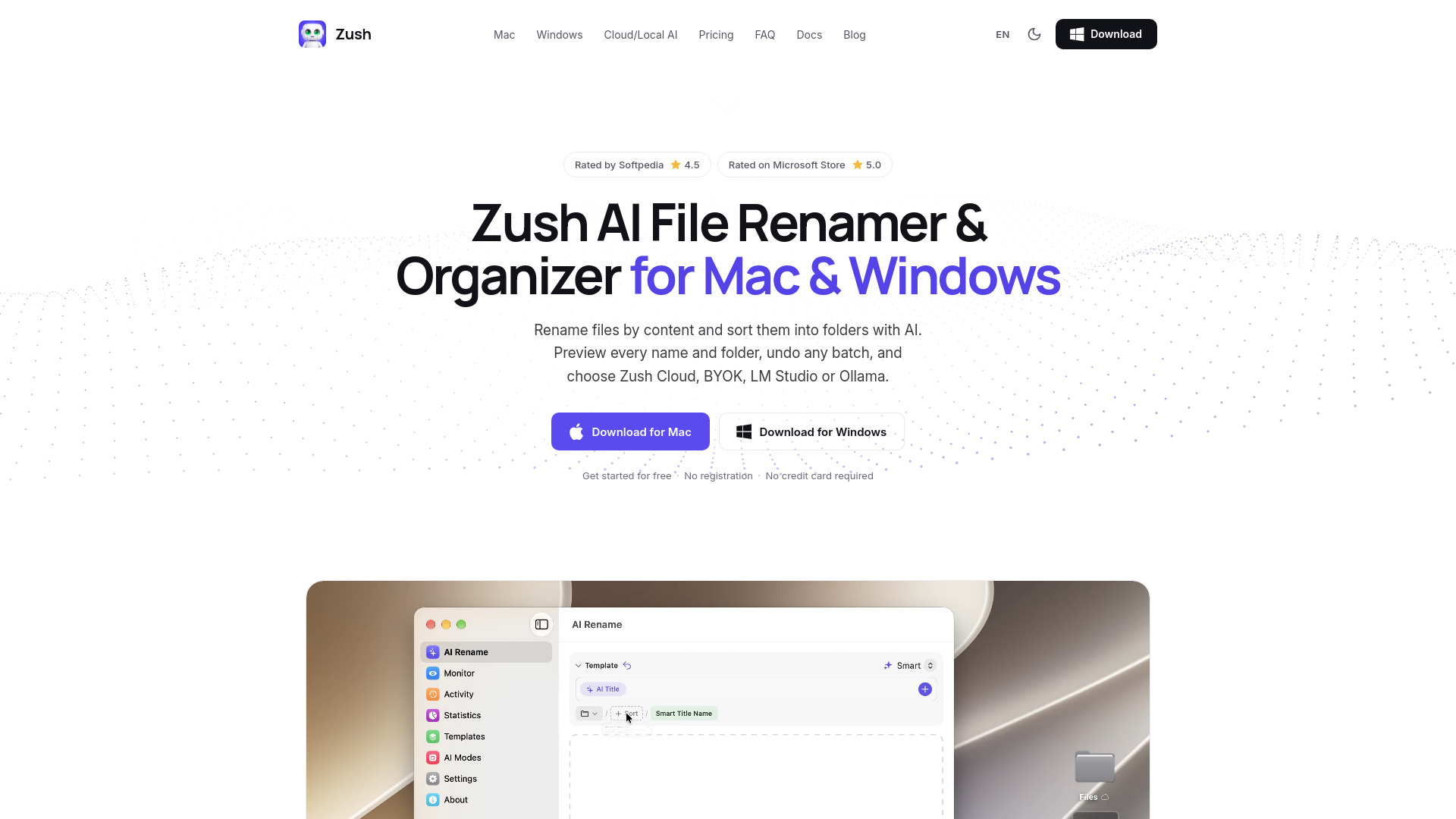
Zush is an AI file renamer and organizer for Mac and Windows. It names files in 107 formats from their content, metadata, and your rules — review, batch rename, or undo anytime. Templates and folder monitoring automate repeat work, on Cloud AI or Local AI.
How to use Zush
- Add your files: Documents, photos, video and audio.
- Build the name: Set your rules with Naming Blocks.
- Review & rename: Preview first, optionally sort into folders, undo when needed.
Features of Zush
- Smart Batch Rename: Analyze and rename 100+ file formats in one batch, from images, EPUB and FB2 ebooks, and PDFs to audio, video, and Office files. Describe any detail for Zush to extract, then reuse it as a Custom AI Block in any template.
- Sort files into folders with AI: AI groups files by content and names the folders — or write your own rule, like “Group invoices by company and receipts by month.” You review every move before applying it.
- Folders Monitoring: Watch one or multiple folders — including iCloud Drive, Google Drive, Dropbox, and OneDrive folders. Zush runs in the background and processes new files automatically.
- Templates: Save reusable rename setups for screenshots, expenses, music tracks, client work, legal files, travel bookings, and monitored folders.
- Naming Blocks: Build consistent filenames from 145+ blocks covering dates, file metadata, audio, photos, finance, legal, travel, clients, and AI-detected fields.
- Custom AI Prompts: Set rename, tagging, and metadata rules so AI output follows your style and workflow.
- Smart Metadata: Automatically add Finder tags and Spotlight metadata. Find files instantly with natural search queries.
- Rename History: Keep track of every change. Made a mistake? Rollback to the original filename with one click.
- Duplicate Detection: Zush compares file contents in every batch and labels exact copies, whatever they are called. Keep them, mark them in the filename, or move them to the Trash as you rename. Copies are never sent to AI, so they use no credits, and Undo puts trashed copies back.
Use Cases of Zush
- Accountants & bookkeepers: Invoices, receipts, and statements named by vendor, date, number, and amount — ready for reconciliation.
- Medical practices: Scanned records named by identifier, date of service, and record type — with a local AI mode, so files never leave the machine.
- Law firms & legal teams: Filings, contracts, and correspondence named by matter, date, type, and party — the folder reads as the case chronology.
- HR & people teams: Candidate, onboarding, review, and policy files named by employee, date, type, role, period, and status.
- Photographers & videographers: RAW photos, clips, and exports named by project, date, subject, scene, and take — from ingest to archive.
- Real estate teams: Agreements, disclosures, inspections, appraisals, and property photos named by address, date, type, party, and status.
- Rename screenshots: "Screenshot 2026-07-03" becomes a name that says what’s on screen.
- Rename PDFs & scans: Invoices, contracts, and scans named by the text inside the document.
- Rename photos: RAW, HEIC, and JPG named by subject and scene.
- Rename documents and ebooks: EPUB, FB2, Word, Excel, PowerPoint, and iWork files named by topic.
- Organize files with AI: Clean up Downloads and mixed folders with searchable names.
Pricing
Zush offers a free tier with 50 renames across all modes. PRO is available as a one-time purchase, with a Black Friday promotion of 25% off using code ZUSH25. PRO includes unlimited renames.
FAQ
What AI options does Zush offer?
Zush offers Cloud AI (via a relay to a commercial AI provider), Bring Your Own Key (connect your own API key from Gemini, OpenRouter, OpenAI, or Claude), and Private Local AI options (LM Studio or Ollama) that work offline after setup.
Can I undo changes?
Yes, every rename or move can be undone. Rename History lets you rollback to the original filename with one click.
Does Zush work offline?
Yes, with Local AI options (LM Studio or Ollama), supported analysis stays on your device and works offline after setup.
What file formats are supported?
Zush supports 107 file formats, including images, EPUB and FB2 ebooks, PDFs, audio, video, and Office files.
How does duplicate detection work?
Zush compares file contents in every batch and labels exact copies. You can keep them, mark them in the filename, or move them to the Trash as you rename. Copies are never sent to AI, so they use no credits, and Undo puts trashed copies back.