LogoTop AI Hubs
Logo of AI Clothes Changer-1

AI Clothes Changer-1

AI virtual try-on tool for realistic outfit changes.

Introduction

What is AI Clothes Changer-1

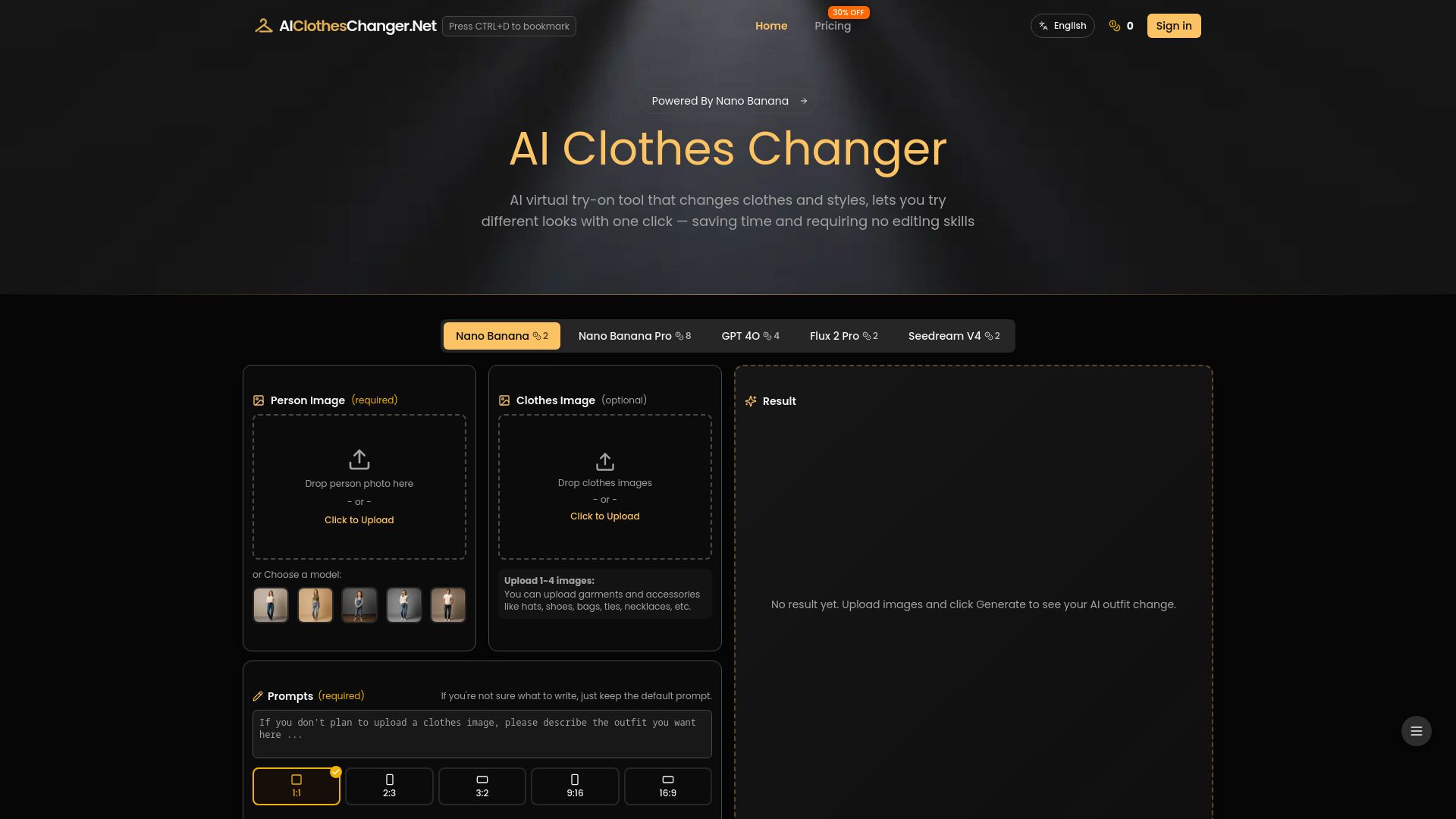
AI Clothes Changer is a virtual try-on tool that utilizes AI to realistically change outfits in photos with a single click. It aims to save time and eliminate the need for editing skills, allowing users to experiment with different looks, update wardrobe visuals, or create product photos for e-commerce.

How to use AI Clothes Changer-1
  1. Upload or Choose a Model Photo: Start by uploading your own photo or selecting an official model from the library. This image serves as the base for outfit changes.
  2. Upload Clothing Items: Add your clothing images or accessories. Multiple items can be uploaded at once.
  3. Generate and Download Outfits: The AI Virtual Try-On will automatically apply the clothing to the model photo. Once generated, you can download and share your outfit, or adjust prompts to explore new styles.
Features of AI Clothes Changer-1
  • Supports multiple AI models including Nano Banana (Pro), GPT-4O, Flux, and Seedream.
  • Allows DIY outfit creation with editable prompts for styling, scenes, and details.
  • Enables uploading multiple clothing items and accessories.
  • Generates realistic and natural-looking outfit changes.
  • Offers flexibility in controlling poses, lighting, and backgrounds.
  • Saves recently generated images for 14 days for easy access and comparison.
  • Compatible with mobile devices (iPhone/Android).
  • Commercial rights included for Pro users.
Use Cases of AI Clothes Changer-1
  • E-commerce Sellers: Quickly showcase multiple outfits on models or product images for platforms like Amazon, SHEIN, Shopify, eBay, and more.
  • Fashion Enthusiasts: Experiment with different looks and styles without needing to try on clothes physically.
  • Content Creators: Generate fashion-related content for social media and blogs.
  • Personal Styling: Visualize new outfit combinations and update personal wardrobe visuals.
Pricing

AI Clothes Changer offers a tiered pricing structure:

Free Plan:

  • 3 Credits
  • Up to 1 high-quality image
  • NO Commercial License
  • NO Ads-Free Experience
  • NO Faster Generation Speed

Basic Plan:

  • $8/month (billed yearly at $96/year)
  • 2,400 Credits per year
  • Up to 1,200 high-quality images
  • Commercial License
  • Ads-Free Experience
  • Faster Generation Speed
  • 20% OFF (badge indicates this offer)

Standard Plan (Best Value):

  • $28/month (billed yearly at $336/year)
  • 9,600 Credits per year
  • Up to 4,800 high-quality images
  • Commercial License
  • Ads-Free Experience
  • Faster Generation Speed
  • 30% OFF (badge indicates this offer)

Note: Unused credits roll over. A one-time payment option is also available with a 30% discount.
FAQ
  • Can I download the outfits generated by AI Clothes Changer? Yes, generated images can be downloaded once the clothing replacement is complete.
  • Can I use the generated images for product listings on Amazon, SHEIN, or other e-commerce platforms? Yes, the tool is suitable for e-commerce product images on various platforms.
  • Is my uploaded photo safe when using AI Clothes Changer? Uploaded photos are used only for AI outfit generation and are not stored, analyzed, or published. Generated images are saved for 14 days on servers and 30 days in the browser, then automatically deleted.
  • What file format does AI Clothes Changer support? Common image formats including JPG, PNG, WEBP, and HEIC files are accepted.
  • Can I use AI Clothes Changer on iPhone/Android? Yes, it is compatible with mobile devices.
  • Is AI Clothes Changer free? New users receive one free trial. Additional credits can be earned through daily check-ins or by purchasing plans. The Free plan offers 3 credits.
  • What clothing items can be swapped with the AI? Most common garment types including tops, dresses, pants, skirts, and outerwear can be handled.
  • Can I change clothes in group photos? The tool works best with individual photos. For group photos, it's recommended to use photos with a single person with a clear view of their body. An accurate description in the prompt might help for single individuals in group shots.
  • Can I use the generated images commercially? Commercial rights are included for Pro users.
  • Can I change outfits for a person using only a description? Yes, you can upload a person's photo and use prompts to change their outfit.
  • How many outfit changes can I generate using the virtual try-on tool? The number of outfit changes depends on the available credits on your subscription plan.

Newsletter

Join the Community

Subscribe to our newsletter for the latest news and updates