What is AI Image to Video - 1
AI Image to Video - 1 is a free AI tool that converts static images into high-quality videos. It supports multiple leading AI models, allowing users to transform photos into dynamic video content with natural motion, camera movement, subject animation, and environmental effects.
How to use AI Image to Video - 1
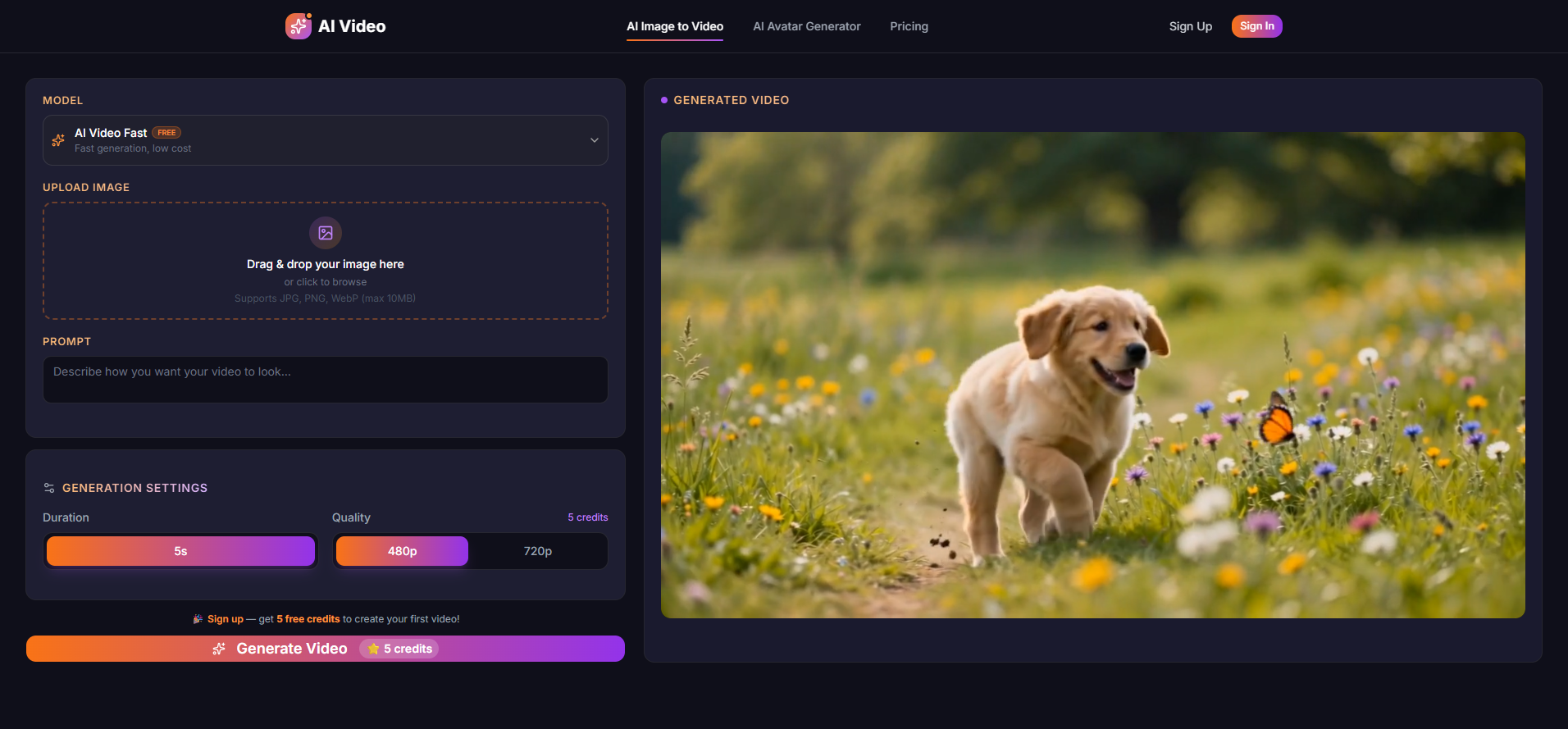
- Upload Image: Drag and drop or click to upload any image. Supports JPG, PNG, and WebP formats (max 10MB).
- Describe Your Vision: Optionally, write a text prompt describing how you want your video to look, including motion, style, or scene details.
- Generate Video: Select a model (e.g., Veo, Kling, Runway, Hailuo, Wan), duration (e.g., 5s), and quality (e.g., 480p, 720p). Click "Generate Video" to create your video.
- Download: Download your generated video in MP4 format.
Features of AI Image to Video - 1
- Multi-Model Support: Choose from leading AI models like Veo, Kling, Runway, Hailuo, and Wan, each offering unique motion styles.
- Free Credits on Signup: Get 5 free credits upon account creation to start generating videos.
- HD Video Output: Generate videos in resolutions up to 1080p.
- Fast Generation: Videos are typically generated within 30 to 120 seconds.
- Commercial Use Rights: All generated videos include commercial usage rights.
- Text + Image Input: Combine image uploads with text prompts for precise creative control.
- No Watermark on Paid Plans: Free plan videos may have a watermark; paid plans remove it.
Use Cases of AI Image to Video - 1
- Social Media Content: Create engaging short-form video clips for platforms like Instagram Reels, TikTok, and YouTube Shorts.
- Marketing Videos: Produce dynamic ad creatives and promotional videos from product images.
- Product Demos: Animate product images for e-commerce listings, landing pages, and pitch decks.
- Art & Animation: Transform artwork and designs into animated videos for portfolios and creative experimentation.
- Educational Content: Animate diagrams and illustrations for animated explanations.
- Storytelling: Create visual narratives by animating scenes from storyboards or concept art.
Pricing
- Offers 5 free credits on signup.
- Paid plans start at $4.99/month.
FAQ
- What is an AI image to video generator? It's a tool that uses AI to transform static images into dynamic video content with natural motion.
- Is it free to use? Yes, with 5 free credits on signup. Paid plans are available starting at $4.99/month.
- Do I need to create an account? Yes, creating a free account provides access to video generation and free credits.
- What AI models are supported? Veo, Kling, Runway, Hailuo, and Wan.
- What video resolutions are available? Up to 1080p HD.
- How long does it take to generate a video? Typically 30 to 120 seconds, depending on length, resolution, and model.
- Can I use the generated videos commercially? Yes, all generated videos include commercial usage rights.
- Can I generate video from text only? Yes, text-to-video generation is also supported.
- Do the generated videos have watermarks? Free plan videos may have a watermark; paid plans do not.
- Is there an API for developers? Yes, a developer API is available. Contact for access and pricing.
- What languages are supported? Text prompts support multiple languages, including English, Chinese, Japanese, Korean, Spanish, and French. The interface is in English.
- How to turn a photo into a video with AI? Upload your photo, optionally add a text prompt, choose a model, and generate. The AI creates the video animation.
- How to turn images into video for free? Use the free AI image to video generator, upload an image, select a model, and generate. New accounts receive 5 free credits.
- Can I turn pictures into video with AI? Yes, the tool supports photo to video, picture to video, and image to video conversion using leading AI models.
- What video formats are supported for image to video? Generated videos are in MP4 format. Input images can be JPG, PNG, or WebP.