What is AI Photo Editor - 2
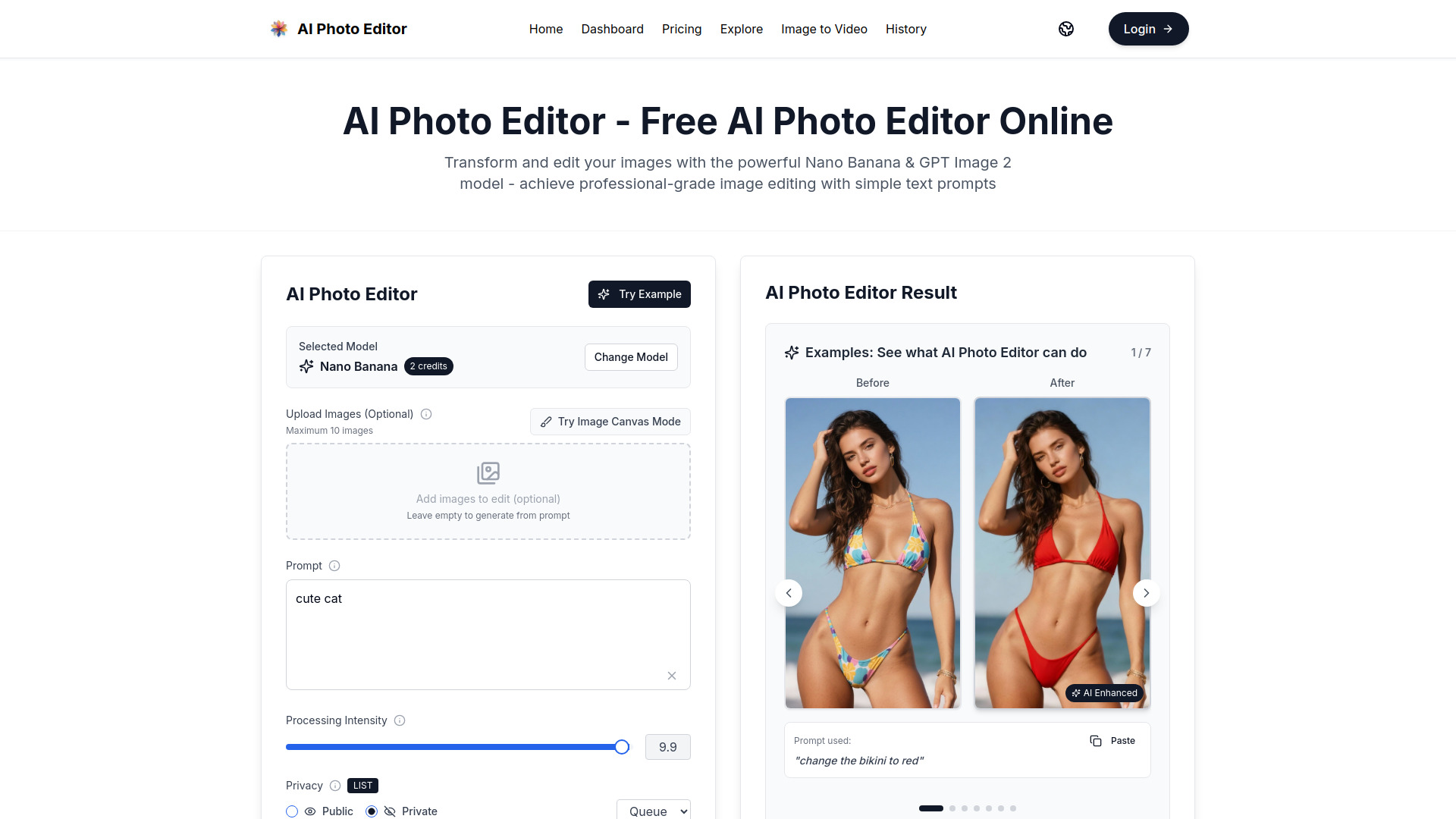
AI Photo Editor is a free online tool that uses advanced AI models like Nano Banana and GPT Image 2 to edit and generate images through simple text prompts. It allows users to transform photos, change elements, restore old images, and create new visuals without needing complex editing skills.
How to use AI Photo Editor - 2
- Access the tool: Go to the AI Photo Editor website.
- Upload images (optional): You can upload up to 10 images to edit, or leave it empty to generate from a prompt.
- Enter a prompt: Type a description of what you want to do, such as "change the bikini to red" or "make the image more vibrant".
- Adjust settings: Choose the processing intensity, privacy (public or private), resolution, and aspect ratio.
- Generate: Click the "Generate Image" button. The tool uses credits (e.g., 2 credits per generation) and produces an edited or generated image.
Features of AI Photo Editor - 2
- AI-powered editing: Uses Nano Banana and GPT Image 2 models for professional-grade results.
- Text-based prompts: Edit or generate images by simply describing what you want.
- Image upload: Supports up to 10 images for editing.
- Customizable settings: Adjust processing intensity, privacy, resolution, and aspect ratio.
- Examples gallery: View before-and-after examples to see what the tool can do.
- No sign-up required: The tool is free to use without registration.
Use Cases of AI Photo Editor - 2
- Photo enhancement: Improve colors, lighting, and details.
- Object changes: Change elements like hair color, clothing, or backgrounds.
- Style transfer: Reimagine photos in artistic styles like Van Gogh's "Starry Night".
- Restoration: Repair and colorize old or damaged photos.
- Creative generation: Create new images from scratch based on prompts.
- Product visualization: Transform subjects into collectible figures or LEGO minifigures.
Pricing
AI Photo Editor offers a free tier with credits. For more usage, there are subscription plans:
- Standard: $15.9/month billed annually ($190.8/year) for 6000 credits/year.
- Special Offer Yearly: $100/month billed annually ($1200/year) for unlimited usage, limited to 100 people.
- Payment methods include Stripe, Clink, and cryptocurrency.
FAQ
Do I need to sign up to use AI Photo Editor? No, the tool is free to use without sign-up.
How many images can I upload at once? You can upload up to 10 images.
What AI models are used? The tool uses Nano Banana and GPT Image 2 models.
Can I use the images commercially? Yes, commercial usage rights are included in the Standard plan.
What are credits? Credits are used for each generation. For example, the Nano Banana model costs 2 credits per use.