What is AIChangeHair
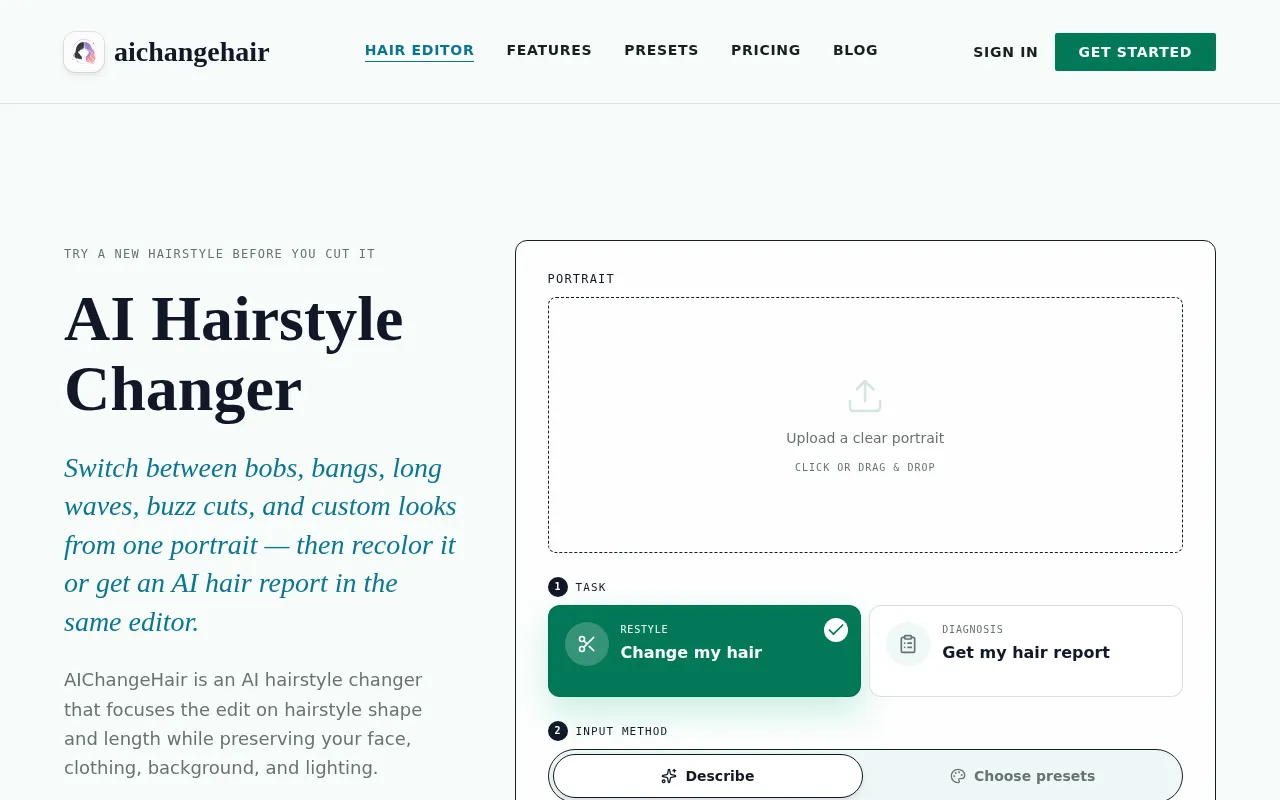
AIChangeHair is an AI-powered tool that lets you preview realistic hair color and hairstyle changes from a single portrait. It focuses edits on hairstyle shape, length, and color while preserving your face, clothing, background, and lighting.
How to use AIChangeHair
- Upload Your Portrait: Drag and drop or upload a clear portrait with visible hair, good lighting, and a front-facing or three-quarter angle.
- Choose the Hair Edit: Pick a hair color, try a hairstyle preset from 180 options, or describe a custom look using a text prompt. You can also generate an AI hair report for face-shape-aware style guidance.
- Generate and Download: Preview the result, download the image, copy the link, or start a new hair edit from your gallery.
Features of AIChangeHair
- Custom Prompt Editor: Type a specific hair request (e.g., "glossy copper bob with soft curtain bangs") and the editor keeps the focus on hair while preserving identity, clothing, lighting, and background.
- 180 Hairstyle Presets: Browse female, male, and children hairstyle references including bobs, pixie cuts, bangs, long waves, braids, buns, buzz cuts, fades, and more.
- Color Controls: Keep the current color, choose a preset shade, or pass a custom HEX color to combine with a selected style.
- AI Hair Report: Generate a visual consultation that studies your face shape and features, then recommends one flattering hairstyle and color shown front, side, and back. Each report is different.
- Multiple Resolutions: Choose from 1K, 2K, or 4K output quality.
- Face-Preserving Edits: The AI edits only the hair while keeping your face, pose, clothing, background, and lighting natural.
Use Cases of AIChangeHair
- Try new hairstyles before cutting: Preview bobs, bangs, waves, pixie cuts, buzz cuts, and more from a single selfie.
- Experiment with hair colors: Test blonde, copper, raven black, rose pink, turquoise, silver, or custom colors.
- Salon consultation: Show clients realistic previews of potential hairstyles and colors.
- Profile refreshes: Update your social media or dating profile pictures with a new look.
- Content creation: Generate hair previews for portfolios, creative projects, or social posts.
Pricing
- Starter (Free): 20 free credits on signup + 20 every day you claim. 1K edits cost 10 credits, 2K cost 16, 4K cost 24. Includes custom prompts, color palette, 180 hairstyle presets, and AI hair reports.
- Pro ($14.99/month): 2,000 credits every month. All resolutions available. Monthly refill for regular creator, salon, and profile refresh workflows.
- Studio ($34.99/month): Unlimited 1K hair edits, plus 4,000 high-res credits per month for 2K, 4K, and AI hair reports. No daily credit counting.
- Lifetime ($200 one-time): 60,000 credits that never expire. Includes all features. Limited time 50% off from $400.
- One-Time Credit Packs: Starter pack ($9.90 for 1,000 credits), Value pack ($19.90 for 2,000 credits), Bulk pack ($39.90 for 4,000 credits).
FAQ
How does the AI hairstyle changer work?
Upload a clear portrait, choose a hairstyle, a hair color, or both, and AIChangeHair builds a focused prompt that edits the hair while preserving your face, pose, clothing, background, lighting, and photo realism.
Is the AI hairstyle changer free to use online?
Yes — the free version gives you 20 credits at sign-up with no credit card, plus 20 more every day you check in. A standard hair edit costs 10 credits.
Is my data safe when I upload photos?
Yes. Uploads are encrypted in transit and at rest, used only to generate your result, and never used to train public models. You can delete your generations and source photos from your gallery at any time.
Can I use the AI hairstyle changer online on my phone?
Yes — it runs entirely in your mobile browser on iOS Safari and Android Chrome, with no app to install.
Can I try hairstyles as well as hair colors?
Yes. You can keep the current style, keep the current color, combine a hairstyle with a new color, write a custom hair prompt, or generate an AI hair report.
What kind of photos work best?
Clear, well-lit portraits with visible hair work best. Front-facing or three-quarter angles give the most natural result. Avoid hats, heavy shadows, and cropped hair.
How long does a hair edit take?
Most edits finish in about 1 to 2 minutes. Failed generations are refunded automatically.
Can I share or sell the results?
Yes. You can use generated hair previews for social posts, salon consultation mockups, profile previews, portfolios, or creative projects, as long as you have the rights to the uploaded photo.