What is CastReader
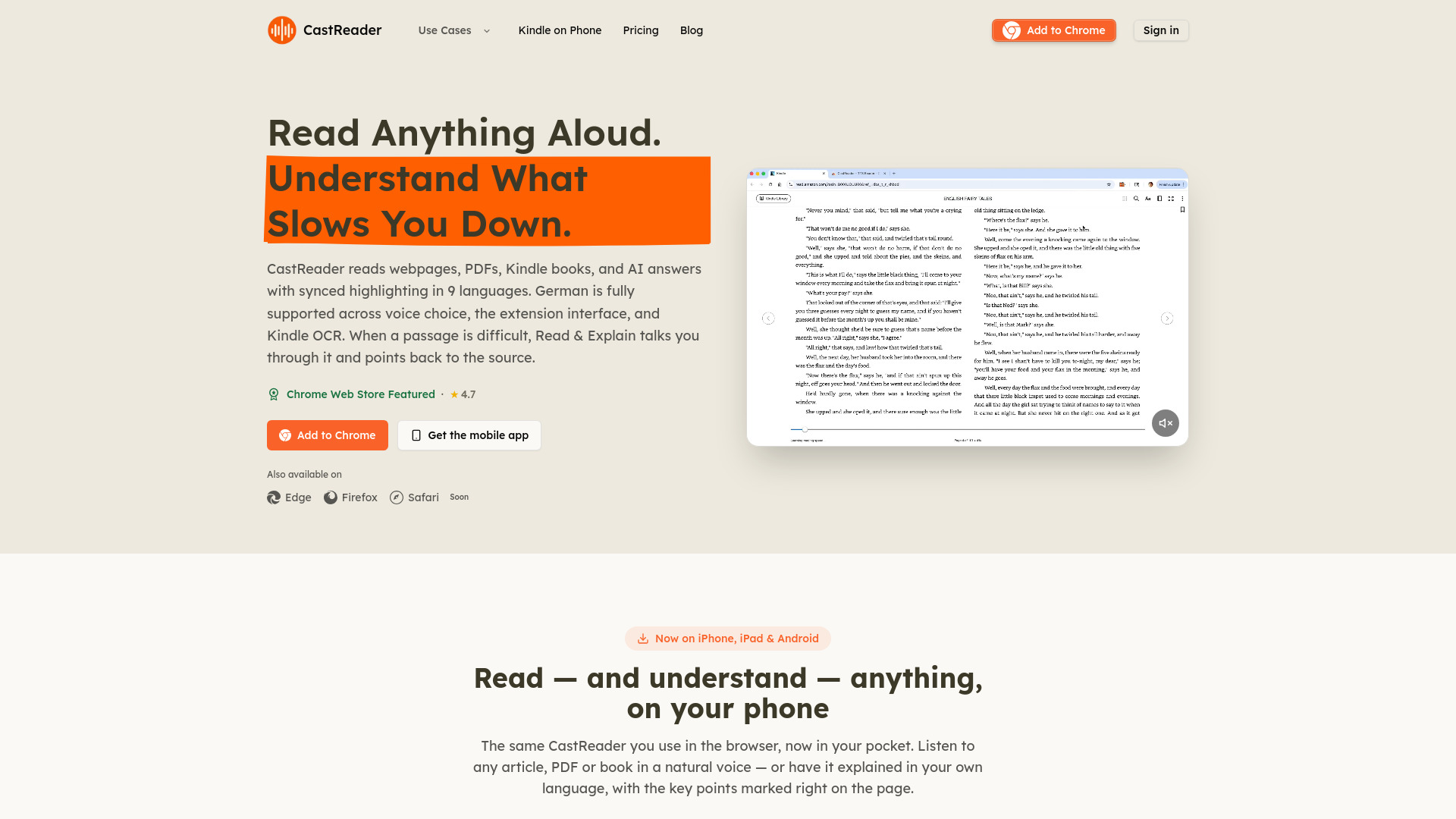
CastReader is an independent read-aloud and reading-explanation service that works across mobile, browser, and document workflows. It reads webpages, PDFs, Kindle books, and AI answers aloud with synchronized highlighting in 9 languages. It also offers a Read & Explain feature that talks you through difficult passages while keeping the source visible.
How to use CastReader
- Browser Extension: Install the CastReader extension for Chrome, Edge, or Firefox. When you're on a supported webpage, PDF, Google Docs, or AI platform like ChatGPT or Claude, click the CastReader icon and press play to hear the content read aloud.
- Mobile App: Download the CastReader app from the App Store (iPhone/iPad) or Google Play (Android). Open the app, import or select a document, PDF, or Kindle book, and tap Read Aloud to start listening.
- Read & Explain: When you encounter a difficult passage, use the Read & Explain feature. It provides spoken guidance, subtitles, and pen-style marks to highlight key points in the original text.
Features of CastReader
- Read Aloud: Speaks the source text as written with synchronized highlighting.
- Read & Explain: Provides spoken explanations, subtitles, and pen marks to clarify difficult passages.
- Multi-Platform Support: Available as a browser extension (Chrome, Edge, Firefox) and native mobile apps (iOS, Android).
- Kindle Integration: Reads Kindle books on phone and browser (Kindle Cloud Reader) with auto page-turning and background playback.
- AI Answer Reading: Adds a Listen action to individual responses on ChatGPT, Claude, Gemini, and other AI platforms.
- Voice Hub: Preview and compare real voice samples across languages and choose a voice for books, study, PDFs, or webpages.
- Smart Extraction: Strips ads, navigation, and sidebars from articles for a clean reading experience.
- Cross-Language Explanation: Keep a foreign-language source visible while hearing an explanation in your preferred language.
- Background Playback: Continue listening with the screen off on mobile.
Use Cases of CastReader
- Long Articles: Listen to long-form articles like a podcast while cooking, commuting, or resting your eyes.
- Kindle Books: Listen to Kindle books on your phone with synced highlighting and resume progress.
- AI Answers: Hear individual responses from ChatGPT, Claude, or Gemini without replaying the whole conversation.
- Google Docs: Read Google Docs aloud when the built-in read-aloud isn't working.
- Foreign-Language Content: Have foreign-language news or research papers explained in your own language.
- Study and Research: Use Read & Explain to unpack dense academic papers, technical docs, or step-by-step guides.
Pricing
CastReader offers a free tier for the browser extensions and mobile apps. An email login is required to purchase or manage Pro, which synchronizes your Pro entitlement across platforms. The Voice Hub labels voices as Free or Pro, and Pro plans are available for purchase.
FAQ
What can CastReader read aloud? CastReader can read webpages, PDFs, pasted text, Google Docs, AI answers, and text in supported services like Kindle Cloud Reader. The mobile apps handle Kindle-focused listening, PDFs, EPUBs, URLs, images, and pasted text.
Does the browser extension work on every website? It works on most text-based pages, including articles, Google Docs, browser PDFs, Claude, ChatGPT, and Kindle Cloud Reader. Pages built entirely with canvas or restricted embedded viewers may require a different workflow.
Is the browser extension free, and do I need an account? The Chrome, Edge, and Firefox extensions have a free tier, and you can start listening without creating an account. An email login is required to purchase or manage Pro and to sync your Pro entitlement across devices.
Can I use CastReader on iPhone and Android? Yes. Download CastReader for iPhone from the App Store or for Android on Google Play. These native apps support long listening sessions with synced highlighting, auto-scroll, resume progress, and background playback.
How can I listen to Kindle books on my phone? Install CastReader for Kindle listening on iPhone or Android, open your Kindle reading queue in the app, choose a book, and tap Read Aloud. CastReader keeps the readable source visible while adding speech, highlighting, auto-scroll, resume progress, and background playback.
What is the difference between Read Aloud and Read & Explain? Read Aloud speaks the source as written with synchronized highlighting. Read & Explain helps when the meaning is the problem: it keeps the source visible, adds spoken guidance and pen-style marks, and lets you choose Overview, Standard, or Deep explanation depth.
Does one Pro account work across devices? Yes. Sign in with the same email on the web, Chrome extension, iPhone, and Android to use the same Pro entitlement.
Is CastReader affiliated with Amazon or Kindle? No. CastReader is an independent reading tool and is not affiliated with Amazon or Kindle.