What is CrewTower
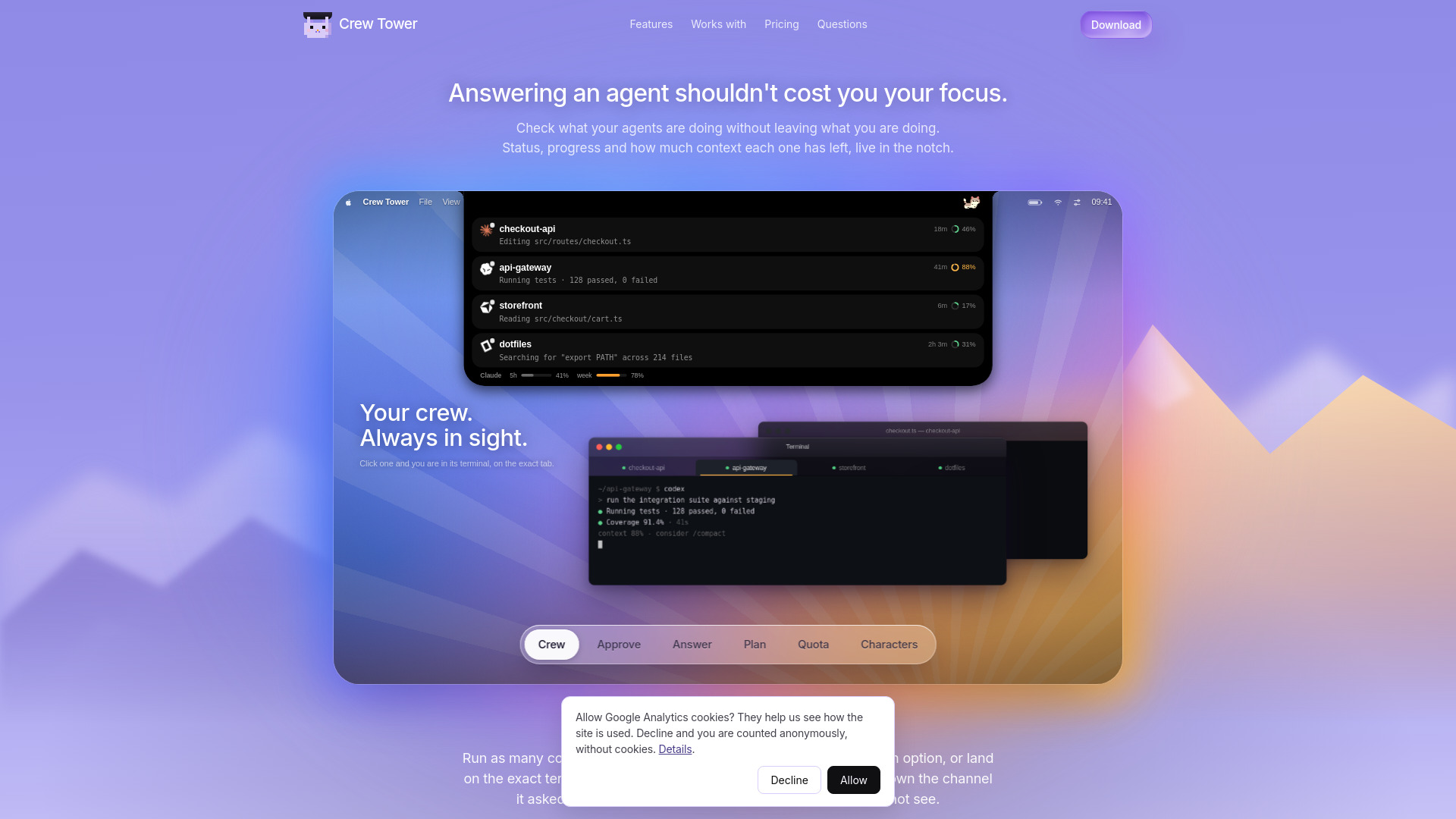
CrewTower is a macOS application that turns the MacBook notch into a live control tower for AI coding agents. It monitors and controls agents like Claude Code, Codex, Cursor, Gemini CLI, Qwen Code, and opencode, allowing you to approve or deny permission requests, answer questions, and jump to the exact terminal tab without leaving your current work. It works on Macs with or without a notch, drawing a floating pill on displays without one.
How to use CrewTower
- Download and install: Download the DMG from the website and drag it to your Applications folder. macOS 15 or later is required.
- Activate: When you first run the app, it will ask for a license key. Activating writes observation hooks into your agent's config files (e.g.,
~/.claude/settings.json,~/.codex/hooks.json,~/.cursor/hooks.json). A backup is created before any changes. - Run your agents: Start your AI coding agents as usual. CrewTower will detect them and display their status in the notch.
- Interact from the notch: When an agent requests permission or asks a question, a card appears in the notch. You can approve, deny, answer, or jump to the terminal tab directly from there.
- Customize: You can enable privacy mode, adjust notification sounds, and choose whether to show the pixel-art crew member.
Features of CrewTower
- Live status for every running agent: See what each agent is doing, its progress, and how much context it has left.
- Approve or deny permissions without touching the terminal: Decisions are sent back over a local socket, so no keystrokes are simulated.
- Answer agent questions: Options are rendered as buttons, and your pick is sent back verbatim.
- Jump to the exact terminal tab: Click a session to bring the correct terminal window, tab, and pane forward.
- Risk flags: Destructive shell commands are highlighted before you approve.
- Three ways to say yes: Allow once, allow for the session, or always allow (writes a durable rule).
- Read plans before they run: Scroll through the entire plan in the notch and approve or send feedback.
- Context window indicator: A ring shows how full the context is, with color changes past 70% and 90%.
- Subscription quota display: See how much of your Claude or Codex subscription quota is left.
- Privacy mode: Keeps the panel shut and sounds off, useful before screen sharing.
- Waiting sessions rise to the top: Sessions waiting for you are prioritized.
- Completion notifications: The notch leans out when a session finishes.
- Nudge system: Alerts for waiting sessions, with escalating nudges that stop after 15 minutes.
- Subagent tracking: See subagents and their progress.
- Local by construction: No code or transcripts leave your machine; no account or analytics.
- Works with or without a notch: Floating pill on external monitors.
- Native performance: Swift and SwiftUI, no Electron.
- Survives restarts: Sessions persist across app relaunches.
Use Cases of CrewTower
- Multi-agent development: Run several AI coding agents in parallel and manage them all from one place.
- Quick approvals: Approve or deny permission requests without switching windows, maintaining focus.
- Monitoring long-running tasks: Keep an eye on agents that are running tests or editing files, and get notified when they finish.
- Context management: Avoid running out of context by monitoring the context window usage.
- Screen sharing: Use privacy mode to hide sensitive details while still being able to interact with agents.
Pricing
CrewTower is available for a one-time purchase of $9.99 (early bird price, regularly $14.99). This includes all features, updates, and a license for one Mac. There is no subscription. A 30-day money-back guarantee is offered.
FAQ
Do I need a Mac with a notch? No. On displays without a notch, CrewTower draws a floating pill with the same geometry.
Does it send keystrokes to my terminal? Never. There is no keystroke path; decisions travel over a local socket.
What happens if Crew Tower is not running? For Claude Code, Codex, and Cursor, the hooks exit cleanly, so the terminal's own prompt stands. For Gemini CLI and Qwen Code, the hook returns an explicit denial to prevent auto-approval.
Can I try it first? There is no trial, but the 30-day money-back guarantee acts as a trial.
Does any of my code leave the machine? No. All data stays local, and network calls are limited to version checks, license validation, and quota checks.
What does it change on my machine? It writes observation hooks into your agent's config files, with backups. Removing the app removes the hooks.
Why does it want Accessibility permission? Only to bring the correct terminal tab forward. Approving, denying, and answering work without it.
Can I run more than one agent in the same project? Yes, sessions are identified by the title the agent writes, so they remain distinguishable.