What is Forge GUI
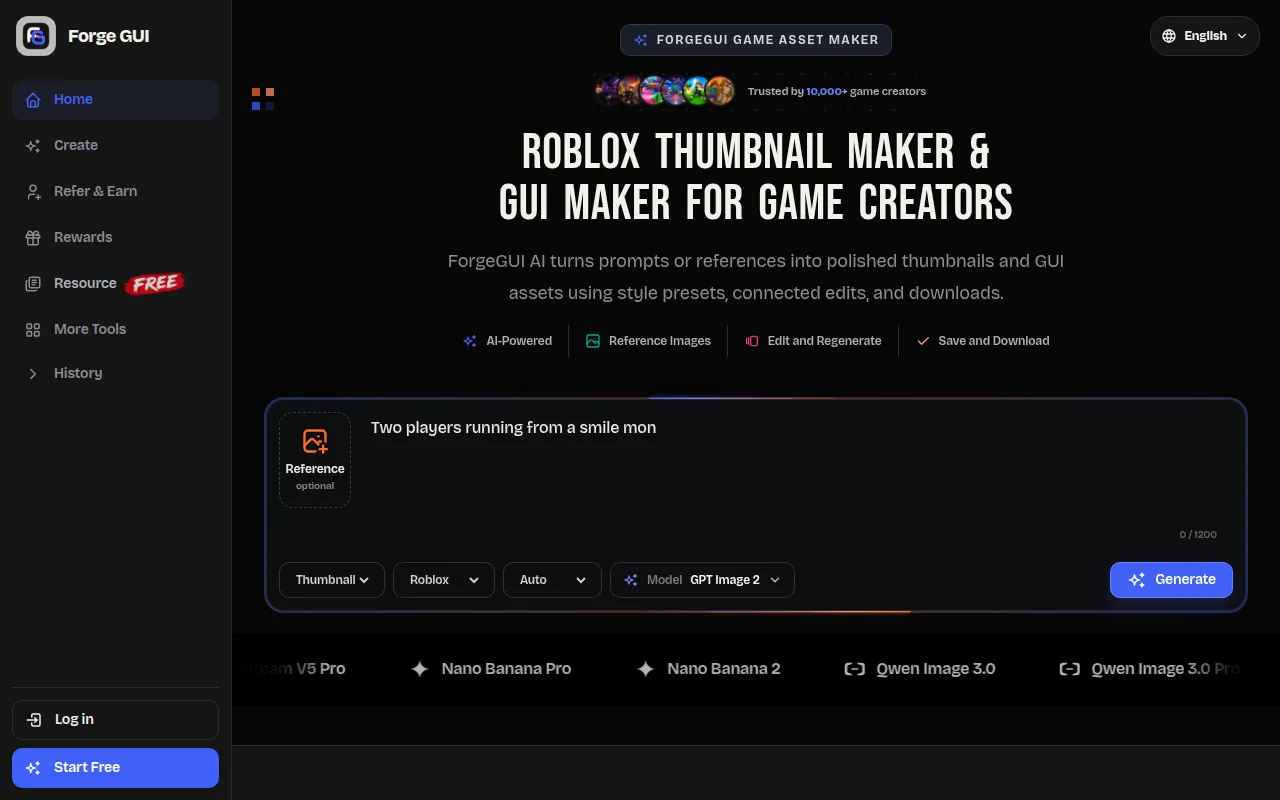
ForgeGUI is a game asset maker that specializes in creating polished Roblox thumbnails and GUI assets. It allows users to generate these assets from text prompts or reference images, with options to edit, save, and download high-resolution results.
How to use Forge GUI
- Describe the asset: Write a prompt detailing the character, action, mood, setting, camera view, or interface elements you want to generate.
- Select a style: Choose from a variety of prepared styles, including platform-specific presets for Roblox, Minecraft, Unity, and Fortnite.
- Add references (optional): Upload an interface screenshot, sketch, or mood board to guide the generation process.
- Generate: Initiate the creation process.
- Review and refine: Examine the generated result, request focused changes, and use follow-up instructions to refine colors, borders, layout, and emphasis.
- Save and download: Save your edited assets and download the high-resolution final images.
Features of Forge GUI
- AI-powered generation of game thumbnails and GUI assets.
- Ability to create assets from text prompts or reference images.
- Supports various game platforms with ready-made styles (Roblox, Minecraft, Unity, Fortnite).
- Options for editing and regenerating results based on feedback.
- High-resolution download capabilities.
- Saved image assets and R2 downloads.
- Platform-aware composition guidance.
- One to four independent image outputs per request.
- Automatic and manual thumbnail style routing.
- Generation history, files, and credit activity are kept together.
Use Cases of Forge GUI
- Creating game thumbnails for Roblox, Minecraft, Unity, and Fortnite.
- Generating GUI assets such as HUDs, menus, panels, buttons, inventory cards, shop screens, quest logs, health bars, ability slots, counters, popups, frames, badges, and icons.
- Quickly testing visual ideas for prototypes and pitch images.
- Updating game visuals for live games, seasonal events, and store assets.
- Designing assets for indie games and solo creator projects.
Pricing
Forge GUI offers a tiered pricing structure based on monthly credit allowances:
- Starter: $15.99/month (1,600 credits/month, billed monthly)
- Pro: $50/month (5,000 credits/month, billed monthly)
- Studio: $200/month (20,000 credits/month, billed monthly)
Each generation uses 10 credits. Annual plans are also available, offering savings of up to 27%.
FAQ
- What is a Roblox thumbnail maker? A Roblox thumbnail maker is a focused workspace for turning prompts and references into game thumbnails. ForgeGUI adds platform-aware composition guidance, one generated result per request, connected edits, saved history, and high-resolution downloads.
- How does the Roblox thumbnail generator work? Outline the character, action, mood, setting, camera view, or interface elements; select a prepared style; add references if useful; then generate. Review the result, request focused changes, and download the finished image.
- What makes the Roblox AI thumbnail maker different? The Roblox AI thumbnail maker prioritizes clear storytelling, expressive characters, strong visual hierarchy, mobile legibility, reference guidance, 16:9 output, and connected edits. Generation history, files, and credit activity also stay together.
- What can the Roblox GUI maker create? The Roblox GUI maker can create HUDs, menus, panels, buttons, inventory cards, shop screens, quest logs, health bars, ability slots, counters, popups, frames, badges, and icons. Character skins are not supported.
- Can the Roblox GUI generator follow an existing style? Yes. Add an interface screenshot, sketch, mood board, or another visual reference, then explain what should remain consistent. Use follow-up instructions to refine colors, borders, layout, visual hierarchy, and component emphasis.
- Which game platforms and styles are supported? Forge GUI includes Roblox, Minecraft, Unity, and Fortnite-style directions. These are independent, platform-inspired presets rather than official products or endorsements.
- How long does generation take? Initial results usually arrive within minutes. Timing varies with references, provider demand, and edit complexity, so Forge GUI does not advertise an unrealistic fixed number of seconds.
- Is ForgeGUI free to start? Yes. Begin with the card-backed seven-day trial and its daily reward schedule. Each generated Thumbnail or GUI result uses 10 credits, with plan details shown before you select a larger allowance.