What is Gemini Omni Video Generator
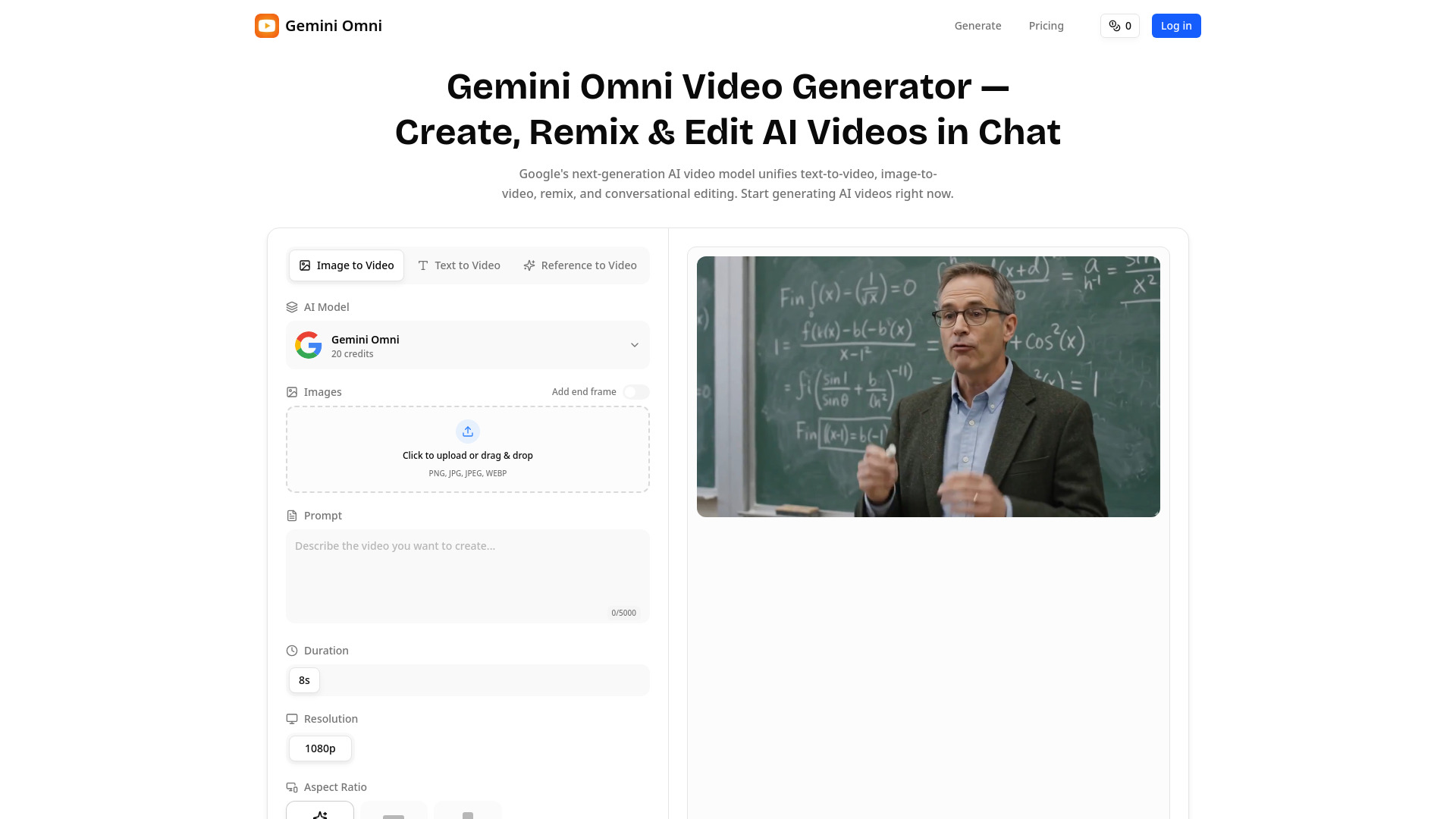
Gemini Omni is Google's upcoming AI video model that allows users to generate, remix, and edit cinematic video clips through conversational chat. It unifies text-to-video, image-to-video, remix, and conversational editing workflows into a single interface within the Gemini chat.
How to use Gemini Omni Video Generator
- Start in the Gemini Chat: Open the Gemini App and select a template (e.g., Civilization, Metallic, Cyberpunk, Jellytoon) or describe your scene from scratch.
- Generate Video: Send a text prompt, upload an image as the first or last frame, or upload an existing clip to remix. The model generates an approximately 8-second video with synchronized native audio.
- Edit by Replying: In the same chat, reply with instructions to modify the video, such as swapping an object, changing lighting, or extending a shot.
Features of Gemini Omni Video Generator
- Text-to-Video Generation: Create complete video clips from text prompts, including camera actions, characters, and sound.
- Image-to-Video Generation: Use images as the first or last frame for video creation.
- Video Remixing: Upload existing clips to restyle, extend, or recompose them.
- Conversational Editing: Edit generated videos through follow-up chat messages, allowing for object replacement, lighting adjustments, and scene modifications.
- Native Audio: Generates synchronized native audio for generated clips.
- In-Video Text Rendering: Capable of rendering legible text within videos, as demonstrated with a chalkboard example.
- Templates: Offers presets like Civilization, Metallic, Cyberpunk, and Jellytoon for quick generation.
- API Access: Reported to be exposed via API as an Agent, allowing integration into creative pipelines.
Use Cases of Gemini Omni Video Generator
- Educational Explainers: Suitable for creating tutorial content, math, and physics explanations due to its text rendering capabilities.
- Short-Form Social Video: Generate on-brand vertical clips for platforms like TikTok, Reels, and Shorts.
- Ad & Marketing Creatives: Prototype product spots and brand films quickly, and iterate on them through chat editing.
- Enterprise Training Video: Create internal training, product walkthroughs, and onboarding content.
- Remixing Existing Footage: Restyle, extend, or recompose existing video clips.
Pricing
- Free Plan: Offers 10 credits upon sign-up, allowing for 1 video or 2 images. Includes daily check-ins for up to 30 free credits per week. Images may have watermarks, and video downloads are not included.
- Lite Plan: Priced at $9.9 USD/month (billed yearly at $118.8), includes 2,400 Credits/year (approx. 240 videos or 1200 images). Offers fast generation, private creation, no watermarks, and full commercial use.
- Pro Plan: Priced at $25 USD/month (billed yearly at $300), includes 12,000 Credits/year (approx. 1200 videos or 6000 images). Offers fast generation, private creation, no watermarks, and full commercial use. Credit cost is approximately $0.025 per credit.
FAQ
- Has Gemini Omni Video Generator been officially released? Information suggests it is an upcoming model, with potential release at Google I/O 2026.
- How does it relate to Veo 3.1? Metadata indicates it is tied to Veo (VEO_MODE_OMNI), suggesting it inherits Veo 3.1's capabilities like native audio, cinematic motion, and clip quality.
- What inputs does it support? Supports text prompts, images (as first or last frame), and existing video clips for remixing.
- How long are Gemini Omni Video Generator videos, and what resolution? Videos are approximately 8 seconds long. The webpage mentions 1080p resolution and aspect ratios like 16:9 and 9:16.
- What makes Gemini Omni Video Generator different from Sora 2, Seedance, or Kling? Gemini Omni's key differentiators include its integration within the Gemini chat interface for a unified generation and editing workflow, its reported ability to remix existing footage, and its conversational editing capabilities.