What is Huxly
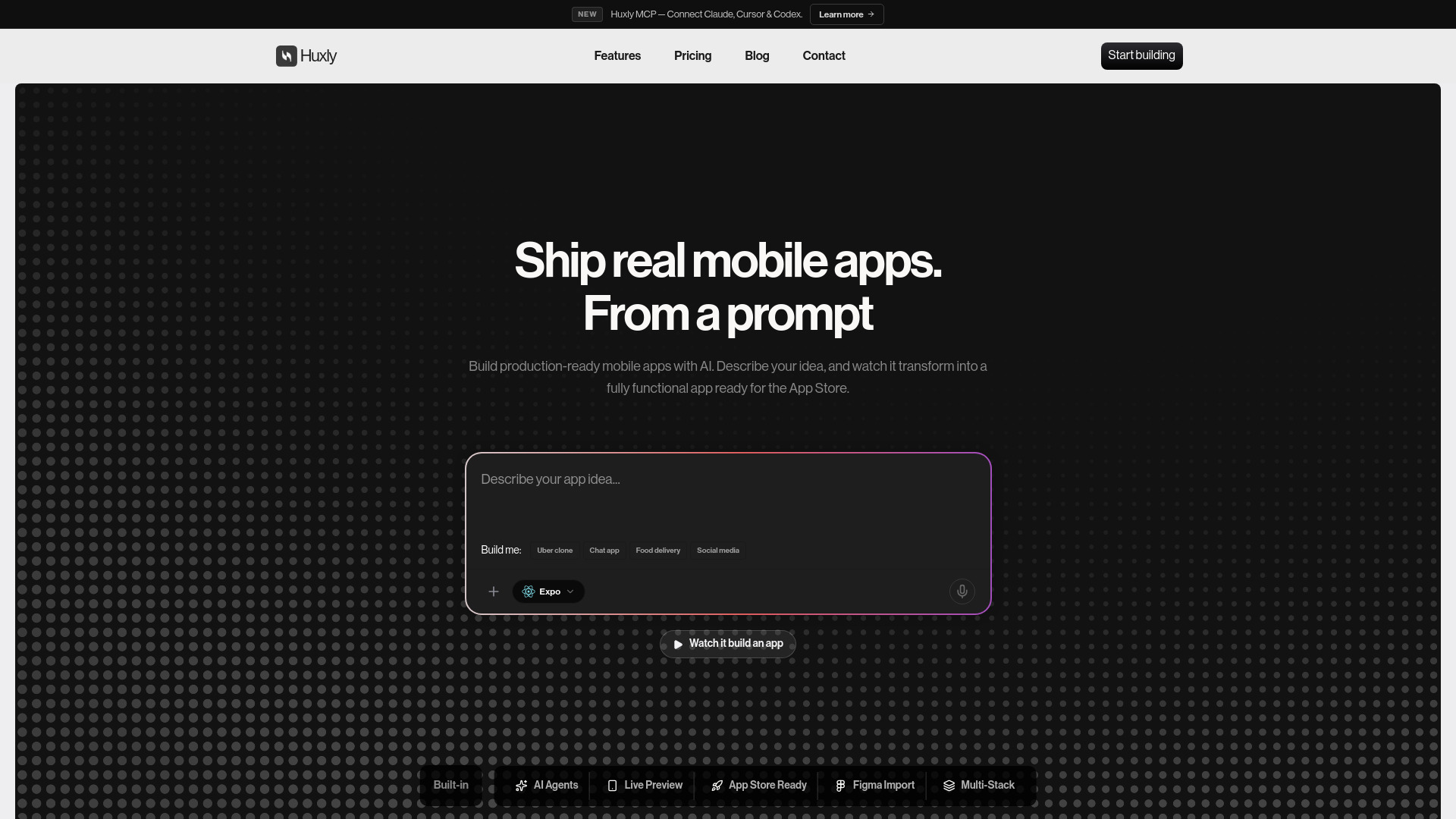
Huxly is an AI-powered mobile app builder that enables users to create production-ready mobile apps for iOS and Android using plain-English prompts. It supports multiple frameworks including React Native (Expo), Flutter, and SwiftUI, and allows users to build, preview, and publish apps to the App Store and Google Play without coding.
How to use Huxly
- Describe your app idea in plain English in the provided textarea.
- Choose your preferred framework (Expo, Flutter, or SwiftUI) from the dropdown.
- Optionally, select a starter template from categories like E-Commerce, Productivity, Education, Finance, or AI.
- Use the live preview to see your app in real-time as it builds.
- Connect your developer accounts to submit your app directly to the App Store and Google Play.
- For advanced control, connect Huxly's MCP server to AI tools like Claude, Cursor, or ChatGPT to write, build, and test the app end-to-end using your own subscription.
Features of Huxly
- AI Agents: Build apps by describing your idea in plain English.
- Live Preview: See your app running in the browser while you build it.
- Multi-Stack Support: Build with Expo (React Native), Flutter, or SwiftUI.
- App Store Ready: Submit directly to the App Store and Google Play from within Huxly.
- Figma Import: Paste a Figma frame and get working screens with components, navigation, and state wired up.
- Backend and Edge Functions: Generate server-side code (auth, payments, webhooks, secrets) and deploy to Netlify, Render, or Railway, or create edge functions on Supabase or Firebase.
- AI Connector (MCP): Connect Claude, ChatGPT, or Cursor to your project for end-to-end app development using your own subscription.
- Starter Templates: Choose from a variety of pre-built templates for different app categories.
- Export and Publish: Export source code, push to GitHub, deploy to TestFlight, and publish to app stores.
Use Cases of Huxly
- Building e-commerce apps with UI kits like ShopForge.
- Creating AI chat apps using ChatSpark UI kit.
- Developing educational apps like Learnspark.
- Building fitness tracking apps such as PulseFit.
- Creating travel apps like Wanderly.
- Developing healthcare appointment apps like DocSpot.
- Building finance and bill payment apps.
- Creating social media or food delivery apps from prompts like "Uber clone" or "Chat app".
Pricing
Huxly offers a free plan that lets you explore the platform and build your first app. Paid plans unlock additional features like unlimited projects, priority support, and direct submission to app stores. If you run out of credits, you can purchase one-time top-up credits that never expire, or upgrade your plan for a larger monthly allowance. Alternatively, you can connect Huxly's MCP server to your own AI tool (like Claude Code or Cursor) and use its subscription to continue building beyond your credits.
FAQ
What is Huxly AI? Huxly AI is an AI-powered mobile app builder that lets you create fully functional mobile apps just by describing what you want. No coding experience required.
What's the difference between Expo, Flutter, and SwiftUI? Expo (React Native) uses JavaScript and ships to iOS and Android. Flutter uses Dart, also cross-platform. SwiftUI is Apple's native framework — iOS only, most polished. All three support live preview, cloud builds, and store submission in Huxly.
Do I need coding experience to use Huxly? Not at all. Huxly AI handles all the code generation for you. Simply describe your app idea in plain language and our AI will build it for you.
Can I export or publish my app? Yes! Export your source code, push to GitHub, deploy to TestFlight for beta testing, and publish directly to the App Store and Google Play from within Huxly.
Is there a free plan available? Yes, Huxly offers a free plan that lets you explore the platform and build your first app. Paid plans unlock additional features like unlimited projects and priority support.
What happens when I run out of credits? You can buy a one-time top-up at any point — top-up credits never expire and stack on top of your plan. Or upgrade your plan for a larger monthly allowance. You can also keep building beyond your credits by connecting Huxly's MCP server to your own AI tool, like Claude Code or Cursor, and using its subscription instead.
How secure is my data with Huxly? We take security seriously. All your data and source code are encrypted, and we never share your projects with anyone. Your apps are yours.
Can I submit my app to the App Store and Google Play? Yes! Paid plans include direct submission to both the App Store and Google Play. Connect your developer account, and Huxly handles the build, signing, and submission process — all in the cloud.
What does Backend integration include? Huxly builds server-side code, not just the app. It can generate a full backend — auth, payments, webhooks, secrets — and deploy it to your own server on Netlify, Render, or Railway. It can also create standalone edge functions on Supabase or Firebase when you only need a single piece of server logic. Either way the code is generated with your app, deployed to your account, and your keys stay server-side.