What is Image 2.5 Sunburst
Image 2.5 Sunburst is a model in the GPT Image 2.5 family for generating and editing images. It is available through an independent browser-based studio that uses an API provider. The model prioritizes premium detail, fidelity, and precise edits, making it suitable for projects that require detailed instructions, reference images, and high editing quality.
How to use Image 2.5 Sunburst
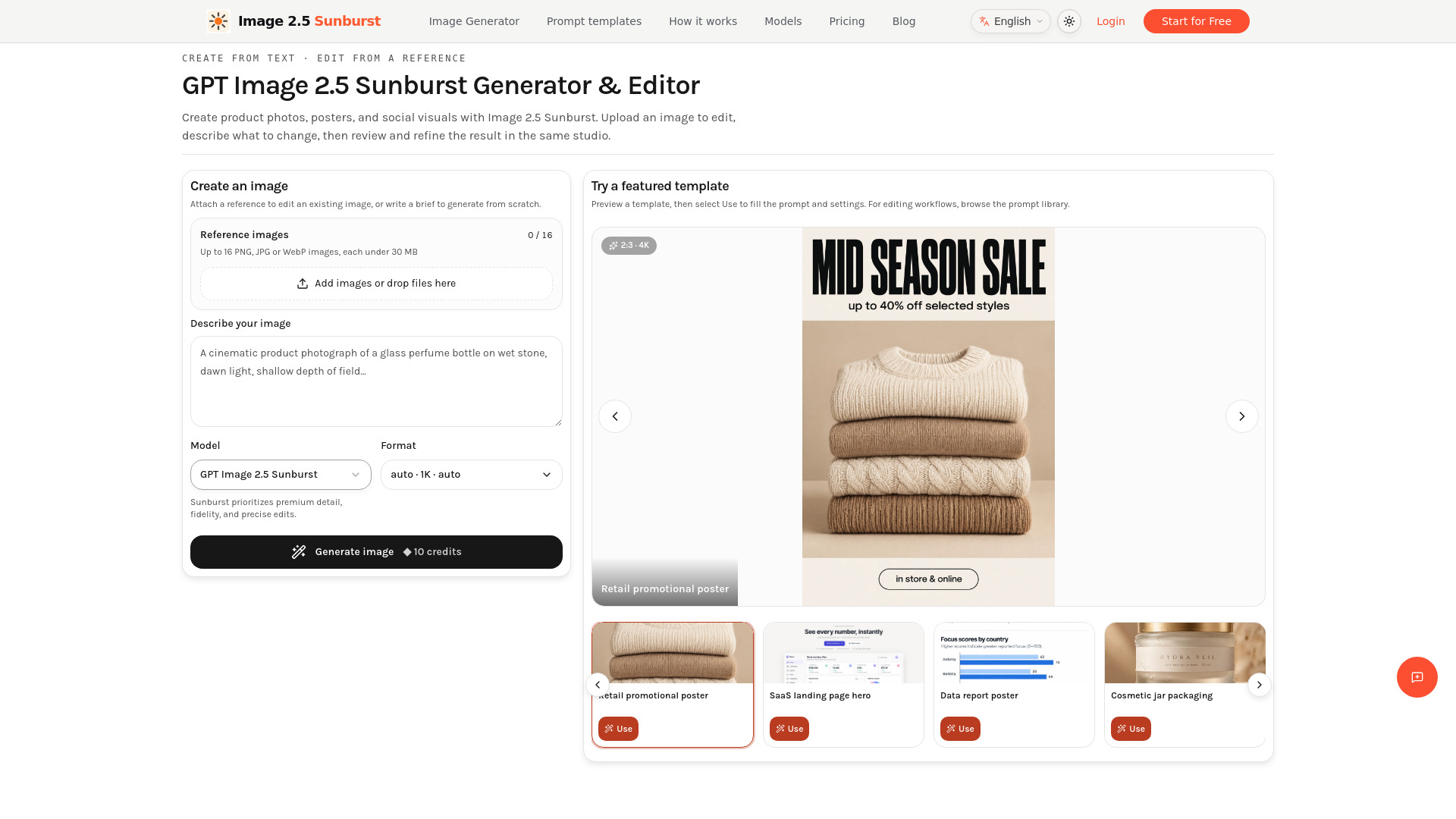
- Write a prompt or upload a reference: Describe your image or attach up to 16 PNG, JPG, or WebP references, each under 30 MB. Attaching references selects editing mode. Explain each image's role, what to change, and what to preserve.
- Choose settings and generate: Select your model and open Format for aspect ratio, resolution, and background. Check the credit amount on the Generate image button before starting your request.
- Review, download, or edit again: Inspect text and reference details. Select "Edit this image" to send the result back with a new instruction. Change one thing per round and restate important constraints.
Features of Image 2.5 Sunburst
- Generate images from text prompts or edit existing images using up to 16 reference images (PNG, JPG, WebP, each under 30 MB).
- Choose from 1K, 2K, or 4K resolution, with aspect ratio and background options.
- Model selection between GPT Image 2.5 Sunburst (quality-focused) and GPT Image 2.5 Flare (faster exploration).
- Prompt templates: 99 templates available to fill the studio with a prompt and settings.
- Edit this image workflow: use a generated result as the next reference for iterative editing.
- Credit-based generation: each generation or edit costs 10, 20, or 35 credits at 1K, 2K, or 4K respectively.
- Failed jobs are refunded when the service records the failure.
- Subscription credits reset monthly; purchased credit packs do not expire.
Use Cases of Image 2.5 Sunburst
- Product photos and background edits: Place a product in a new setting while preserving shape, label, and colors.
- Posters with readable text: Create posters with exact headlines in quotes and specified positions; check spelling and legibility.
- Reference-led creative variations: Use a clear reference and one direction (e.g., new lighting or clothing) to create variations.
- Images sized for your project: Choose aspect ratio, resolution (1K, 2K, 4K), and background options for specific project needs.
- Featured templates: White-background marketplace hero shot, food editorial shot, retail promotional poster, SaaS landing page hero, data report poster, cosmetic jar packaging, YouTube thumbnail, four-panel comic strip, presentation cover slide.
Pricing
- Each generation or edit costs 10, 20, or 35 credits at 1K, 2K, or 4K respectively.
- Continuing from a result is a new paid request.
- Credits for a failed job are returned when the service records the failure.
- Subscription credits reset when the next monthly grant arrives. Annual plans are billed yearly but grant credits monthly. Purchased credit packs do not expire.
- Browsing and copying templates is free. Generating requires sign-in and credits.
FAQ
Can I try Image 2.5 Sunburst for free? Browsing and copying templates is free. Generating requires sign-in and credits. Check your account balance for available welcome credits; paid plans and credit packs are listed above.
How are Image 2.5 Sunburst edits charged? Each generation or edit costs 10, 20, or 35 credits at 1K, 2K, or 4K. Continuing from a result is a new paid request. Credits for a failed job are returned when the service records the failure.
Is Image 2.5 Sunburst the same as GPT Image 2.5? GPT Image 2.5 is the family; Image 2.5 Sunburst and Flare are its model choices. This site is an independent service using an API provider, not the official OpenAI website or a ChatGPT subscription.
Why did Image 2.5 Sunburst change a detail I wanted to keep? Editing can alter surrounding details. Try one change at a time, explicitly list what to preserve, and upload the earlier image again if needed. Check faces, product geometry, labels, and lighting after each round.
Can Image 2.5 Sunburst edit my own photo? Yes. Attach up to 16 PNG, JPG or WebP images, each under 30 MB, and describe the edit. References are sent in list order; use image 1, image 2 and so on in your prompt to explain each reference.
Does Image 2.5 Sunburst support 4K and transparent backgrounds? The Format menu offers 1K, 2K, and 4K resolution with aspect ratio and background options. Check the downloaded image dimensions and transparency before use. Resolution labels are separate from the model choice.
Can I keep editing an Image 2.5 Sunburst result? Yes. Choose Edit this image to use that result as the next reference, then enter a new instruction. Restate important constraints: this workflow passes the image forward rather than promising complete conversation memory.
Do I need ChatGPT Plus or my own API key? No. Use an account on this site to generate with Image 2.5 Sunburst. You do not need to supply an OpenAI API key or buy ChatGPT Plus. This studio has its own credit balance and billing.
How do I use the Image 2.5 Sunburst prompt templates? Browse the 99 templates and choose Use to fill the studio with a prompt and settings, or copy the text and adapt it. Replace product names, quoted text, and scene details with your own brief. Editing templates require your own reference image.
Do subscription credits roll over? Subscription credits reset when the next monthly grant arrives. Annual plans are billed yearly but grant credits monthly, rather than providing the full year's credits at once. Purchased credit packs do not expire. Check your balance before starting a new generation.
Can I upload multiple reference images at once? Yes. Add up to 16 reference images per request, each under 30 MB. Select or drop multiple files, add more, or remove individual images. Retry failed uploads; all references must finish uploading before generation. Reference count does not increase the credit cost per job; credits still depend on output resolution.
What reference image formats and sizes are supported? Use JPEG/JPG, PNG or WebP. Each image must be smaller than 30 MB (30,000,000 bytes), with up to 16 images per request. Compress oversized files or convert unsupported formats before uploading.