What is Maxworker.ai
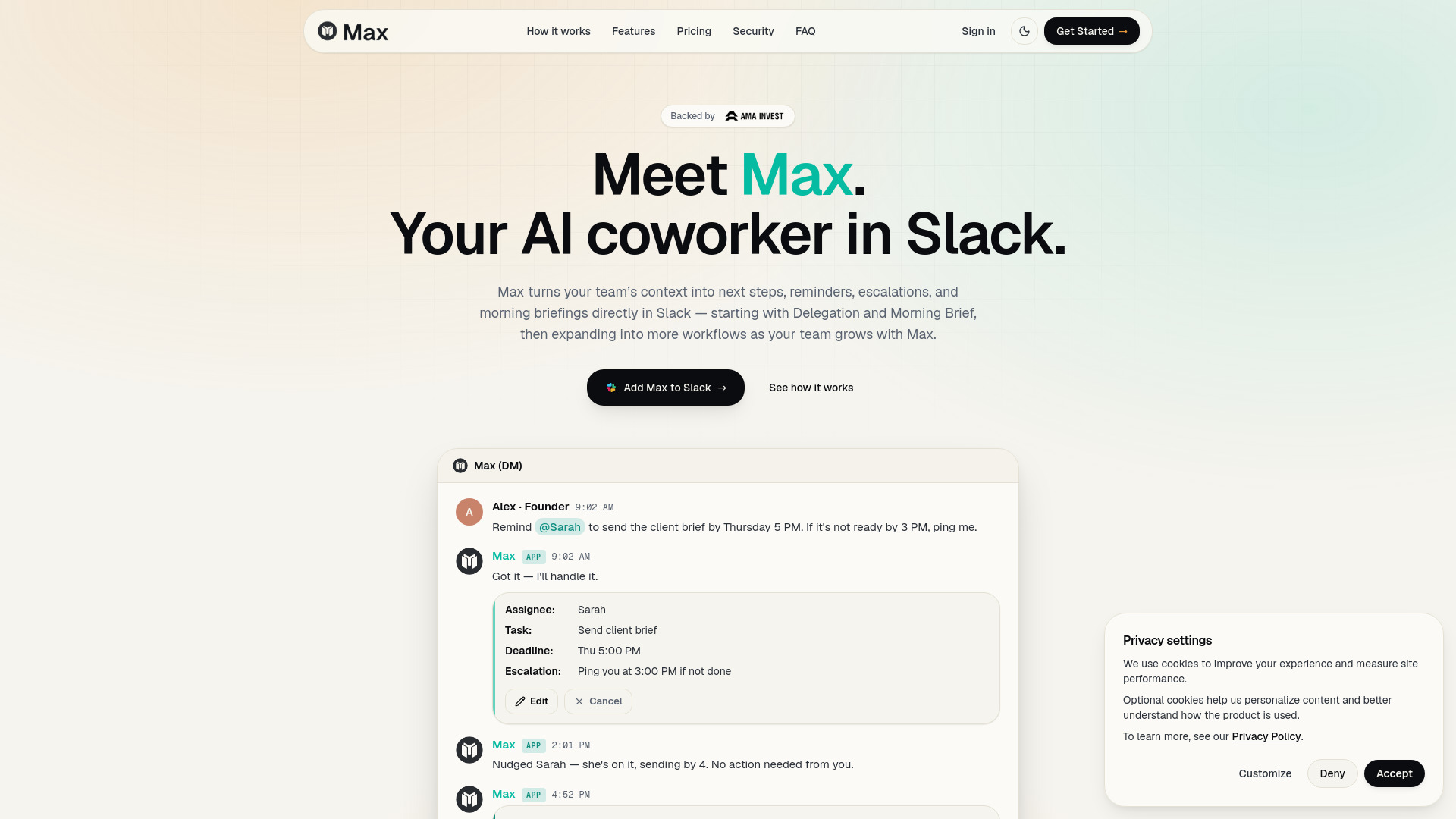
Max is an AI coworker that operates inside Slack, connecting to 25+ essential work tools (with 3,000+ integrations coming soon). It turns your team's scattered context—from emails, calendars, CRMs, project management tools, and more—into ready-to-review work like reports, drafts, summaries, and next steps. Max works on a fixed-price model with no surprises.
How to use Maxworker.ai
- Give Max the outcome: Start with a plain-language request in Slack, e.g., "Max, prepare a client-ready performance update for this account."
- Max finds the inputs: Max automatically checks connected sources (e.g., HubSpot, Google Sheets, Notion, Slack, Google Drive) to gather relevant data.
- Your team reviews the result: Max returns a draft, summary, or task list with context attached. Your team can approve, edit, or cancel before any action is taken.
Features of Maxworker.ai
- Morning Brief: Every morning, Max sends a clear briefing in Slack with open tasks and deadlines, important messages or emails, today's schedule, and focus priorities.
- Delegation: Assign tasks with deadlines and escalation rules using natural language. Max tracks progress, sends reminders, and escalates if needed.
- 25+ integrations at launch: Slack, Gmail, Google Calendar, Google Drive, Microsoft 365, HubSpot, Salesforce, Linear, Jira, Asana, Notion, Airtable, GitHub, Trello, ClickUp, Monday.com, Intercom, Zendesk, Calendly, Stripe, Zoom, Figma, Dropbox, Loom, Mailchimp.
- No workflow building required: Start with a plain-language task; once the output is right, you can make it recurring.
- Human-in-the-loop: Max prepares drafts and suggested updates first; your team approves actions before anything is sent or changed.
Use Cases of Maxworker.ai
- Delegation: "Remind @Sarah to send the client brief by Thursday 5 PM. If it's not ready by 3 PM, ping me." Max creates a task, tracks it, nudges the assignee, and reports completion.
- Morning Brief: Get a daily summary of open tasks, important messages, calendar events, and focus priorities directly in Slack.
- Client updates: Ask Max to prepare a client-ready performance update using campaign data, client notes, and action items from connected tools.
FAQ
Is Max just another chatbot? No. Max works where your team already communicates—starting with Slack—and brings outputs back to the place your team reviews, approves, and moves work forward.
Where does Max work? Slack first, with web dashboard and mobile for briefs and triage. Teams support is coming next.
What tools can Max connect to? 25+ core tools at launch including Slack, Gmail, Google Calendar, Google Drive, Microsoft 365, HubSpot, Salesforce, Linear, Jira, Asana, Notion, Airtable, GitHub, Trello, ClickUp, Monday.com, Intercom, Zendesk, Calendly, Stripe, Zoom, Figma, Dropbox, Loom, and Mailchimp. More integrations roll out as Max scales.
Do we need to build workflows first? No. Start with a plain-language task. Once the output is right, you can make it recurring.
Can Max send emails or update tools? Max prepares drafts and suggested updates first. Your team approves actions before anything is sent or changed.
Will Max replace people? No. Max takes repetitive work off the team so people can focus on judgment, customers, strategy, and decisions.
How do we measure ROI? Track hours saved, outputs delivered, recurring tasks completed, follow-ups drafted, approval speed, and team capacity created.