What is Mesa.dev
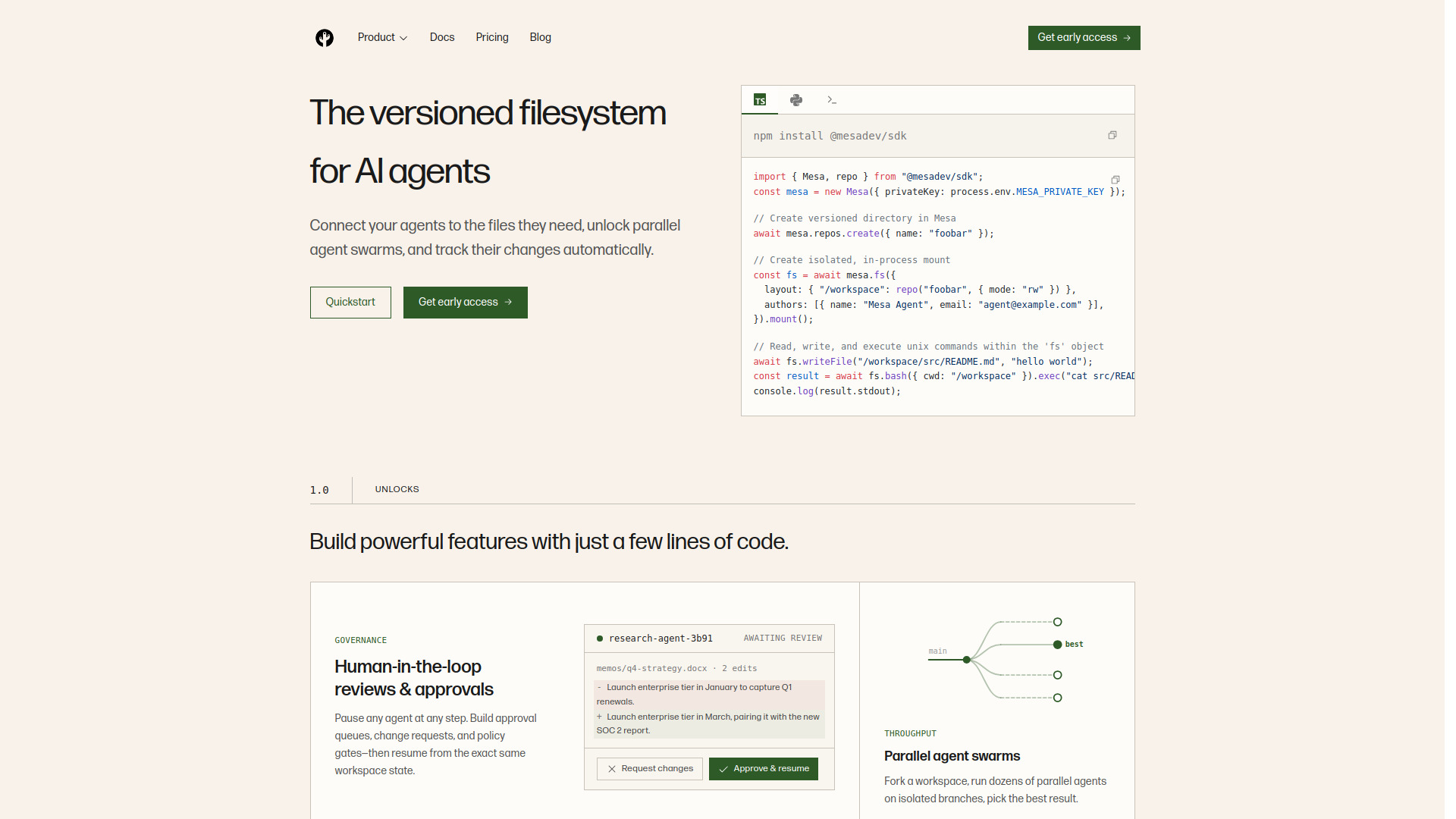
Mesa is a versioned filesystem designed specifically for AI agents. It provides a POSIX-compatible virtual filesystem that can be mounted in applications or on the OS, along with versioning, branching, and APIs. It enables agents to access files, run parallel swarms on isolated branches, and track changes with sub-50ms reads and writes.
How to use Mesa.dev
- Install the SDK:
npm install @mesadev/sdk. - Create a Mesa instance with your private key.
- Create a versioned repository:
await mesa.repos.create({ name: "foobar" }). - Mount a filesystem with a layout mapping a workspace path to the repository.
- Use standard file operations (e.g.,
writeFile) and execute Unix commands viafs.bash().exec().
Features of Mesa.dev
- Versioned filesystem: Full versioning semantics with branching, history, and diffs.
- POSIX compatibility: 100% POSIX-compatible, allowing use of standard Unix tools.
- Parallel agent swarms: Fork workspaces and run multiple agents on isolated branches.
- Human-in-the-loop reviews: Pause agents, create approval queues, and resume from the same state.
- Large file support: No per-file size limits, random access, and built-in deduplication.
- Fast performance: Sub-50ms reads/writes via MesaFS, p95 reads under 100ms via API.
- Git sync: Built-in support for syncing with Git upstreams like GitHub and GitLab.
- Egress metering: Free reads through MesaFS; metered for Git and Content API.
Use Cases of Mesa.dev
- Agent workspaces: Provide agents with persistent, versioned file storage.
- Parallel agent runs: Run multiple agents on separate branches to explore different solutions.
- Human approval workflows: Implement review gates for agent-generated changes.
- Audit trails: Track every change made by agents for compliance and debugging.
- Large data storage: Store datasets, models, and media alongside code.
FAQ
Does my agent really need versioning? Branch-based versioning is a huge unlock for agent applications, enabling human review, parallel swarms, audit trails, and rollback checkpoints.
Why can't I just use GitHub or GitLab? Git providers have rate limits, repo limits, and lack a real filesystem. Mesa offers Git-like versioning plus a fast, mountable filesystem.
How is this different from S3 and S3 Files? S3 Files only works on AWS and lacks branch-based versioning. Mesa is cross-cloud and provides built-in primitives for parallel agents without locking.
Is MesaFS POSIX compatible? Yes, MesaFS is 100% POSIX compatible.
Can I sync data from other sources? Mesa supports syncing from Git upstreams like GitHub and GitLab. Non-Git upstreams like S3 and Google Drive are planned.
How does egress metering work? Reads via MesaFS are free; Git and Content API egress is metered per GB.
Does Mesa handle large files? Yes, with random access, no per-file size limits, and deduplication.
How fast is Mesa? Sub-50ms reads/writes via MesaFS, p95 reads under 100ms via API, and millisecond-level forks.
Is Mesa fast enough? Mesa's time-to-first-token is lower than Git by an order of magnitude, with warm reads in nanoseconds and cold reads under 100ms.