What is minimax h3 image
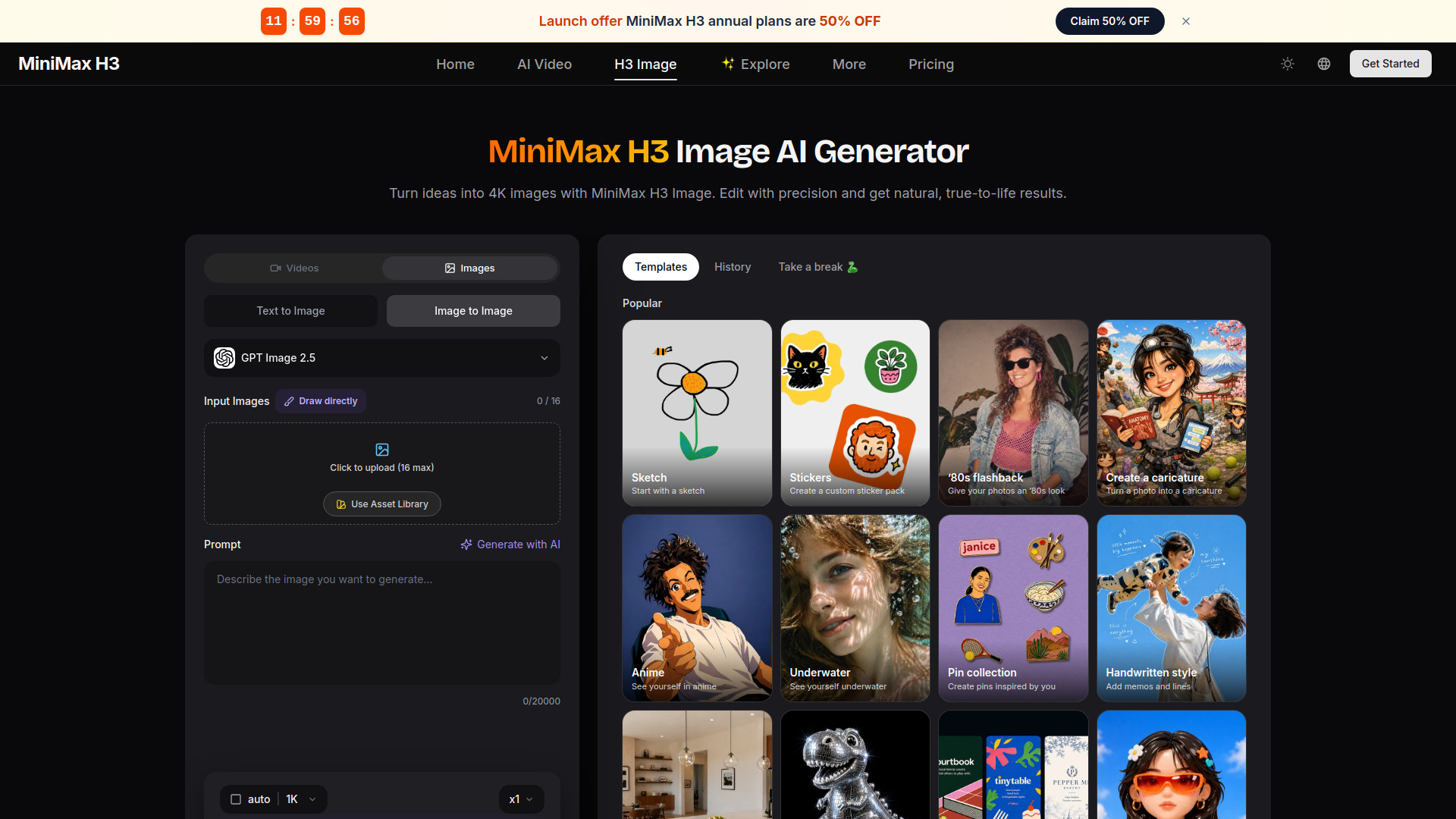
MiniMax H3 Image is an AI image generator that turns text prompts and up to 16 reference images into detailed pictures. It is the new image model from MiniMax, now in early access on Hailuo AI. It supports resolutions up to 4K and excels at photorealistic portraits, game assets, product exploded views, oil painting, and Eastern art styles.
How to use minimax h3 image
- Upload Your References: Add up to 16 images of the people, products, and places you want in the picture, or skip this step and start from text only.
- Describe the Scene: Write a prompt that says how the references should be arranged, plus the style, lighting, and mood. Then pick an aspect ratio and 1K, 2K, or 4K.
- Generate and Download: Click Generate, compare the results, adjust the prompt if needed, and download the version you like.
Features of minimax h3 image
- Up to 16 Reference Images in One Prompt: Upload as many as 16 reference images and combine the people, objects, and locations they show into one composed scene. H3 Image keeps each reference recognizable and places it where your prompt says.
- Accurate Prompt Following: Describe where each subject goes, what it wears, and how the light falls, and H3 Image follows the instructions closely. Even with many references in play, the layout and details you ask for stay in the picture.
- 1K, 2K, and 4K Output: Pick the resolution that fits the job: 1K for quick drafts, 2K for social and web, and 4K when you need print-ready detail or room to crop. Switch resolution from the panel without changing your prompt.
- Photorealistic Portraits: Lifelike skin, hair, and lighting for headshots, editorial portraits, and character photos. Use a reference photo to keep the same face across several looks and settings.
- Game Assets and 3D Scenes: Props, characters, environments, and stylized 3D rooms ready for concept art, pitch decks, and level mood boards.
- Product Exploded Views: Exploded diagrams that lay out every part of a product in order, from gadgets and furniture to engines and equipment. Useful for product pages, manuals, and teardown visuals.
- Oil Painting: Visible brushwork, rich color, and classical composition for portraits, landscapes, and still lifes in a painterly finish.
- Eastern Art Styles: Ink wash, gongbi detail, and traditional East Asian aesthetics for illustrations, posters, and cultural themes.
- Text Rendering: Can generate readable text in images, including a contract image with nearly 5,000 characters of text, with tiny print staying sharp when zoomed in.
- Face Consistency: Upload a clear photo as a reference and H3 Image keeps the face recognizable across new outfits, settings, and styles.
Use Cases of minimax h3 image
- Photorealistic Portraits: Create lifelike headshots, editorial portraits, and character photos with consistent faces across different looks.
- Game Assets and 3D Scenes: Generate props, characters, environments, and stylized 3D rooms for concept art, pitch decks, and level mood boards.
- Product Exploded Views: Produce exploded diagrams for product pages, manuals, and teardown visuals.
- Oil Painting: Generate painterly portraits, landscapes, and still lifes with visible brushwork and rich color.
- Eastern Art Styles: Create illustrations, posters, and cultural themes with ink wash, gongbi detail, and traditional East Asian aesthetics.
- Text-in-Image: Generate images with readable text, such as contracts, signs, labels, and posters.
- Character Sheets and Lookbooks: Use reference images to keep the same face across multiple images for lookbooks and character sheets.
- Combining Multiple References: Mix people, objects, and scenes from up to 16 reference images into one composed scene, such as a room full of products, a group portrait, or a staged set.
Pricing
MiniMax H3 Image offers free credits for new accounts, allowing you to try the service before paying. Paid plans add more credits when you need more images. Images made under a paid plan or credit pack can be used for commercial work, including ads, product pages, client work, and print.
FAQ
What is MiniMax H3 Image?
MiniMax H3 Image is the new image model from MiniMax. It turns text, or up to 16 reference images, into one detailed picture. H3 Image is now in early access on Hailuo AI.
How many reference images can I upload to H3 Image?
Up to 16 in a single generation. Mix people, objects, and scenes, and H3 Image combines them into one picture.
What resolutions does H3 Image support?
1K, 2K, and 4K. Use 1K for fast drafts and 4K when you need the most detail or room to crop.
What is MiniMax H3 Image best at?
Photorealistic portraits, game assets and 3D scenes, product exploded views, oil painting, and Eastern art styles.
Can H3 Image put readable text in an image?
Yes. Early testers made a contract image with nearly 5,000 characters of text, and the tiny print stays sharp when you zoom in. Signs, labels, and posters come out clean too.
Does H3 Image keep the same face across different images?
Yes. Upload a clear photo as a reference and H3 Image keeps the face recognizable across new outfits, settings, and styles. Creators use this for lookbooks and character sheets.
How do I combine many references in one H3 Image prompt?
Say what each reference is and where it goes, for example: "the woman from image 1 sits on the sofa from image 3." Then add the style, lighting, and mood you want.
Can I generate with H3 Image without reference images?
Yes. Switch to text-to-image and describe the picture you want in the prompt.
Is MiniMax H3 Image free to try?
Yes. New accounts get free credits, so you can try H3 Image before you pay. Paid plans add more credits when you need more images.
Can I use H3 Image pictures for commercial work?
Yes. Images made under a paid plan or credit pack can be used in ads, product pages, client work, and print.
Can I turn my H3 Image pictures into videos?
Yes. Send your picture to MiniMax H3 video and use it as the first frame or a reference. Your still image becomes a short clip with motion and sound.