What is NNScholar
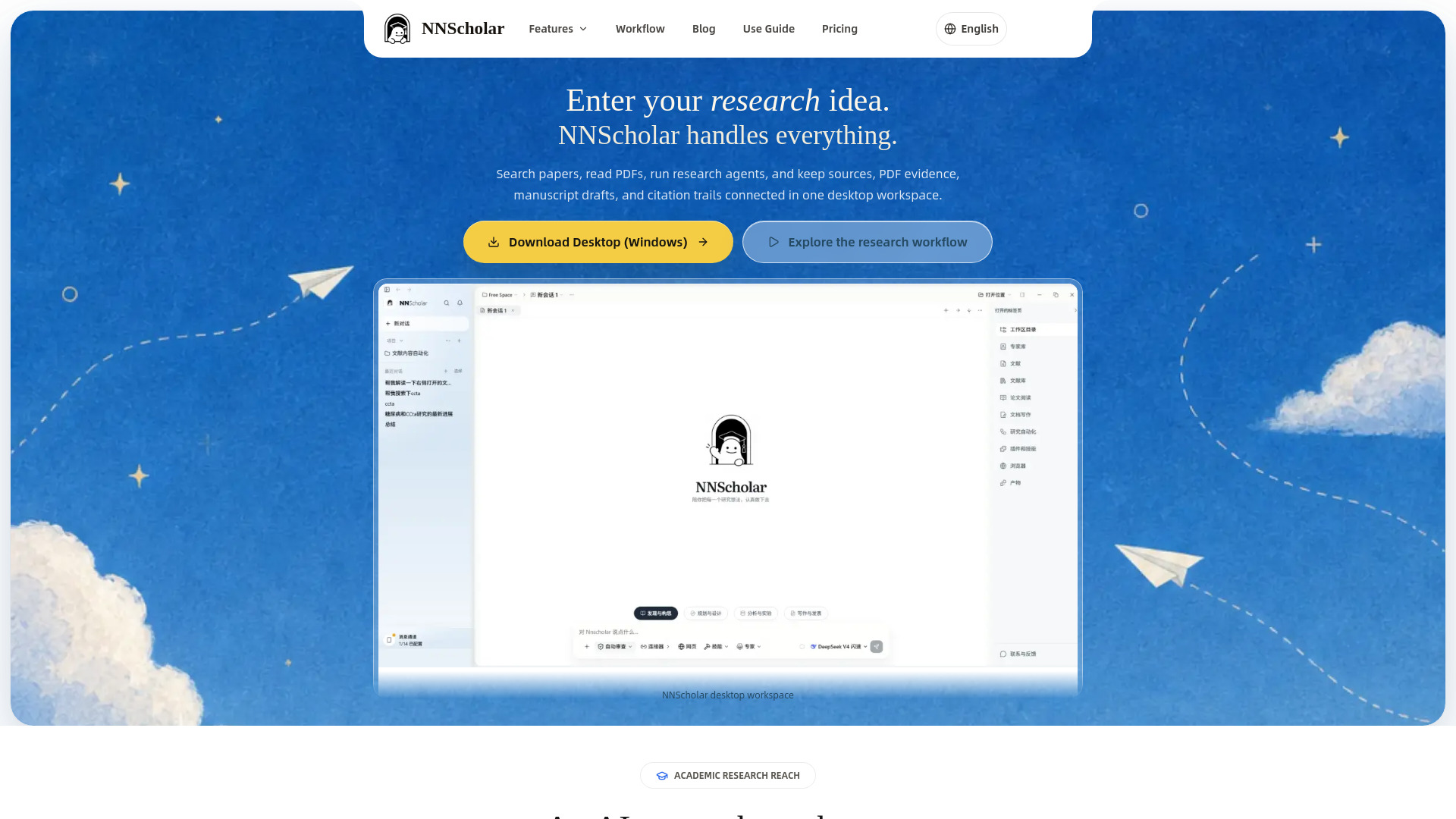
NNScholar is a desktop AI research workspace designed for literature reviews, research evidence management, and academic writing. It connects paper search, PDF reading, evidence tracking, citation verification, research planning, and academic writing so that a research question, sources, notes, drafts, figures, and submission materials stay in one traceable project space. It is available for macOS, Windows, and Web.
How to use NNScholar
- Start with a research question: Enter your research idea or question in the current conversation.
- Search related literature: Use search terms to reveal candidate papers and abstracts.
- Save candidate papers: Select useful papers and keep them for later reading in the research space.
- Read and annotate PDFs: Open saved papers, chat with PDFs, translate, annotate, and ask questions within the context of the paper.
- Organize evidence: Build a research evidence board that connects claims, sources, decisions, risks, and follow-up actions.
- Write and submit: Use AI academic writing workflows to turn evidence into outlines, drafts, figures, and submission materials.
- Use AI research agents: Organize evidence, check sources, and draft the next step inside your project.
- Extend with academic skills: Reuse academic data extraction workflows for review, synthesis, verification, writing, and submission prep.
Features of NNScholar
- Literature Search: Start an AI literature review from a topic, DOI, PMID, arXiv, or research question, then save useful sources into the same project.
- PDF Reading: Chat with PDF, translate, annotate, and ask questions inside the context of an academic paper.
- Research Space: Keep a research paper library with notes, files, conversations, stages, and outputs connected as the project grows.
- Writing & Submission: Use AI academic writing workflows to turn evidence into outlines, drafts, figures, and submission materials.
- AI Research Agents: Use an AI research assistant to organize evidence, check sources, and draft the next step inside your project.
- Evidence Board: Build a research evidence board that connects claims, sources, decisions, risks, and follow-up actions.
- Citation Tracing: Follow references, related papers, and topic updates from seed literature before you trust a claim.
- Academic Skills: Reuse academic data extraction workflows for review, synthesis, verification, writing, and submission prep.
- Multi-document Q&A: Ask questions across multiple documents.
- Reference Verification: Connect sources, claims, evidence, research decisions, and risks so you can return to original materials before using a conclusion.
Use Cases of NNScholar
- Literature reviews: Start from a research question, then move through literature discovery, abstract screening, PDF reading, multi-document Q&A, evidence organization, research planning, paper structure, and submission preparation.
- Proposals and paper writing: Turn evidence into outlines, drafts, figures, and submission materials.
- PDF reading and annotation: Chat with PDFs, translate papers, highlight, annotate, and ask questions within the context of an academic paper.
- Evidence tracking: Build an evidence board that connects claims, sources, decisions, risks, and follow-up actions.
- Citation verification: Follow references, related papers, and topic updates from seed literature before trusting a claim.
- Academic data extraction: Reuse workflows for review, synthesis, verification, writing, and submission prep.
- Research project management: Keep a research paper library with notes, files, conversations, stages, and outputs connected as the project grows.
Pricing
- Free signup: Includes 100 welcome credits.
- Intro Month: A once-per-account first-payment offer with 1,000 credits.
- Lite: Includes 1,000 credits per month.
- Pro: Includes 8,000 credits per month.
- Max: Includes 60,000 credits per month.
- Team: Includes a 120,000-credit shared organization pool with member budgets, invoices, and audits.
FAQ
What is NNScholar?
NNScholar is a desktop AI research workspace for literature reviews. It connects paper search, PDF reading, evidence tracking, citation verification, research planning, and academic writing so a research question, sources, notes, drafts, figures, and submission materials stay in one traceable project space.
How is NNScholar different from ChatGPT, Claude, or Zotero?
General AI tools are usually one-off chat surfaces, while Zotero is mainly a reference manager. NNScholar connects search, PDF reading, literature context, claim-evidence links, reference verification, research tasks, and deliverables into one continuous academic workflow.
Is NNScholar useful for literature reviews, proposals, and paper writing?
Yes. Start from a research question, then move through literature discovery, abstract screening, PDF reading, multi-document Q&A, evidence organization, research planning, paper structure, and submission preparation. It fits graduate students, postdocs, clinical researchers, and labs.
How does NNScholar help with literature search and screening?
NNScholar helps you search around a research topic, import DOI, arXiv, PMID, and batch references, then save candidate papers into the current research space. Screening, abstract comparison, and evidence organization can continue from the same context.
Can it read PDFs, translate papers, and answer across documents?
Yes. NNScholar is designed for PDF reading, selected-text translation, highlights, annotation, side-by-side reading, PDF chat, and multi-document Q&A, so papers become traceable evidence sources rather than isolated files.
How can AI answers and references stay verifiable?
NNScholar focuses on source-grounded work instead of black-box generation. The evidence board, reference verification, and literature tracking connect sources, claims, evidence, research decisions, and risks so you can return to original materials before using a conclusion.
Should I use Desktop or WebUse?
WebUse is the fastest way to start in the browser. Desktop is better for long-running research projects, focused PDF reading, local files, and a dedicated research environment. macOS and Windows download options will be listed on the download page, and you can use WebUse first.
How do NNScholar credits and plans work?
Free signup includes 100 welcome credits. Intro Month is a once-per-account first-payment offer with 1,000 credits, Lite includes 1,000 credits per month, Pro includes 8,000 credits per month, Max includes 60,000 credits per month, and Team includes a 120,000-credit shared organization pool with member budgets, invoices, and audits.