LogoTopAIHubs
icon of AI Subtitle Translator

AI Subtitle Translator

AI tool for translating subtitle files into over 50 languages efficiently.

Introduction

What is AI Subtitle Translator

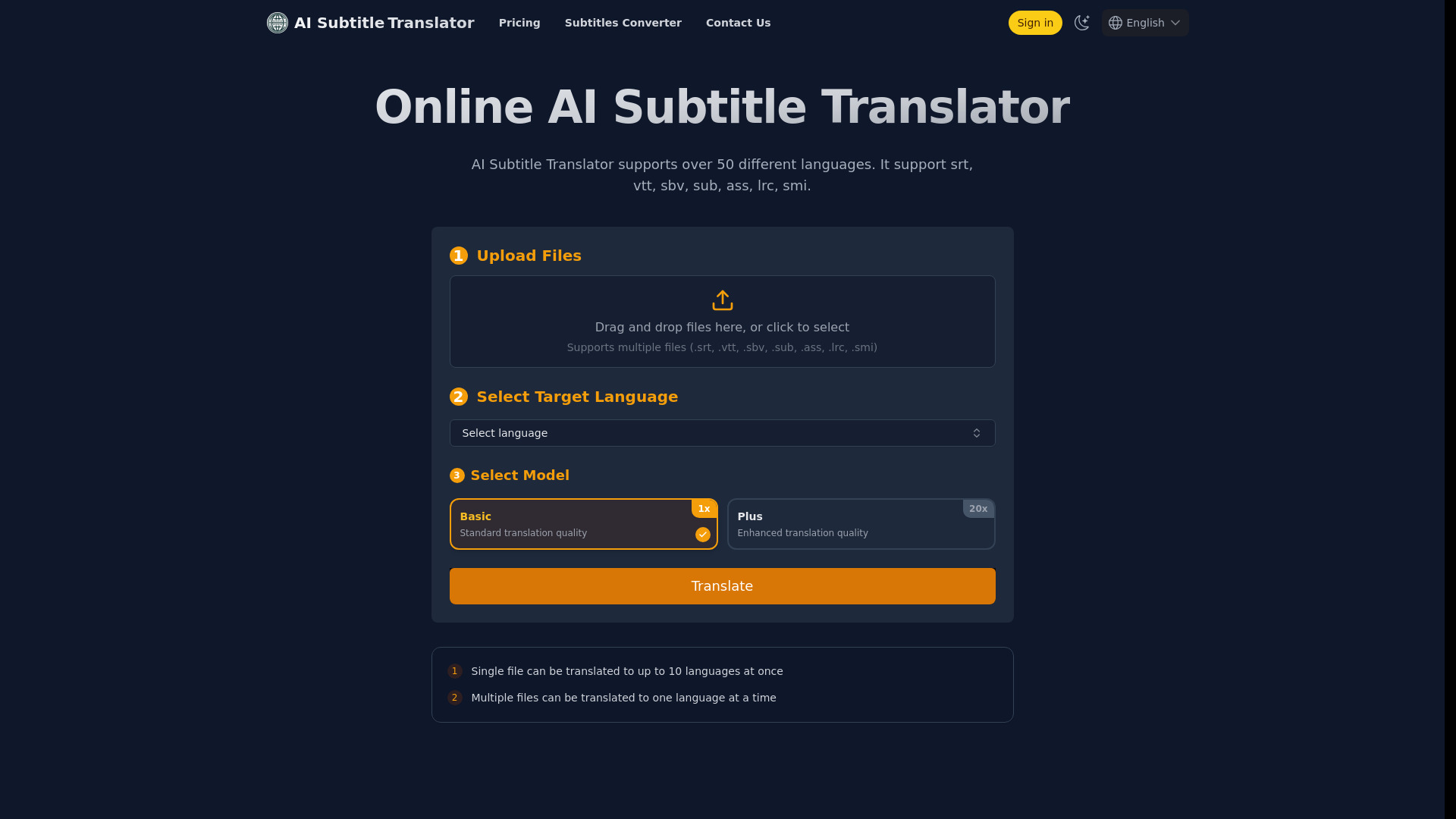
AI Subtitle Translator is an advanced tool that uses artificial intelligence to translate subtitles from one language to another. It supports a wide array of languages and multiple subtitle formats, making it a comprehensive solution for translating subtitles for global audiences.

How to use AI Subtitle Translator

Experience the future of subtitle translation with our easy three-step process:

  1. Upload: Upload your subtitle file to our secure platform.
  2. Translate: Select target languages and let our AI work its magic.
  3. Download: Download your perfectly translated subtitles in minutes.
Features of AI Subtitle Translator
  • Language Support: Supports over 50 languages, including English, Spanish, French, German, Chinese, Japanese, and Korean. Reach your global audience with ease.
  • Subtitle Format Compatibility: Supports multiple subtitle formats, including srt, vtt, sbv, sub, ass, lrc, and smi. Upload your subtitle files without worrying about format conversion.
  • Batch Processing: Upload multiple files simultaneously and process multiple target languages at once, dramatically improving work efficiency. Intelligent queue management makes large-scale subtitle translation simple and efficient.
Use Cases of AI Subtitle Translator

AI-powered subtitle translation for global content creators.

Pricing

AI Subtitle Translator offers various plans:

Credits Pack (One-time purchase):

  • 50 Credits: $10 (1 year valid)
  • 200 Credits: $12 (1 month valid)

Monthly Subscription:

  • Pro: $10/month (200 credits per month, auto-renewal)
  • Pro +: $18/month (400 credits per month, auto-renewal)

Yearly Subscription (Save 20% with annual billing):

  • Pro: $8/month (2400 credits per year, auto-renewal)
  • Pro +: $15.5/month (4800 credits per year, auto-renewal)

Crypto Payment (USDT):

  • Pro Monthly: 10 USDT/month (200 credits)

  • Pro + Monthly: 18 USDT/month (400 credits)

  • Pro Annual: 96 USDT/year (2400 credits)

  • Pro + Annual: 186 USDT/year (4800 credits)

  • Subscriptions are billed monthly or yearly and can be cancelled anytime.

  • Subscription credits do not roll over to the next month/year.

  • Refunds available within 7 days of purchase, with restrictions.
FAQ
  • What is AI Subtitle Translator? AI Subtitle Translator is an advanced tool that uses artificial intelligence to translate subtitles from one language to another. It supports a wide array of languages and multiple subtitle formats, making it a comprehensive solution for translating subtitles for global audiences.
  • How many languages does the AI Subtitle Translator support? The AI Subtitle Translator supports numerous languages, including but not limited to English, Spanish, French, German, Chinese, Japanese, and Korean. For a full list of supported languages, please refer to the language support section on our website.
  • Which subtitle formats are compatible with the AI Subtitle Translator? Currently, our AI Subtitle Translator supports multiple subtitle formats, including srt, vtt, sbv, sub, ass, lrc, and smi. We are continuously working to support more formats to ensure broad compatibility.
  • Is this just an SRT translator? Not exactly. While we support various subtitle formats for input, the translated output is currently generated in SRT format only, which may result in the loss of style information. However, you can use our Subtitle Converter to convert the translated SRT files into other formats.
  • Is there a word limit for translations with the AI Subtitle Translator? We currently do not impose a strict word limit on translations, aiming to provide you with a more flexible service experience. However, please note that for extremely long subtitle files, the translation might fail due to processing time limits of the AI models.
  • How do I use the AI Subtitle Translator? To use the AI Subtitle Translator, simply upload your subtitle file, select the target language, and click the translate button. There's no need to select the original language as our system will automatically detect it.
  • What if the language I need for translation is not listed? If the language you need for translation is not currently supported, please contact us via email. We will consider adding it to our list of supported languages.
  • Is the AI Subtitle Translator free to use? AI Subtitle Translator offers new users a small amount of free credits upon registration to try our service. For continued use and additional credits, users can subscribe to our service plans or purchase credit packs. This helps us maintain high-quality translation services while keeping them accessible to everyone.
  • How long will the uploaded subtitles and translated subtitles be saved? The uploaded subtitles and translated subtitles will be saved for 7 days. Please download them as soon as possible. You can also view them in the 'My Subtitles' page.
  • Can I translate multiple subtitle files at once? Yes, you can translate multiple subtitle files at once. You can upload up to 5 subtitle files at a time. The target language for all files will be the same.
  • What are the differences between the Basic and Plus models? The Basic model offers standard translation quality with faster processing speed and lower cost. The Plus model uses more advanced AI to provide higher translation quality, but it requires more processing time and costs more credits.
  • Are the credit multipliers for models fixed? The credit multipliers are not fixed. We may adjust the multipliers based on operational costs to provide a sustainable and high-quality service.

More Products

xeditai

Details

Why settle for basic AI? More utilities. More power. More possibilities than ChatGPT or Gemini. Not one-shot AI : Curate with Edit/Regen/Copy/Add sections. Not one-brand LLM : Target with template, model, role, tone. Not sequential run : Compare with Cross-LLM Parallel or Strategy mode. mode.gy Sign up, Click Suggest + Gen to finish artifacts. No prompt engineering needed. Editable and fully owned. Change settings to create: 'Tech Spec', 'BRD', 'Academic Paper'. Rich-text editing functionality Auto-saving (cloud persistence) Exports to PDF, DOCX, PPTX Supports varied structured outputs Workspace for iterative work Multi-model parallel running Model chaining in Strategy Mode Multiple concepts targeting No one-brand language model lock-in Different templates, roles & tones Model switch in same document Beneficial for diverse professionals Features support via comprehensive guides Simultaneous model outputs comparison Draft comparison and refinement Flexible output structuring Video tutorials for features Automatic saves across devices Multiple exporting options Templates for specific documents Curates, refines, compares outputs Outputs ready for collaboration Outputs ready for publishing Easily shareable outputs Supports media-rich content creation User-friendly interface Optimized for real work scenarios Model choice according to task Debate, scoring, synthesis in Strategy Mode Section by section document editing Full control over content generation Multi-model content creation Outputs side-by-side in Parallel Mode Automating tasks for researchers Automating tasks for educators Automating tasks for creators Customer support via guides/tutorials Tailored workspace per user's needs Multiple tones for varied writing Enhanced collaboration through exports Effective platform for founders Effective platform for product teams. xeditai is a generative AI studio that enables users to create, compare, refine, and publish content using multiple AI models in one workspace. It hosts a variety of AI models including GPT-4, Claude, Gemini, Llama, and Qwen, allowing users to switch seamlessly within the same document, section by section, according to the appropriate model for the task at hand. xeditai also offers various features such as full rich-text editing and structure, cloud persistence, templates & tones, parallel mode, and strategy mode. Full rich-text editing gives users the ability to create structured and media-rich content. The cloud persistence feature ensures that users' work is automatically saved to the cloud, providing access from different locations. Templates & tones allow users to create PRDs, BRDs, research drafts, scripts, and docs in a structured way. The parallel mode lets users run multiple AI models simultaneously and compare outputs side by side, while the strategy mode chains models together with debate, scoring, and synthesis to converge on the most robust output. xeditai also includes the functionality to export work in various formats like PDF, DOCX, or PPTX, ready for stakeholders, publishing, or team collaboration. The platform is designed to benefit founders, product teams, creators, educators, and researchers, allowing them to create specs, research, and scripts effectively. Customer support consists of comprehensive guides and video tutorials to help users understand the functionality of each feature in the workspace.

Newsletter

Join the Community

Subscribe to our newsletter for the latest news and updates