What is Flux 3
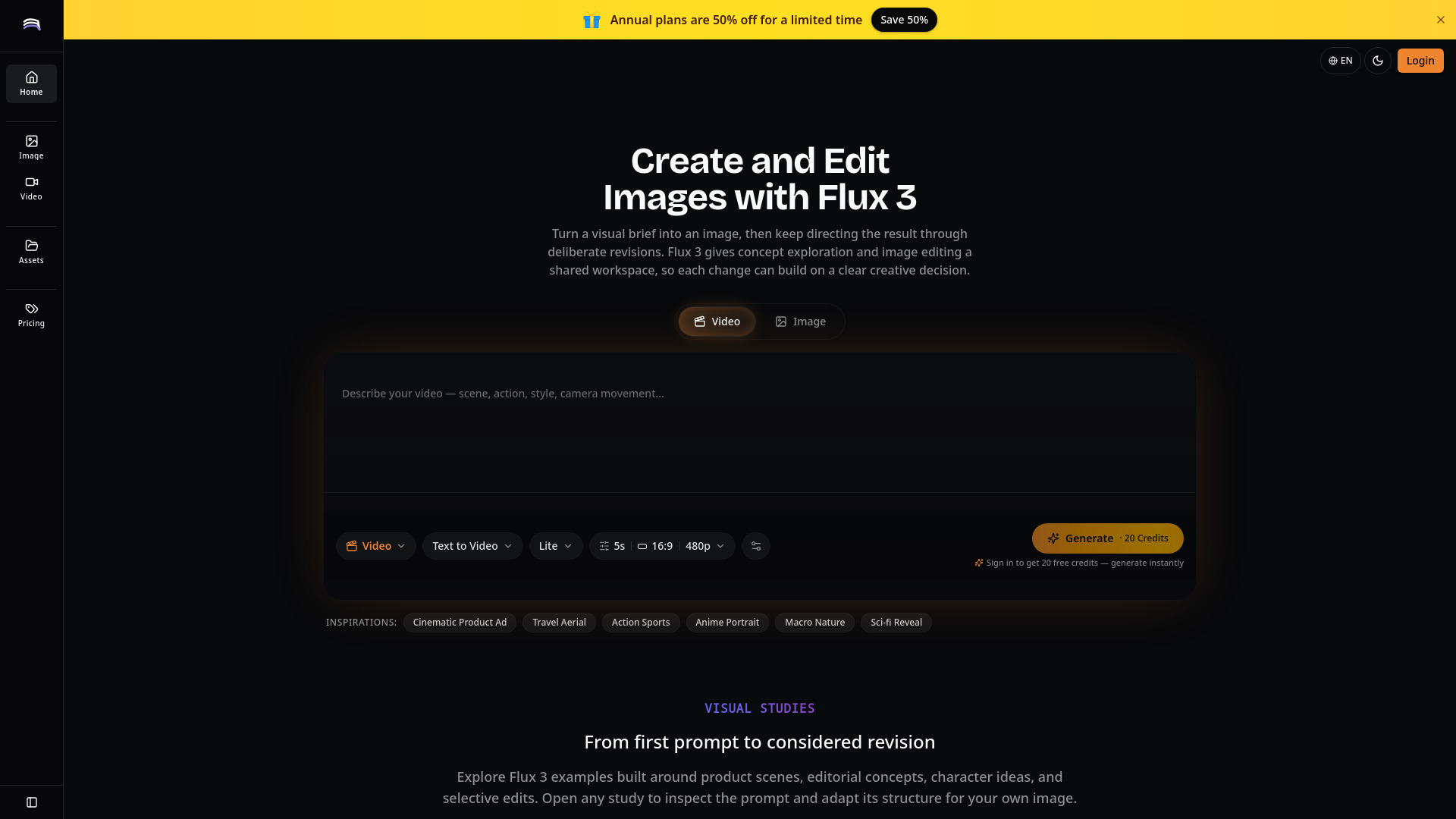
Flux 3 is an AI studio for multimodal generation that unites image generation, focused editing, and video creation with synchronized audio in one iterative workspace. It allows users to turn a visual brief into an image, refine it through deliberate revisions, and then bring the strongest direction into motion.
How to use Flux 3
- Start from a complete visual brief: Describe the subject, setting, composition, light, palette, and intended use in one connected prompt.
- Revise one decision at a time: Change a single priority (e.g., camera angle, background material, color relationship) to make comparisons useful.
- State what must remain stable: Name both the desired change and the details to preserve (subject, mood, framing, palette constraints).
- Promote a still into motion deliberately: When an image is worth animating, describe the camera move, subject's action, pacing, and audio mood.
- Write prompts around relationships: Explain how elements interact (where light falls, how the subject sits in the frame, what should move).
- Keep a reusable direction record: Save the prompt, selected image or clip, and reason for each edit.
Features of Flux 3
- Image Generation: Create prompt-led images from text descriptions.
- Focused Editing: Make targeted revisions to existing images (e.g., change material, adjust palette, remove distractions).
- Video Generation: Create short video clips from text or selected stills.
- Synchronized Audio: Generate video with audio that matches the scene.
- Iterative Workspace: All steps (generation, editing, video) are integrated in one workspace.
- Multiple Modes: Text-to-image, text-to-video, image-to-video, and editing.
- Customizable Settings: Adjust video duration (e.g., 5s), aspect ratio (e.g., 16:9), resolution (e.g., 480p), and model (e.g., Lite).
- Inspiration Prompts: Pre-built prompt ideas for cinematic product ads, travel aerials, action sports, anime portraits, macro nature, and sci-fi reveals.
Use Cases of Flux 3
- Product scene exploration: Build prompts around product silhouette, surface, backdrop, light direction, and brand mood.
- Campaign moodboards: Translate abstract campaign language into concrete visual studies.
- Editorial key art: Frame ideas through symbolism, scale, contrast, and negative space.
- Character look development: Define characters through repeatable visual anchors (silhouette, wardrobe, palette, posture, environment).
- Short video drafts with audio: Generate short clips from text or stills with synchronized audio.
- Existing image refinement: Remove distractions, simplify backgrounds, rebalance colors, or create space for copy.
FAQ
Q: What is Flux 3? A: Flux 3 is an AI studio for generating, editing, and animating images with synchronized audio.
Q: How do I start? A: Sign in to receive 20 free credits, then describe your visual brief in the prompt area and click Generate.
Q: Can I edit an existing image? A: Yes, you can upload an image and make focused edits by describing the change while preserving other elements.
Q: Can I create video with audio? A: Yes, Flux 3 supports video generation with synchronized audio.
Q: What settings can I adjust? A: You can adjust video duration, aspect ratio, resolution, and model (e.g., Lite).