What is Seedream 5.5 AI - com
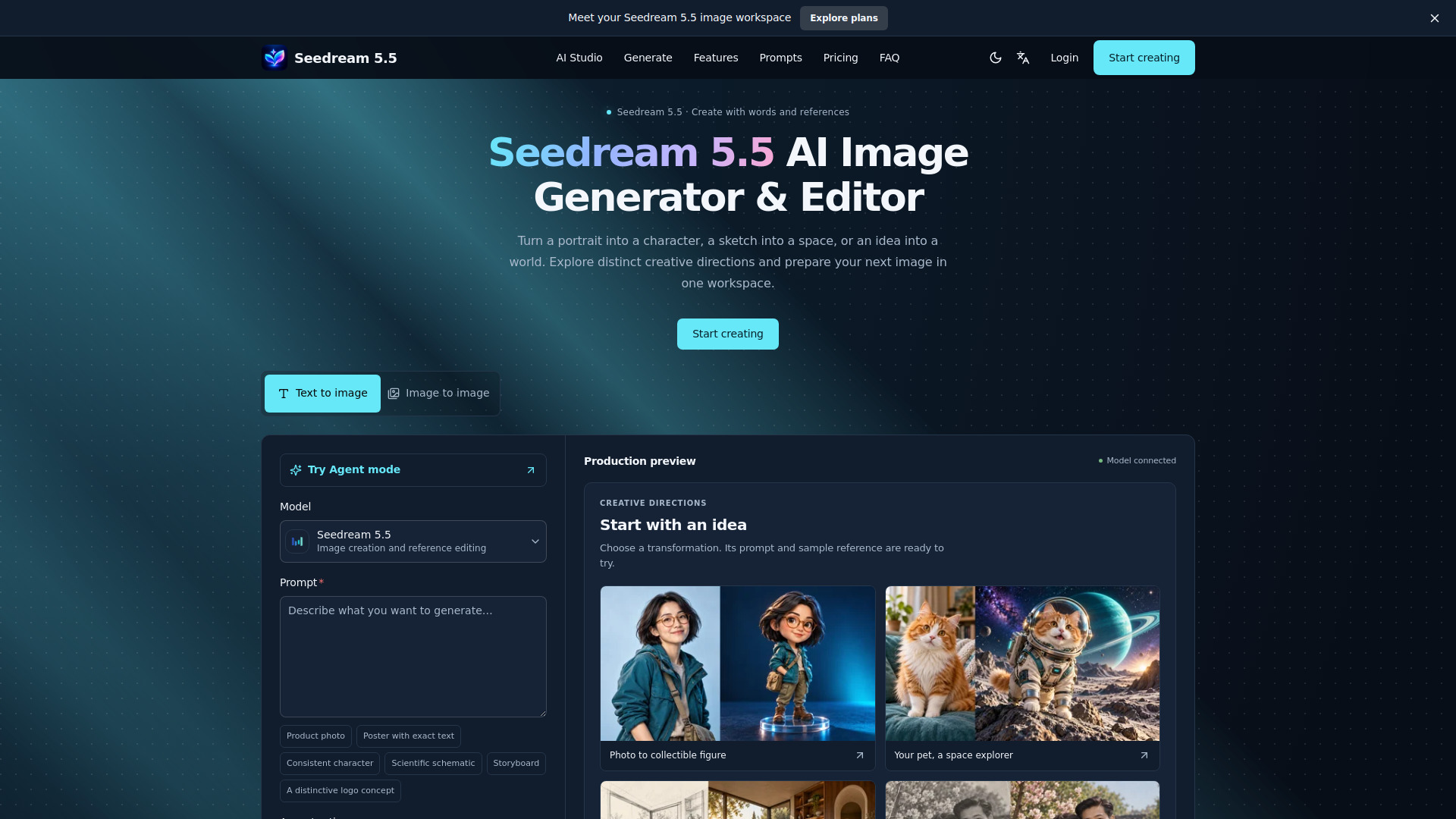
Seedream 5.5 is an AI-powered image generator and editor that creates and edits images from text prompts and reference photos. It is part of the Seedream family of models by ByteDance Seed and offers creative workflows such as photo-to-3D characters, fashion portraits, sketch-to-room concepts, pet art, comics, and campaign visuals.
How to use Seedream 5.5 AI - com
- Describe the image: Start with the subject, then add the setting, lighting, and style. Put exact words in quotes and specify their placement.
- Bring your references: Switch to Image to image mode and upload your photos. Name each reference in the prompt so the model knows what to preserve.
- Choose your settings: Select an available model and output shape (aspect ratio and resolution). Review the live status and credit quote before submitting.
- Review and download: Inspect the finished image beside your prompt. Check faces, product details, and spelling, then download or continue editing.
Features of Seedream 5.5 AI - com
- Text-to-image generation from detailed prompts
- Image-to-image editing with up to 10 reference images
- Multiple aspect ratios (Auto, 1:1, 9:16, 16:9, and more)
- Resolution options: 1K, 1.5K, 2K
- Number of outputs: 1 (2, 3, and 4 are disabled)
- Prompt tools: copy prompt, download brief
- Starter ideas: product photo, poster with exact text, consistent character, scientific schematic, storyboard, logo concept
- Creative directions: photo to collectible figure, pet as space explorer, sketch to interior, photo restoration
- Model comparison: Seedream 5.5, Seedream 5.0 Pro, Seedream 5.0 Lite, Seedream 4.5
- Agent mode for conversational refinement
- Prompt library with inspiration gallery
Use Cases of Seedream 5.5 AI - com
- Turn a portrait into a collectible 3D figurine
- Create fashion editorial portraits from casual photos
- Transform a room sketch into a photoreal interior concept
- Reimagine a pet as a space explorer or other character
- Generate a four-panel comic from a character reference
- Preview a logo in real materials (embossed metal, debossed leather)
- Design bilingual event posters with exact text
- Plan jewelry campaigns with detailed gemstone and metal textures
- Try tattoo ideas on a placement reference before committing
- Design a novel cover with specific title and mood
- Change the season in a travel photo while keeping the viewpoint
Pricing
Seedream 5.5 uses a credit-based system. Credits can be purchased via monthly plans or one-time credit packs. All prices are in USD.
Monthly Plans:
- Starter: $7.99
- Creator: $18.99
- Pro: $44.99
- Starter (annual?): $91.70
- Creator (annual?): $203.90
- Pro (annual?): $458.90
One-Time Credit Packs:
- Mini Pack: $2.99 (100 credits)
- Flex: $10.99 (450 credits) – Popular
- Power: $25.99 (1,200 credits) – Best value
Credits are valid for 365 days. Task cost is shown before generation. Payments are processed securely via Stripe. No auto-renewal for credit packs.
FAQ
How do I start creating with Seedream 5.5?
Write a prompt or choose a creative direction, add references when needed, and review the selected model and quote. Sign in to submit an available generation task.
How are image requests charged?
Check the live quote for the selected model, operation, and output settings. The website does not promise unlimited free generation.
Does Seedream 5.5 replace other models?
Other models keep their original names and settings. A request is sent only to the model selected for that task; an older model is not relabeled as Seedream 5.5.
How do I request text in an image?
Put the exact words in quotes, describe their position, and use a clear reading order. Review spelling and alignment in the result.
Can I use reference photos?
Choose reference editing when the selected model supports it, upload authorized images, and state what to change and preserve. Supported limits appear with the actual model.
What happens if a task fails?
Check the task status and error message. Provider failures follow the existing credit-reversal workflow. A completed image that needs creative changes is a separate case.