LogoTopAIHubs
icon of SnapVee Studio

SnapVee Studio

All-in-one AI content workspace for creators, video remixing, and generation.

Introduction

What is SnapVee Studio

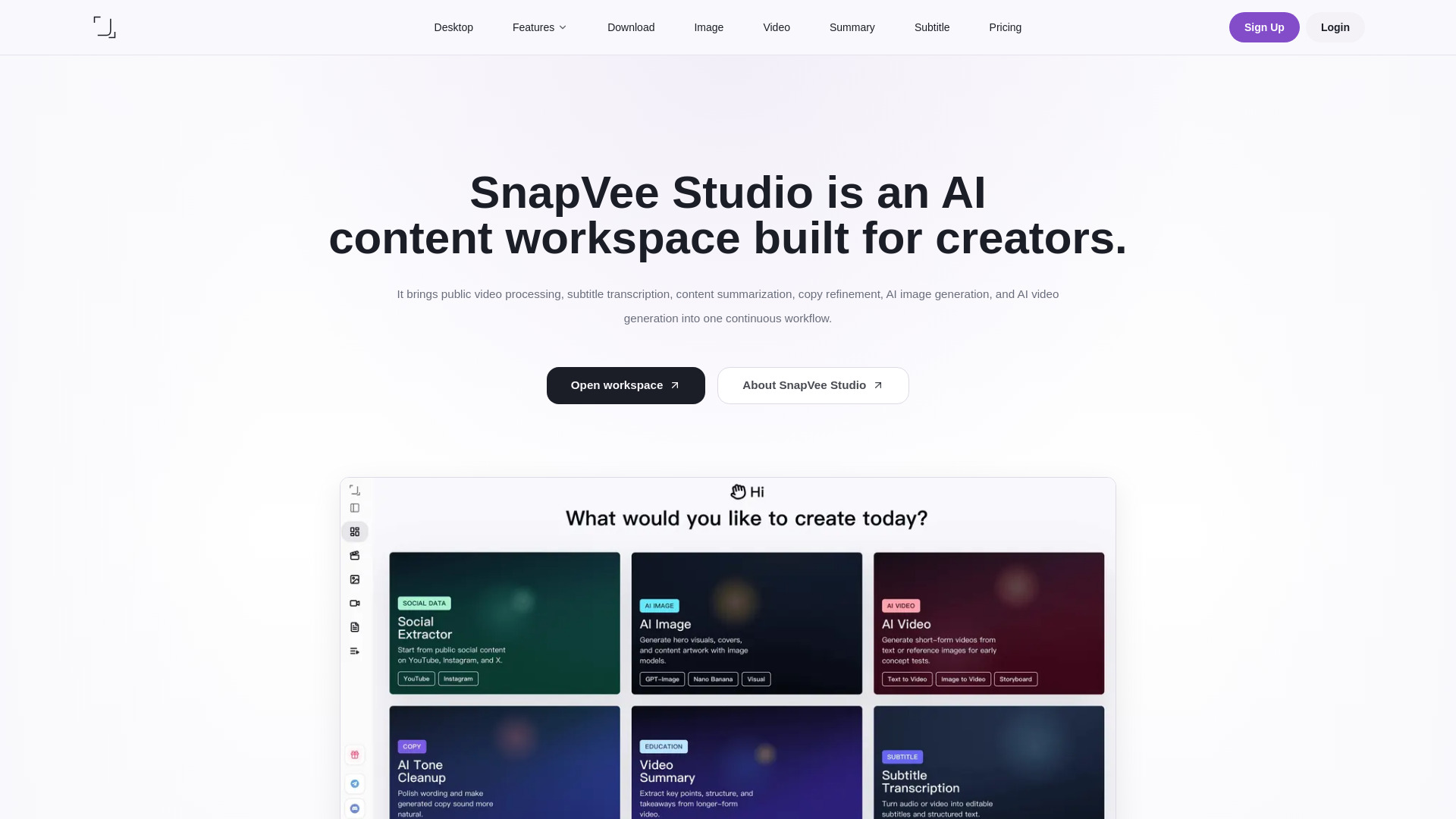
SnapVee Studio is an all-in-one AI content workspace for creators. It brings public video processing, subtitle transcription, content summarization, copy refinement, AI image generation, and AI video generation into one continuous workflow.

How to use SnapVee Studio
  1. Capture source material: Download video or audio from public links (YouTube, Instagram, TikTok, X, Facebook, Threads, etc.) to bring the source into your workflow.
  2. Understand the content: Use video summary and subtitle transcription to turn long content into chapters, summaries, subtitles, and editable text.
  3. Create new output: Move into AI image generation and AI video generation to build visuals and videos from prompts or reference images.
  4. Polish copy: Use the AI copy optimizer to humanize AI-generated text for titles, descriptions, scripts, and social posts.
Features of SnapVee Studio
  • Download: Capture video or audio from 50+ platforms in HD or 4K with audio separation and multi-language track support.
  • Video Summary: Turn long videos into summaries, chapters, and key points.
  • Subtitle Transcription: Convert video or audio into editable subtitles and transcripts (SRT, VTT, bilingual subtitles).
  • AI Copy Optimizer: Polish stiff AI drafts into more natural writing.
  • AI Image Generation: Generate covers, post visuals, and creative image assets from prompts using models like GPT Image 2, Nano Banana 2, Seedream v4, etc.
  • AI Video Generation: Generate videos from text or image prompts with control over model, aspect ratio, and duration (supports Seedance 2.0, Sora, Veo, Kling, Runway, Hailuo, MiniMax, etc.).
  • Desktop App: Desktop version includes watermark removal and shares the same account and allowances.
Use Cases of SnapVee Studio
  • Content Creators: Download reference clips and source material for creative workflows.
  • Social Media Marketers: Collect and repurpose content from multiple platforms quickly.
  • Video Editors: Get HD or 4K sources with audio separation for reference clips, B-roll, and multilingual tracks.
  • Educators & Students: Save lectures, tutorials, and educational videos for offline study.
  • Creators & Influencers: Back up your own posts and archive published work.
  • Personal Users: Save favorite videos for offline viewing.
Pricing
  • Free: $0. 60 AI credits + 5 download points for new users, valid for 7 days. Best for short workflow checks.
  • Pro: $6.00/month (billed quarterly at $17.99). Monthly allowance: 200 download points + 900 AI credits + 600 min subtitles + 300 min summaries. Includes separate add-ons, monthly refresh, shared balance across web and desktop, and faster queues.
  • Add-on packs: Pay-as-you-go AI credit packs from $4.99 and download packs for extra capacity without a subscription.
FAQ

What can SnapVee Studio do? SnapVee Studio is a creator workspace for public-link downloads, video summaries, subtitle transcription, AI-copy polishing, AI creation, and desktop watermark removal. Web and desktop share the same account and allowances.

Is SnapVee Studio free? A free trial is available. Downloads spend download points; subtitles and summaries convert video minutes into credit spend; AI creation spends AI credits. For ongoing use, upgrade to Pro.

How are Pro allowances counted? Pro shows download allowance and credits separately. Downloads spend points by quality; transcription and summaries convert actual video length into credit spend; images, AI video, and premium models spend AI credits.

Which features use allowances? Processing tools such as downloads, video summaries, subtitle transcription, AI image or video generation, and desktop watermark removal use the matching allowance. Browsing pages, signing in, checking balances, and viewing task status do not consume allowance.

What is the difference between Pro and add-on packs? Pro includes 200 download points, 600 min subtitle transcription, 300 min video summaries, and 900 AI credits each month. Monthly allowance does not roll over. Download packs and AI credit packs are one-time purchases for extra capacity.

What happens if I do not have enough allowance? Tasks will not enter processing when the matching balance is too low. Buy download packs for more downloads, and AI credit packs for transcription, summaries, image generation, AI video, or premium models.

Are allowances returned if a task fails? If a task is not created successfully, deducted download points or credits are returned when possible. If a task fails after entering the processing queue, common causes include expired links, public site changes, inaccessible source media, or timeouts.

Which platforms and content are supported? SnapVee Studio focuses on widely used public platforms such as YouTube, Instagram, TikTok, X, Facebook, and Threads. Only process content you own, are authorized to use, or a platform clearly allows you to save.
Newsletter

Join the Community

Subscribe to our newsletter for the latest news and updates