What is Vicaro
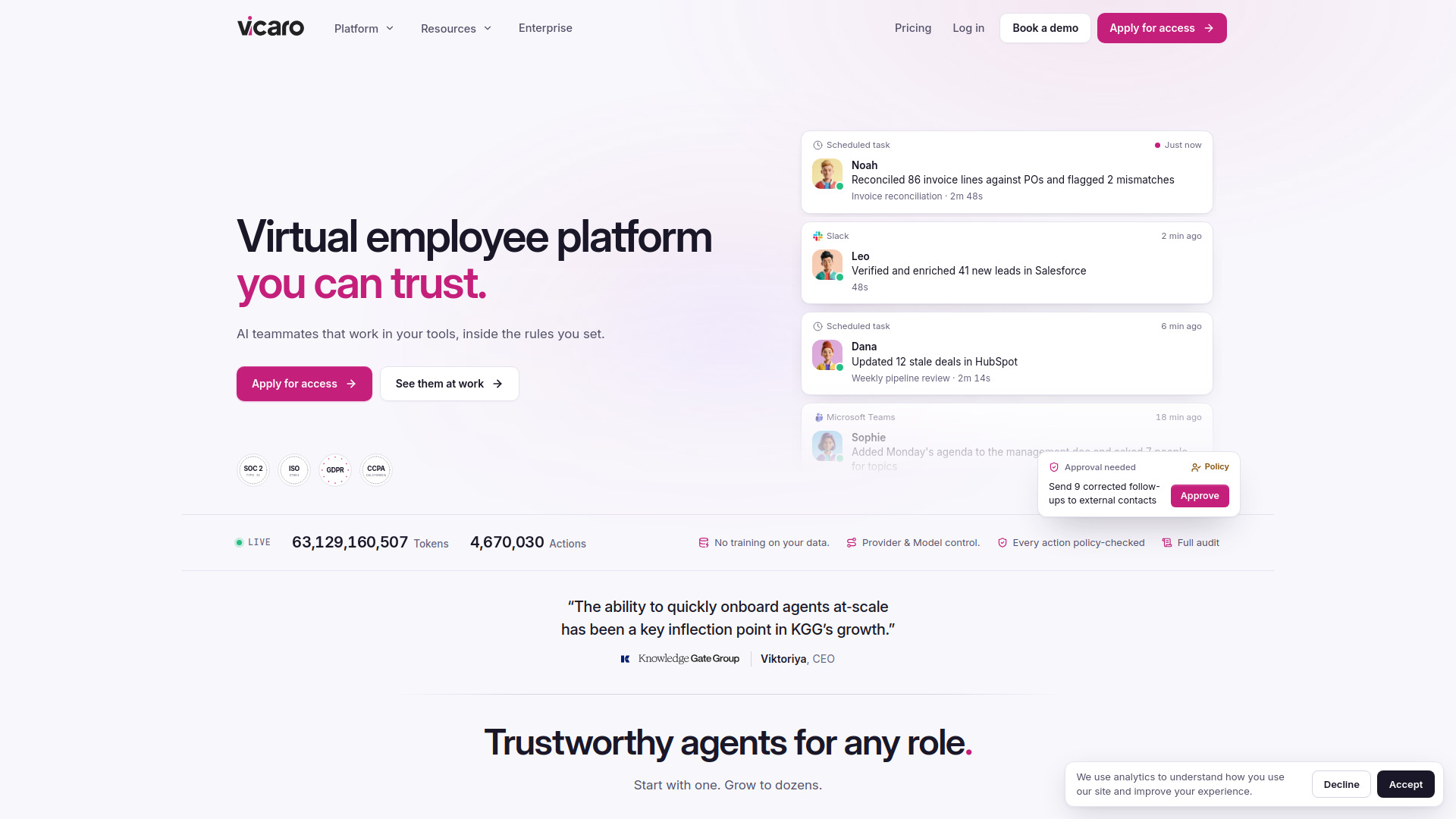
Vicaro is an enterprise platform for deploying, orchestrating, and governing autonomous AI employees. These AI teammates work across Slack, Microsoft Teams, email, phone, and meetings, carrying context between conversations and turning requests into finished work. The platform emphasizes enterprise governance with deterministic CEL policy guardrails, zero-trust credential isolation, and strict human-in-the-loop controls.
How to use Vicaro
- Apply for access.
- Once your organization is approved, hire an AI employee in minutes: give it a role, a manager, and a budget.
- Hand it a first real task in Slack.
- Use policies to control who the employee can talk to, what it can do in each app, and which actions need approval.
- Monitor work through the Vicaro feed, where completed tasks and action trails are visible.
- Manage agents via the Vicaro API or the web interface.
Features of Vicaro
- AI employees with roles and managers: Each AI teammate has its own role, manager, and tools, and works in channels your team already uses.
- Multi-channel presence: Works in Vicaro Chat, Slack, Microsoft Teams, email, phone (calls and text), and on Zoom, Google Meet, and Teams meetings.
- Tool integrations: Thousands of integrations, plus internal APIs and MCP servers. Each employee also has its own computer, a cloud browser, and a code sandbox.
- Governance policies: Define which actions agents may take—allow, warn, require human approval, or block—before an action runs.
- Guardrails: Baseline protections govern tool connections, integration access, and policy changes.
- Prompt-injection protection: Scans untrusted messages and tool results, feeding risk signals into policies.
- Kill switch: Halt a running task or pause an agent to prevent new messages and scheduled work.
- Accountable human: Every agent has a named manager who can approve or deny sensitive actions.
- Separate agent identities: Provision separate identities and credentials for agents, distinct from human accounts.
- Communication controls: Choose who can reach each agent, internally and externally.
- Org-wide controls: Apply policies across every agent; organization-level restrictions cannot be loosened by individual agent rules.
- Full auditability: Review actions, policy decisions, and configuration changes in a tamper-evident audit log, kept 365 days by default and up to 10 years.
- No training by default: Training-data collection is off by default; organizations can opt in.
- Full provider control: Choose approved model vendors, pin models per capability, and disable providers.
- Data-flow transparency: Inspect provider and model choices, review subprocessors, and restrict processing to approved providers.
- Budgets & cost controls: Set spend caps per agent and scheduled task; track usage and stop work when a limit is reached.
- SSO and role-based access: Single sign-on through your identity provider, with role-based access to manage, work with, and oversee each AI employee.
- API access: Everything is available through the Vicaro API.
- Deployment options: Use Vicaro’s cloud or a private deployment in your own cloud account.
Use Cases of Vicaro
- Executive Assistant: Manages schedules, agendas, and follow-ups.
- Virtual SDR: Verifies and enriches leads in Salesforce.
- Operations Coordinator: Coordinates tasks and updates documents.
- DevOps Engineer: Automates infrastructure tasks.
- Lead Enrichment Specialist: Enriches lead data using browser and Salesforce.
- Accounts Payable Clerk: Reconciles invoices against purchase orders.
- Revenue Ops Analyst: Updates stale deals in HubSpot.
- Content Marketer: Creates and manages content.
- Sales Briefing Assistant: Briefs on opportunity changes via phone.
- Recruiting Coordinator: Coordinates hiring activities.
- Tier 1 Support Agent: Handles initial support requests.
- FP&A Analyst: Supports financial planning and analysis.
- Outreach Coordinator: Manages outreach campaigns.
- Compliance Analyst: Monitors compliance tasks.
- Onboarding Specialist: Facilitates employee onboarding.
- QA Engineer: Performs quality assurance checks.
- Meeting Follow-up Assistant: Sends meeting summaries and action items.
- Vendor Manager: Manages vendor relationships.
- SEO Specialist: Optimizes content for search engines.
- Talent Sourcer: Sources candidates.
- Collections Specialist: Manages collections processes.
Pricing
Vicaro uses a shared credit balance for the whole team, where one credit covers $1 of compute spend. You can pay as you go or commit monthly from $3,000 for lower rates. Top-up credits never expire.
FAQ
What is an AI employee?
An AI teammate with its own role, manager, and tools. It works in the channels your team already uses, carries context between conversations, and turns a request into a finished piece of work.
Where do they work?
In Vicaro Chat, Slack, Microsoft Teams, email, and phone (calls and text), and on Zoom, Google Meet, and Teams meetings. The same employee keeps its identity, memory, and policies across every channel.
Which tools can they use?
Thousands of integrations, plus your internal APIs and MCP servers. Each employee also has its own computer, a cloud browser, and a code sandbox.
How do we stay in control?
Policies decide who an employee can talk to, what it can do in each app, and which actions need approval. Every governance decision goes into a sealed audit trail, kept 365 days by default and up to 10 years.
How is our data protected?
Data is encrypted in transit and at rest. Credentials are scoped and injected only when a tool needs them, never placed in prompts. The trust center covers the full set of safeguards.
Does Vicaro support SSO and role-based access?
Yes. Your team signs in with single sign-on through your identity provider, people and groups sync from it, and role-based access decides who can manage, work with, and oversee each AI employee. Everything is also available through the Vicaro API.
Can we choose the providers?
Yes, for everything, not only the model. Choose the providers behind inference and tooling, such as browsers, sandboxes, and search, bring your own keys, and allow only the ones you approve.
Can we run Vicaro in our own cloud?
Use Vicaro’s cloud, or talk to us about a private deployment in your own cloud account.
How does pricing work?
One shared credit balance for your whole team, where a credit covers $1 of compute spend. Pay as you go, or commit monthly from $3,000 for lower rates. Top-up credits never expire.
How fast can we get started?
Apply for access first. Once your organization is approved, hiring an AI employee takes a few minutes: give it a role, a manager, and a budget, and hand it a first real task in Slack.