What is VidKiss
VidKiss is a browser-based AI video and image workspace that provides access to nine video models and five image models with one shared credit balance. It allows users to create videos from text or a photo in minutes. The platform offers credit packs starting at $4.98, and purchased credits never expire.
How to use VidKiss
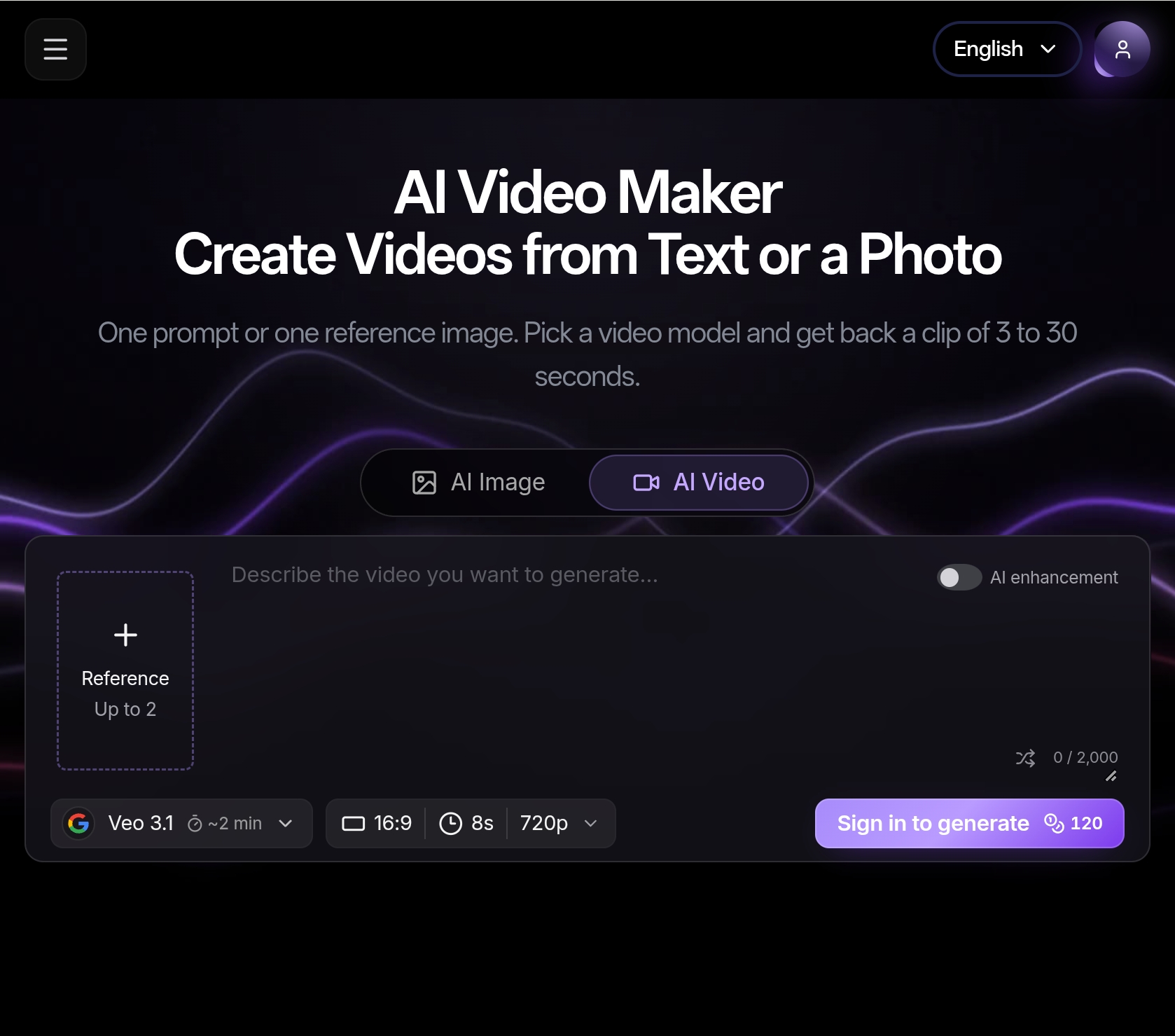
- Write a Prompt or Upload an Image: Describe the scene you want — subject, setting, lighting, camera move — or upload a still you already own and let the model animate it. Both modes start from the same box, so you can switch between them without leaving the page.
- Pick a Model: Choose any video model in the picker. Text-to-video and image-to-video both draw on the same credit balance, and the cost is shown before you submit.
- Set the Length and Aspect Ratio: Set the length — 3, 4, 5, 6, 8, 10, 12, 15, 20, 25 or 30 seconds — and pick the aspect ratio: 16:9, 9:16, 1:1, 4:3, 3:4 or 21:9. Need a vertical or square layout? Choose 9:16 or 1:1 before you generate instead of cropping afterwards.
- Generate and Download: Hit Generate. The exact credit cost is on screen before you submit, and a clip usually comes back in a few minutes, queue time included, depending on the model. When it's done, download the file and post it wherever you need it.
Features of VidKiss
- Text to Video and Image to Video: Describe a scene, or upload one reference image and let the model animate it. Both modes share the same input box and the same credit balance.
- Video and Image Models in One Picker: Video models include Seedance 2.0 Mini, Seedance 2.0, Seedance 2.0 Fast, Seedance 2.5, Seedance 1.5 Pro, Seedance 1.0 Pro, Veo 3.1, Kling 3.0, Kling 3.0 Turbo, Kling 2.6, Kling 2.5 Turbo, MiniMax H3, and Gemini Omni Flash. Image models include Nano Banana, Nano Banana Pro, Nano Banana 2, GPT Image 2.5, GPT Image 2, Seedream 5 Pro, and Seedream 5 Lite.
- Length, Aspect Ratio and Resolution, Set Before You Generate: Clips run 3 to 30 seconds. Pick from six aspect ratios (16:9, 9:16, 1:1, 4:3, 3:4, 21:9) and choose from the resolutions each model supports.
- History, Re-runs and Downloads: Every prompt and result stays in your generation history, so you can compare variations, rerun a prompt and download the file later. Delete any generation whenever you like.
- One Balance for Every Model: Credit packs are one-time purchases, and purchased credits never expire.
- Prompt Examples Built In: The prompt box ships with example scenes you can drop in and edit.
Use Cases of VidKiss
- Text to Video: Type a scene, get the clip you described. Describe the subject, the action, the camera move and the light. The model you pick runs it and returns a video you can download.
- Image to Video: Bring one still image into motion. Upload one still you already own, describe how it should move, and the model you pick animates it.
- Text to Image: Generate still frames from prompts using image models like Nano Banana, GPT Image, and Seedream.
- Stills Feed the Video Workflow: A still you like can be taken into image-to-video as the reference frame.
Pricing
A 5-second clip starts at 40 credits, depending on the model. Credit packs are one-time purchases that start at $4.98, and purchased credits never expire. Image generation starts from 19 credits. The exact credit cost is shown before you submit.
FAQ
What is VidKiss?
VidKiss is a browser-based AI video and image workspace that provides access to nine video models and five image models with one shared credit balance.
How long does it take to generate a video?
A clip usually comes back in a few minutes, queue time included, depending on the model.
Do credits expire?
No, purchased credits never expire.
Can I use the same credits for both video and image generation?
Yes, text-to-video, image-to-video, and image generation all draw on the same credit balance.
What video lengths are available?
Clips can be 3, 4, 5, 6, 8, 10, 12, 15, 20, 25, or 30 seconds long.
What aspect ratios are supported?
16:9, 9:16, 1:1, 4:3, 3:4, and 21:9.
Can I download the generated videos?
Yes, you can download the file when it's done.
Is there a history of my generations?
Yes, every prompt and result stays in your generation history, so you can compare variations, rerun a prompt, and download the file later.