What is ChatGPT Bulk Delete
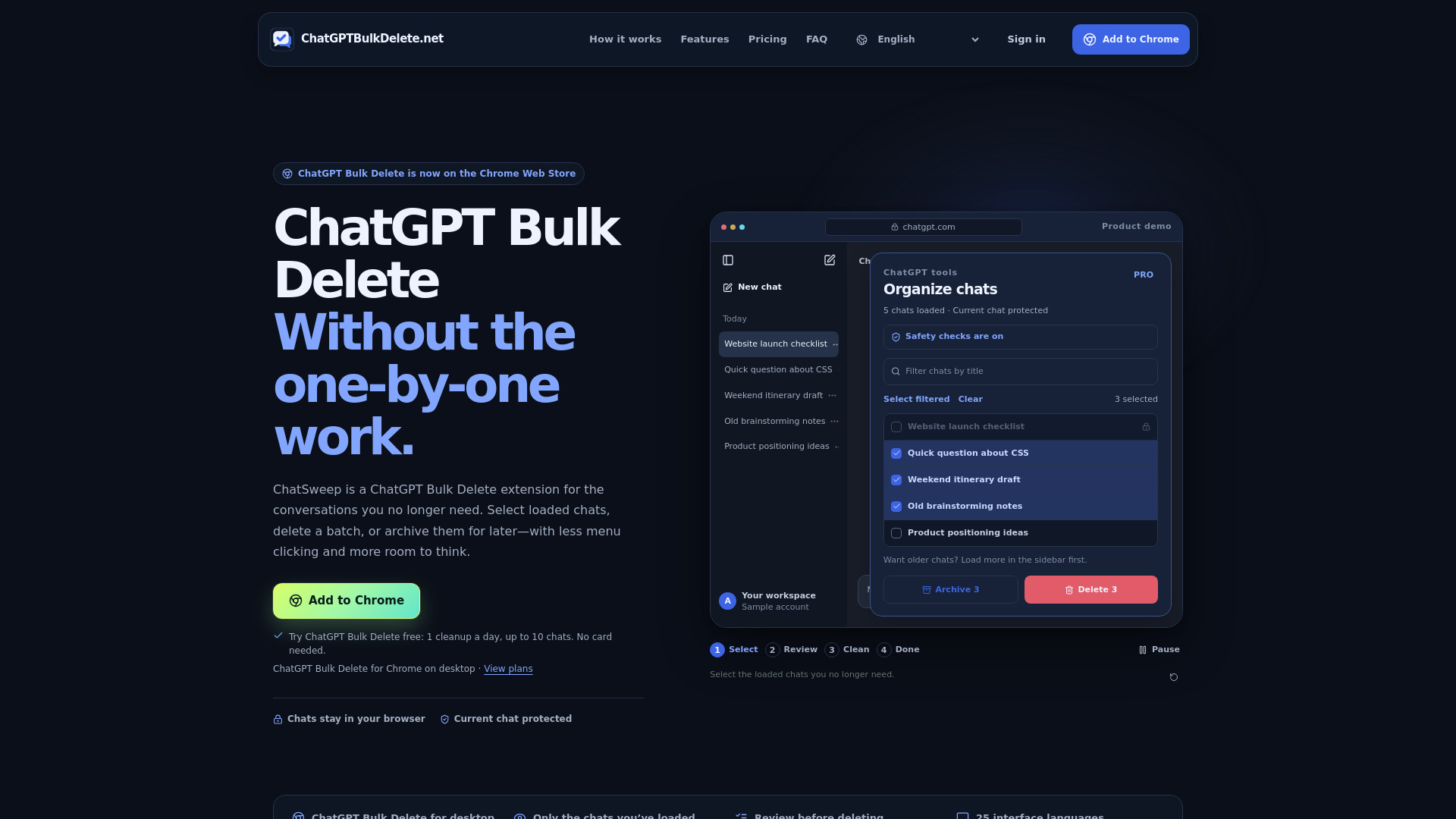
ChatGPT Bulk Delete (also known as ChatSweep) is a Chrome extension for deleting or archiving multiple ChatGPT conversations in batches. It adds checkboxes to the ChatGPT sidebar so you can select loaded chats, review the batch, and then delete or archive them from a single panel. The extension is designed to be deliberate and safe: it protects the currently open conversation, requires confirmation before deletion, and stops if page controls cannot be verified. It is an independent tool and is not affiliated with or endorsed by OpenAI.
How to use ChatGPT Bulk Delete
- Install the extension from the Chrome Web Store (desktop Chrome only).
- Open ChatGPT and launch the ChatGPT Bulk Delete panel.
- Show checkboxes and select the chats you want to remove from the sidebar. Only chats already loaded in the sidebar can be selected; to include older chats, scroll the sidebar to load more history, then refresh the extension’s selector.
- Review the selected batch and confirm the action.
- Choose Delete or Archive. Delete permanently removes conversations; Archive removes them from the sidebar while keeping their contents (available with Pro and Lifetime plans).
- During a cleanup, stay on the ChatGPT page and avoid switching tabs or interacting with the page. Leaving will pause the task; after a long absence, you may need to start again.
Features of ChatGPT Bulk Delete
- Bulk delete multiple ChatGPT conversations in one confirmed batch.
- Bulk archive conversations (Pro and Lifetime plans) to remove them from the sidebar without deleting their contents.
- Current-chat protection: the open conversation is excluded from selection, and the extension pauses if you switch into a selected chat during a cleanup.
- Review and confirmation step before any deletion occurs.
- Safety checks: the extension verifies page controls before acting and stops if controls or results cannot be verified.
- Works only with chats already loaded in the ChatGPT sidebar; it does not automatically fetch your entire history.
- Reads loaded sidebar titles to show your selection but does not read message contents or upload chat titles.
- Available in 25 interface languages.
- Free plan: 1 cleanup per day, up to 10 chats per run.
Use Cases of ChatGPT Bulk Delete
- Clearing temporary questions, old drafts, and conversations you no longer need.
- Archiving finished projects or reference chats to keep the sidebar tidy while preserving their contents.
- Regularly maintaining a cluttered ChatGPT sidebar with a deliberate, review-first workflow.
- Removing batches of chats after brainstorming sessions or quick tests.
Pricing
- Free: $0 forever, no card needed. Includes 1 bulk delete per day, up to 10 chats per run, current-chat protection, and confirmation before deletion.
- Pro (Yearly): $19.99 per year (about $1.67/month, billed yearly). Includes unlimited bulk delete, no limit on chats per run, and bulk archive. Renews yearly; cancel before next renewal.
- Lifetime: $39.90 one-time payment. Includes everything in Pro, all future updates, and no recurring charges.
Purchases are tied to your verified account; sign in from the extension with the same Google account or email to sync paid access. Card details are handled by Stripe.
FAQ
Which chats can I select?
Only chats already loaded in ChatGPT’s sidebar. To include older chats, scroll the sidebar to load more history, then refresh the extension’s selector. It does not automatically fetch your entire history.
Can it delete the conversation I’m using?
The open conversation is excluded from selection. If you switch into a selected chat while a cleanup is running, the extension pauses to protect it.
What’s the difference between delete and archive?
Delete removes conversations and usually cannot be undone. Archive removes them from the sidebar while keeping their contents. Bulk archive is available with Pro and Lifetime.
Does it read or upload my conversations?
It reads loaded sidebar titles to show your selection, but does not read message contents or upload chat titles. Only your account, billing status, activation and entitlement checks go to the server.
What happens if ChatGPT changes its website?
The extension checks the controls it needs before acting. If those controls or the result can’t be verified, it stops instead of guessing or retrying uncertain deletions. A later ChatGPT update may still require an extension update.
How do I activate a paid plan or cancel?
Purchase on the website, then sign in from the extension with the same Google account or verified email. Your paid plan syncs automatically—no activation code. You can manage or revoke connected browsers on your account page.