LogoTopAIHubs
icon of Unblur Image AI

Unblur Image AI

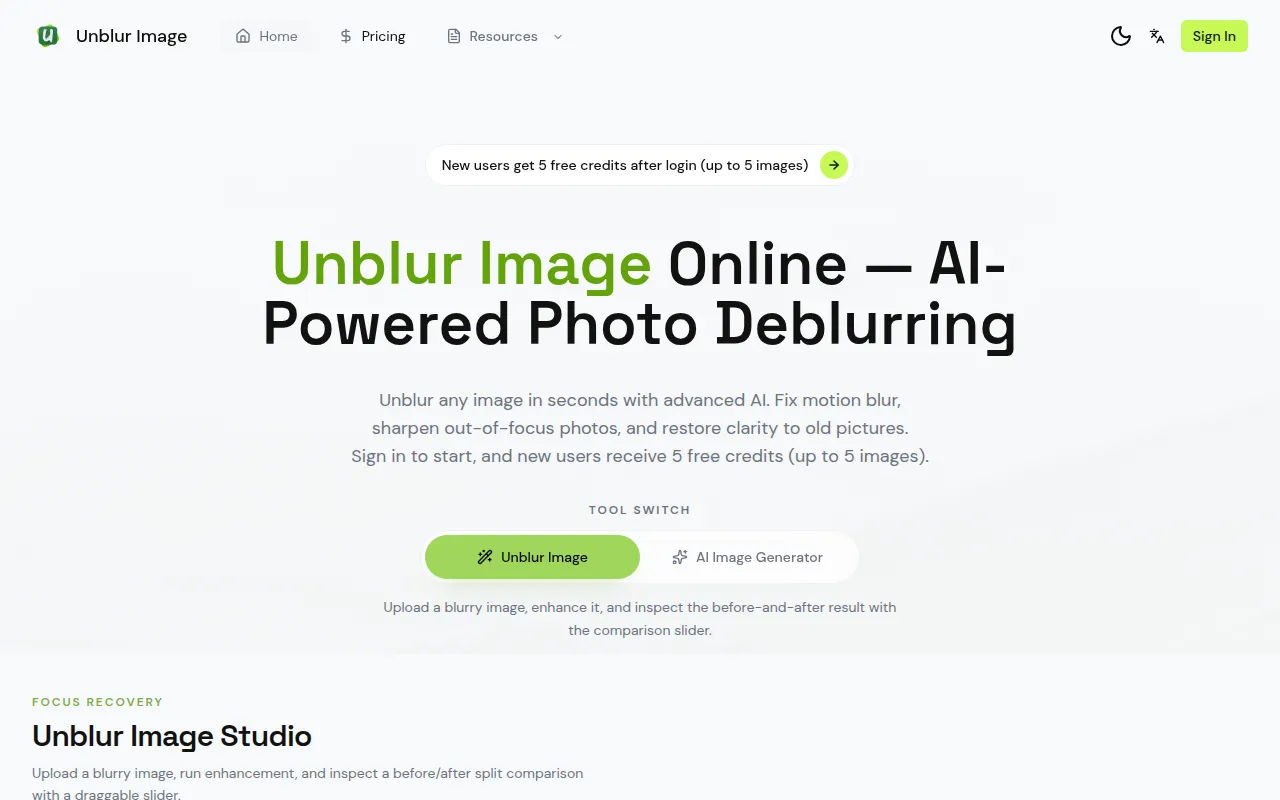
AI-powered online tool that automatically removes blur, restores details, and upscales photos in seconds for everyone.

Introduction

What is Unblur Image AI

Unblur Image is an AI-powered online tool designed to automatically remove blur from images, restore details, and upscale photos. It aims to make photo enhancement accessible to everyone, requiring no editing skills.

How to use Unblur Image AI
  1. Upload Your Blurry Image: Drag and drop or click to upload the image you want to unblur. The tool supports JPG, PNG, and WebP formats, with a maximum file size of 12MB.
  2. AI Unblurs Automatically: The AI analyzes the blur type, detects affected areas, and applies intelligent deblurring within seconds.
  3. Download Sharp Result: Preview your unblurred image side-by-side and download the clear, sharp result without watermarks.
Features of Unblur Image AI
  • AI-Powered Blur Detection: Automatically identifies motion blur, out-of-focus, Gaussian blur, or compression artifacts and applies optimal restoration.
  • Detail Recovery: Reconstructs textures, edges, and fine details obscured by blur.
  • Face Enhancement: Restores facial features, eye sharpness, skin texture, and hair details.
  • Quality Upscaling: Enhances overall image quality and upscales photos to higher resolutions.
  • Motion Blur Removal: Fixes photos affected by camera shake or subject movement.
  • Out-of-Focus Fix: Restores clarity to photos taken with incorrect focus.
  • Low-Light Enhancement: Improves photos taken in poor lighting by reducing noise and blur.
  • Old Photo Restoration: Removes blur, scratches, and artifacts from vintage or damaged photos.
  • Text & Document Clarity: Makes blurry text readable, suitable for scanned documents and screenshots.
  • Batch Processing (Pro): Process multiple images simultaneously (available in the Pro plan).
Use Cases of Unblur Image AI
  • Fixing photos ruined by camera shake or subject movement.
  • Restoring clarity to photos taken with incorrect focus.
  • Improving photos taken in poor lighting conditions.
  • Breathing new life into vintage or damaged photos.
  • Making blurry text in documents and screenshots readable.
  • Enhancing landscape details, anime scenes, and texture-rich images.
Pricing

New users receive 5 free credits upon signing in, which can be used to process up to 5 images. Specific pricing plans or tiers are not detailed in the provided content, but a "Pricing" page is linked in the navigation.
FAQ
  • Is Unblur Image free to try? New users receive 5 free credits upon signing in, allowing them to process up to 5 images.
  • How do I unblur an image online? Upload your blurry image, let the AI automatically unblur it, and then download the sharp result.
  • What types of blur can Unblur Image fix? It can fix motion blur, out-of-focus blur, Gaussian blur, compression artifacts, camera shake, and blur from old photos.
  • Can I unblur an image on my phone? The tool is web-based and can be accessed on any device with a web browser, including phones.
  • What image formats are supported? Supports JPG, PNG, WebP, and other common formats.
  • Is my uploaded photo kept on your servers? The provided content does not specify this detail.
  • How is Unblur Image different from Photoshop sharpening? Unblur Image uses AI for automatic blur detection and removal, requiring no manual editing skills, unlike Photoshop's manual sharpening tools.
  • What's included in the Pro plan? The Pro plan includes batch processing for multiple images simultaneously.

Newsletter

Join the Community

Subscribe to our newsletter for the latest news and updates